
Check the acquisition promise
Read the store headline, screenshots and description. What problem is the app promising to solve?
Study the storefront ↗
Charles Jackson · iOS
Explore the ad evidence, study the storefront, and build your next acquisition hypothesis.
01 / Creative research
Read the store headline, screenshots and description. What problem is the app promising to solve?
Study the storefront ↗Explore apps with direct store-link matches. Compare their hooks and formats without assuming the same approach works here.
Browse observed advertisers ↗Store rankings and revenue estimates describe market context. They do not establish ad spend, conversions or ROAS.
Review the market context ↗02 / Storefront & product
Study the product story and store experience behind the acquisition funnel.




03 / Market context
Keep revenue, downloads and store rankings separate from advertising performance.
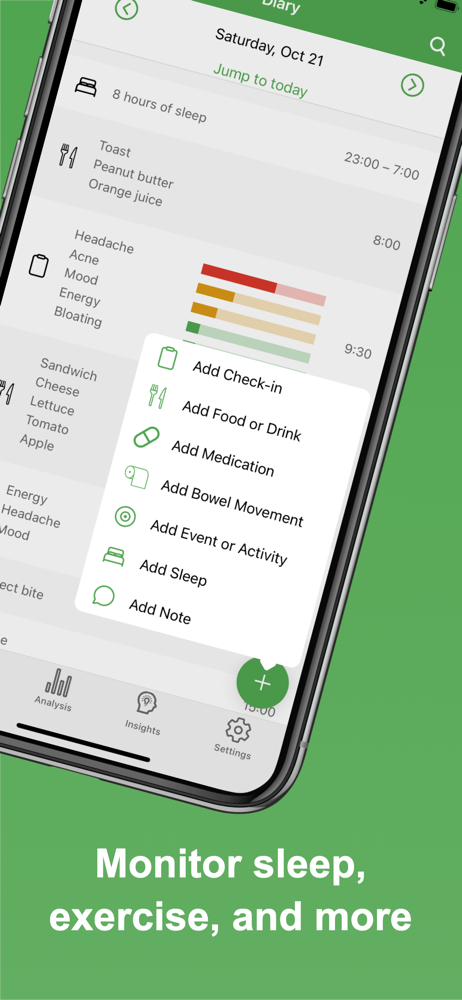
I can’t believe that it took me this long to find this app. I’ve been looking for so long for something to track all of the things needed for my health, and all of the apps were either calorie counters (which wasn’t what I needed) or they were way too expensive for me. Eat Smart Kiwi is simple to use, yet SO thorough and detailed, and I was overjoyed to find that all of the diary functions are FREE to use with no limits. If you are looking for a tracker to monitor your medications/supplements, food, sleep, exercise, bms and more, look no further.
I have tried about 5 now and this is the most intuitive, basic, straight forward app that offers more in-depth analysis as you go. The ability to keep it simple or customize with very precise and scientific data inputs is extremely helpful to anyone who downloads the app. Also the price for additional services is shockingly affordable compared to the other 5 I tried to use.
I just got this today and I’m loving it so far. I recently got put on a low-histamine diet to treat POTS and MCAS, but it’s been hard to tell what foods aggravate my symptoms and which ones are safe. It helps so much that I can add my symptoms to scale daily that aren’t already listed. I love that creating a recipe makes adding my individual foods an efficient shortcut. I love that each symptom has its own customizable scale and can be as detailed or low-maintenance/simple as you want. I love that I can customize each phrase on the scale and add a little humor to it (like on a scale of “none” to “I think I’m dying”, or “aw yeah 😎” to “I’m down for the count”). I think the only things I’d change are: 1. Have a little more variation in color on the scale (it’s just green, yellow, and red, it would be nice to have something in between, like variations of those three shades), and 2. Have different color scheme themes (like the whole app being shades of blue, or shades of pink, or fall, winter, nautical, or pastels, etc.); but those are purely aesthetic things.
Track what you eat. Track how you feel. Get personalised recommendations on what to eat differently. Eat Smart Kiwi helps you discover the effect of...
| Name | Price | Type |
|---|---|---|
| Eat Smart Kiwi Monthly Pro | $1.99 | Monthly |
| Eat Smart Kiwi Pro (Monthly) | $2.99 | Monthly |
| Eat Smart Kiwi Pro Free Trial (Monthly) | $2.99 | Monthly |
| Eat Smart Kiwi Annual Pro | $9.99 | Yearly |
| Eat Smart Kiwi Pro Annual | $14.99 | Yearly |


