
Check the acquisition promise
Read the store headline, screenshots and description. What problem is the app promising to solve?
Study the storefront ↗
Prepear, Inc. · iOS
Explore the ad evidence, study the storefront, and build your next acquisition hypothesis.
01 / Creative research
Read the store headline, screenshots and description. What problem is the app promising to solve?
Study the storefront ↗Explore apps with direct store-link matches. Compare their hooks and formats without assuming the same approach works here.
Browse observed advertisers ↗Store rankings and revenue estimates describe market context. They do not establish ad spend, conversions or ROAS.
Review the market context ↗02 / Storefront & product
Study the product story and store experience behind the acquisition funnel.





03 / Market context
Keep revenue, downloads and store rankings separate from advertising performance.
I’ve really enjoyed using PrePear so far, and am thankful they haven’t completely eliminated the free user option (as has happened to me 2x with other apps). My only quibble is that the iPad app *still* doesn’t have landscape mode, which is the only way I use my iPad when cooking. So I just have to use the desktop mode, and I find that sometimes it freezes or hangs and I have to reload the page to get all my recipes to load. But otherwise I love that you can import recipes from blogs, which works for about 75-80% of the blogs I frequent. (Developers, please feel free to tell me if I just missed where I can switch to landscape mode in the app!)
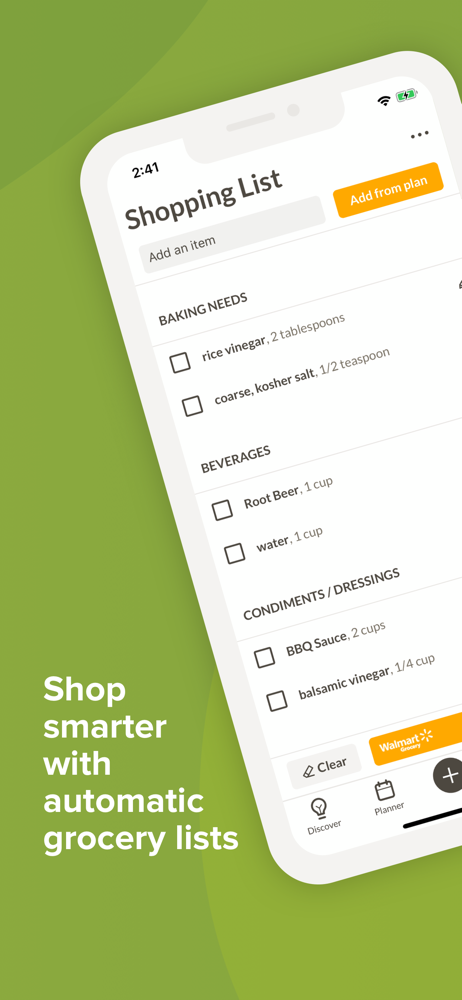
The one issue I had with this app, see below, was fixed before I posted this review. With the latest update everything works great! So many things to love! 1)I absolutely love that I can create a shopping list directly from the ingredients of recipes with a click of a button! Then I can shop Walmart grocery (which is my preferred grocery right now) in the app. Each ingredient is displayed separately with options from Walmart on what to purchase. If I need more information as I’m shopping I can click on the ingredient and it brings up the info from the recipes, yes, each recipe it’s in. Only problem: right now I can’t checkout in the app, but I am able to checkout in the Walmart app. It doesn’t bother me too much because I usually need to shop for other things on the Walmart app anyway. 2) Using the recipes during cooking is wonderful! Before this app, I had started printing or writing out recipes because I have a hard time cooking with all the scrolling and my device shutting down. This is by far better than paper! I can see the ingredients list at the same time as the recipe, which is genius. I can also cross out what I’ve used or done by clicking on it. It’s one of the ways my four year old likes to help. Cook mode in the app is great. 3) The reason for me taking off one star is because when I try to filter recipes, cookbooks, etc., one of the features that I rely on in most other apps and websites, doesn’t work right now. When I click that I’m done, the app closes and my filters have been forgotten. If this is fixed, I would definitely give a five-star review and recommend this app to everyone.
Count me in as a Prepear fanboy!! It’s rare that you can say that an app has changed the way you do things, but that is exactly the case with Prepear. It’s by far the best one out there that collects your recipes and handles your meal plans. I’ve tried a bunch of them - and this one handles what it does so efficiently and effectively. I’ve read a little about the developers, and the app was started by parents who were trying to figure out an easier way to handle meals, recipes, and groceries for their families - so it’s designed with an eye on being super useful and by people who are actively using this and trying to make it better. I’ve been pleased with the app updates so far, and look forward to what they have in store “coming soon”. Sure, it doesn’t have as many of the bells and whistles as other similar apps, but I didn’t find those nearly as intuitive to use - this one just plain works! Love the Prepear Mode when cooking - and the way it handles the pantry and groceries added from the meal plan is really smart. Menu planning is a breeze - and it’s really easy to plug in a menu planning service as well. I use Super Healthy Kids - and it’s changed the way my family eats. If you’ve got picky eaters like me, I don’t know of anything better out there. It’s a game changer. This is one of my most used apps by far, and I very pleased with it!
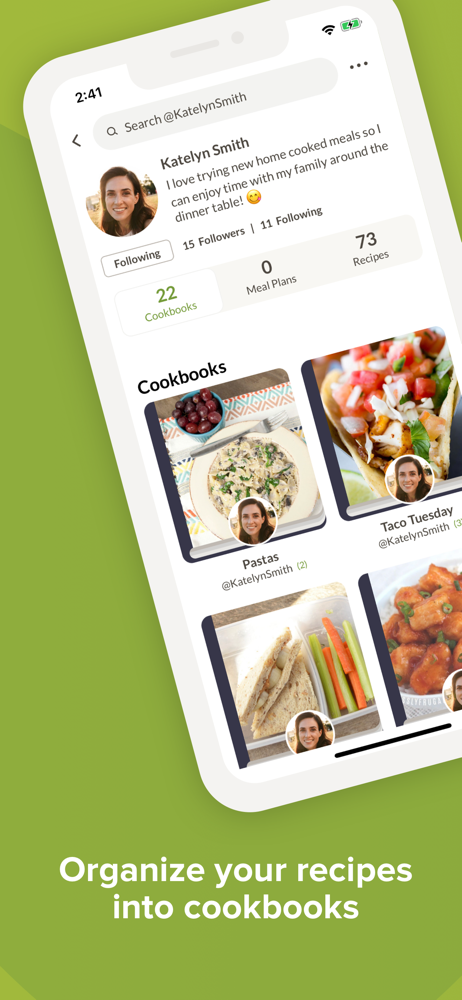
SAVE AND ORGANIZE RECIPES Collect your favorite recipes from anywhere, and sort them into Cookbooks for super simple meal planning. Share with friends...
| Name | Price | Type |
|---|---|---|
| Prepear Gold Subscription (Monthly) | $9.99 | Monthly |
| Prepear Gold Subscription (Monthly) | $9.99 | Monthly |
| Tier 10 Token | $9.99 | One-time |
| Tier 12 Token | $11.99 | One-time |
| Tier 15 Token | $14.99 | One-time |
| Tier 20 Token | $19.99 | One-time |
| Prepear Gold Subscription (Annual) | $59.99 | Yearly |
| Prepear Gold Subscription (Annual) | $79.99 | Yearly |
| Prepear Gold Subscription (Annual) | $99.99 | Yearly |
| Prepear Gold Subscription (Annual) | $119.99 | Yearly |


