
Check the acquisition promise
Read the store headline, screenshots and description. What problem is the app promising to solve?
Study the storefront ↗
John Rommel Estropia · iOS
Explore the ad evidence, study the storefront, and build your next acquisition hypothesis.
01 / Creative research
Read the store headline, screenshots and description. What problem is the app promising to solve?
Study the storefront ↗Explore apps with direct store-link matches. Compare their hooks and formats without assuming the same approach works here.
Browse observed advertisers ↗Store rankings and revenue estimates describe market context. They do not establish ad spend, conversions or ROAS.
Review the market context ↗02 / Storefront & product
Study the product story and store experience behind the acquisition funnel.



03 / Market context
Keep revenue, downloads and store rankings separate from advertising performance.
WARNING: enabling Full Access on the PokeRater keyboard will enable the developers to fully access everything you type, including credit card numbers, bank account information, and passwords. Direct from Apple: "Third Party Keyboards provide an alternative way to input keyboard data. These keyboards can access all of the data you type, including bank account and credit card numbers, street addresses, as well as other personal and sensitive information. These keyboards may also access nearby text or data, which is useful for improving autocorrect functionality." I really do love this app. It's fantastic for showing you the quality and IVs of the Pokemon you catch in POGO. But, the Full Access option on the PokeRater keyboard is absolutely terrifying. There is NO reason for them to need that access, and the fact that they instruct users to enable that on purpose is highly suspicious.
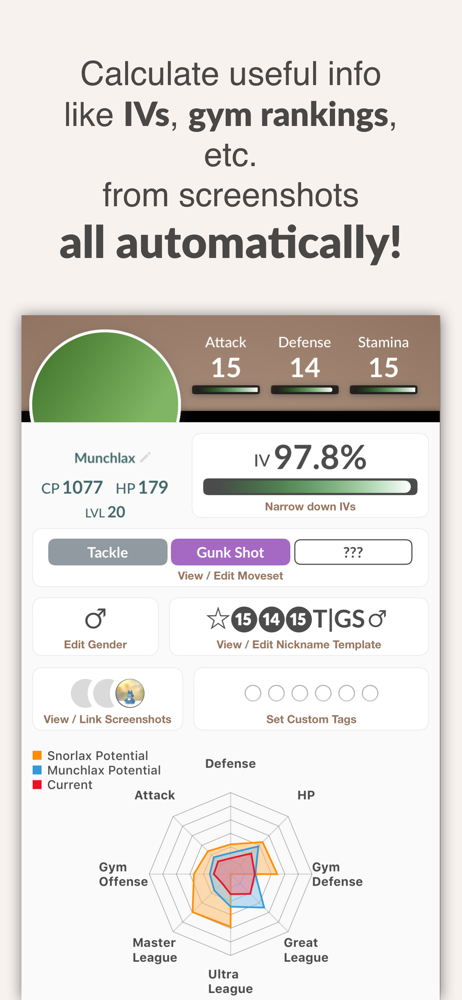
Overall, kudos to the developer for a well made app that looks pretty sleek too. It will even auto-import in the free ads version, unlike another popular IV checker currently in the App Store. The iOS keyboard integration is truly the best feature of this app. I can now input special symbols, copy & paste text, and edit within the name. That said, I wish we could drag and drop our favorite symbols because I want them in a certain order. I’ve had to redo the whole list several times already (twice because I accidentally tapped on a symbol and it got removed). That was such a pain. Also, a few symbols don’t work and showed up as boxed question marks. There is also a minor, yet inconvenient, issue with the keyboard when there’s a “?” in the name. I would definitely consider the paid subscription once the name generator is more customizable. The IV checker is not that much faster than inputting the info yourself into a browser-based IV calculator, but can’t blame the app since it doesn’t have direct access to Pokémon appraisal. There are also several minor bugs throughout the app, but they are manageable and the dev is quick with updates. More importantly, I disagree with the calculation of the defensive rating half of the time. I think the algorithm needs improvement. Blissey’s best defensive set should be zen headbutt and dazzling gleam.
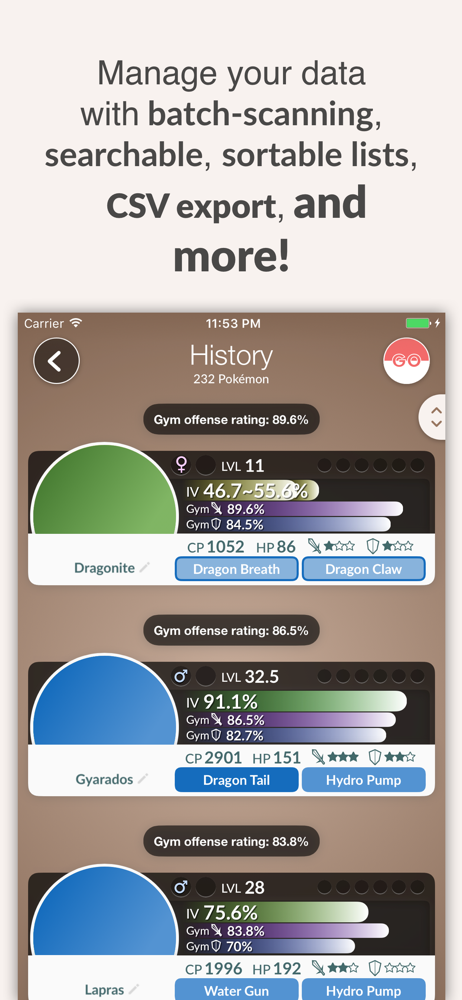
To tell the truth, Around 1 year ago when I still looking and testing for IV checker apps, I try this one and then drop it to choose Poke genie as my main IV checker app. Now, after trying this one again, I saw a lot of improvement and potential that even surpass Poke genie While Poke genie still retains its clean and easy to use GUI, PokeRater use a more clever approach to make its GUI look beautiful while not too complex and still easy to use. Furthermore, PokeRater has more features than poke genie like a better filter options, you can now filter imported Pokemon by move's type or even an auto-import screenshot for free. However, the greatest feature that this app offer is its own keyboard to name Pokemon in Pokemon Go. Instead of adding extra language's keyboard like Hiragana keyboard to get some extra symbols, this keyboard offers nearly all possible symbol that can be used in Pokemon Go and it is also offer a way to navigate cursor while giving Pokemon's name!! For those that love to name theirs Pokemon, this is an extremely convenient feature. Now, a little more feature that I would like to ask. I try testing this app with 2 others IV checker apps to see its accuracy using non-power up perfect IV Pokemon's screenshot without appraisal data. It turns out that 2 others IV checker can tell me exactly that it is a perfect IV Pokemon while this app gave me 2 choices of 77% and 100% IV. I think it is because those 2 apps let player set their level for more accuracy while this app did not. So, is it possible to give an option to set player's level for more accuracy?
* PokéRater is safe. It complies with Pokémon GO's Terms of Service and will NOT ask you to log into your account. No risks of getting banned. * Poké...
| Name | Price | Type |
|---|---|---|
| Pro Trainer (Monthly) | $0.99 | Monthly |
| Remove Ads | $3.99 | One-time |


