
Check the acquisition promise
Read the store headline, screenshots and description. What problem is the app promising to solve?
Study the storefront ↗
Tailwind · iOS
Explore the ad evidence, study the storefront, and build your next acquisition hypothesis.
01 / Creative research
Read the store headline, screenshots and description. What problem is the app promising to solve?
Study the storefront ↗Explore apps with direct store-link matches. Compare their hooks and formats without assuming the same approach works here.
Browse observed advertisers ↗Store rankings and revenue estimates describe market context. They do not establish ad spend, conversions or ROAS.
Review the market context ↗02 / Storefront & product
Study the product story and store experience behind the acquisition funnel.






03 / Market context
Keep revenue, downloads and store rankings separate from advertising performance.
So, I wrote to Tailwind because I was hitting an image limit of 10 images when trying to schedule an Instagram story. This was pretty prohibitive to my workflow, as I tend to share up to 20 images at a time to my stories when delivering sneak previews to my clients. I talked with Clay at Tailwind customer service, and he not only told me he would share my feedback of raising the image limit, he specifically asked me what limit would be more useful for me. Which like, ok, already stellar service because when is the last time you shared feedback with a company who then asked you for specifics on the changes you’d want to see rather than just giving you a generic ‘I’ll share that with the team!’ So, fast forward a few hours (yes SAME DAY), Clay emails me again to say that the team has officially raised the limit on story images to 20, per my feedback. Wut. What company does that? This is wildly impressive customer service folks. I know this app isn’t perfect (what app is?), but this kind of experience cinched it for me. I am officially moving over to Tailwind for my social media planning. And yes, I’m a real person who actually had this experience, and nope I’m not getting anything in return for this review. Just seriously stoked on the experience I just had. Thanks so much Clay and team!
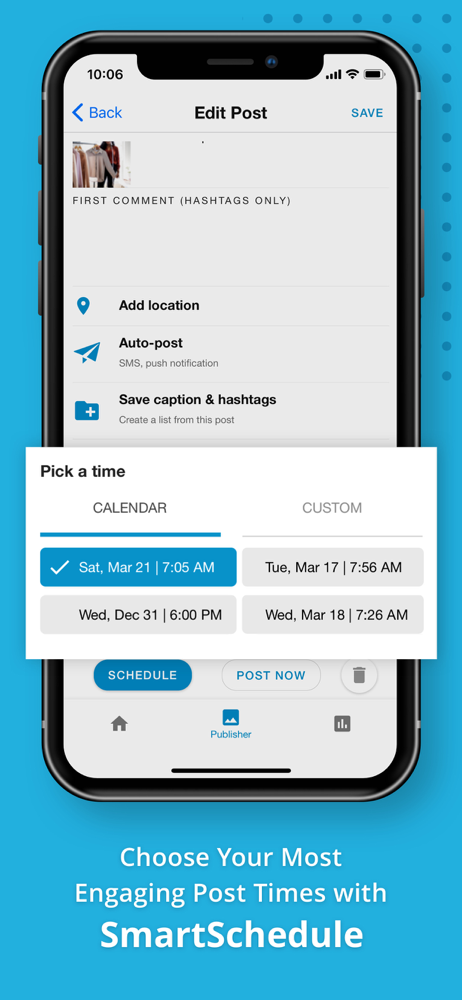
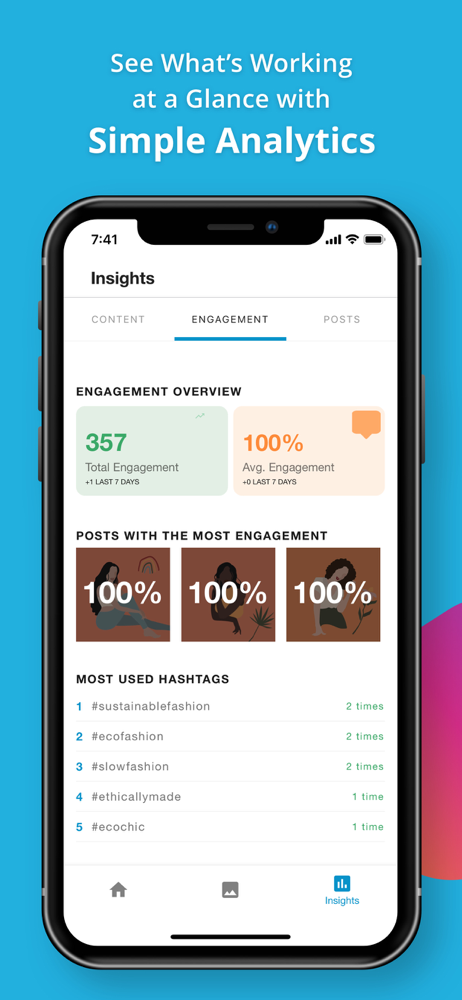
I’m a busy solopreneur who is trying to manage it all. Before Tailwind I would post periodically because between working full time and side hustling I could not find the time to post to social media. I knew the importance of being consistent when building an audience so knew it was imperative the I post and engage with my audience. Tailwind has made it so easy. I know batch upload my content and Tailwind auto posts according to the best time it’s data shows my audience is most active on the platform. My engagement has skyrocketed. Thanks Tailwind from one of your biggest fans!
Tailwind on the desktop/laptop is useful and how it worked on the iPad before the recent update was ok. Now when I’m using the app on safari on my iPad Pro Tailwind no longer shows all the photos of my products in my Etsy shop. It only shows the cover photo. This is no different than using Pinterest to pin from my etsy shop. Pinterest now likes fresh pins even if they link to the same website. Being able to choose multiple photos of my product to pin from my Etsy listing (through Safari) was the whole reason I liked using Tailwind on my iPad. Tailwind through Safari on iPad also no longer lets you choose multiple boards. I can only choose one board at a time. Useless. As for the app itself: it no longer works in landscape mode on the iPad. I hate apps that do that. If they have an iPad version it should work in landscape mode. It also no longer lets you choose multiple boards. The purpose of Tailwind is to let you take one pin and add it to multiple boards at the time. The app update took that function away. Why? The app wasn’t perfect before. It did have glitches but I was able to sit with my iPad while watching tv and get my drafts scheduled. Now Tailwind is only useful on my desktop which isn’t always convenient for me to use. Please, please fix this. Tailwind on iOS on iPad Pro used to work just like Tailwind on Desktop on Safari. Make that part functional again.
Meet Tailwind: The smart assistant for Instagram and Pinterest that enables anyone to confidently create scroll-stopping posts and Pins. Grow your bra...
| Name | Price | Type |
|---|---|---|
| Tailwind Plus Mobile Monthy | $9.99 | One-time |
| Tailwind Plus Monthly | $14.99 | One-time |
| Tailwind Plus Mobile Annual | $95.99 | One-time |
| Tailwind Plus Annual | $119.99 | One-time |


