
Check the acquisition promise
Read the store headline, screenshots and description. What problem is the app promising to solve?
Study the storefront ↗
Watts Water Technologies · iOS
Explore the ad evidence, study the storefront, and build your next acquisition hypothesis.
01 / Creative research
Read the store headline, screenshots and description. What problem is the app promising to solve?
Study the storefront ↗Explore apps with direct store-link matches. Compare their hooks and formats without assuming the same approach works here.
Browse observed advertisers ↗Store rankings and revenue estimates describe market context. They do not establish ad spend, conversions or ROAS.
Review the market context ↗02 / Storefront & product
Study the product story and store experience behind the acquisition funnel.


03 / Market context
Keep revenue, downloads and store rankings separate from advertising performance.
It does the minimum but there are things that could be much better 1Changes frequently don’t hold. I have a driveway snowmelt boiler. When I set the system to “Away,” I can’t get the snowmelt to stay on. I hit “melt” and after a few seconds it switches back. 2. You should be able to rename the scenarios. Rather than “Perm 4,” or whatever, I want to call one “Winter” or “Summer.” 3 I can find no way to clear the Alerts. The problem is gone but I still get the triangle with an exclamation mark every time.
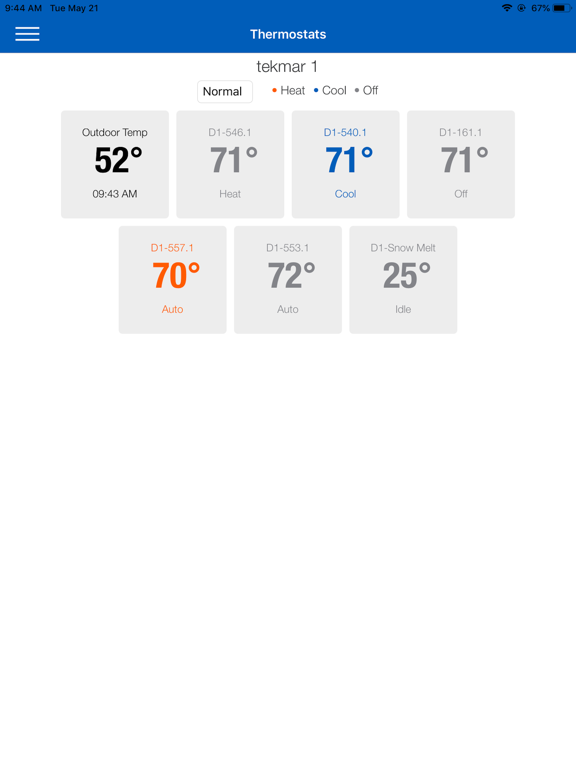
When it was first released a few years ago, I was convinced that this is a version 1.0 that’s going to be improved rapidly. Years later same, the same level of functionality: 1. no ability to see set temperature or fan status without drilling into each thermostat2. No automatic refresh of current temp reading 3. no way to schedule scene changes or thermostat temp adjustments4. impractical UI elements such as horseshoe that adjust temperature or fan speed5. no option to organize thermostat list, 6. no app alerts for critical events outside of the appI emailed these suggestions to tech support for years without any response from their product team.
1. The overview screen that shows all thermostats should refresh periodically, and immediately upon wakeup of the app. Currently, it refreshes only if I exit the thermostats screen and reload it. Consequently, it sometimes shows information that is hours old. 2. The tiles on the thermostats screen should show the set points, as well as the current temperatures. There is plenty of room in each tile for this information. 3. The horseshoe sliders are difficult to operate accurately. Please use standard UI elements, such as scroll wheels for numerical values and on-off sliders for on-off settings.
The tekmarNet® mobile app allows remote access to an HVAC system when installed with a tekmarNet® Gateway 486. Users can view and change settings for...


