
Check the acquisition promise
Read the store headline, screenshots and description. What problem is the app promising to solve?
Study the storefront ↗
Raja Vijayaraman · iOS
Explore the ad evidence, study the storefront, and build your next acquisition hypothesis.
01 / Creative research
Read the store headline, screenshots and description. What problem is the app promising to solve?
Study the storefront ↗Explore apps with direct store-link matches. Compare their hooks and formats without assuming the same approach works here.
Browse observed advertisers ↗Store rankings and revenue estimates describe market context. They do not establish ad spend, conversions or ROAS.
Review the market context ↗02 / Storefront & product
Study the product story and store experience behind the acquisition funnel.
The store evidence
US store price
$7.99
US rating
4.8 / 5
US rating count
2,409
Current version
2026.2.3
2026-09-17 · Developer notes
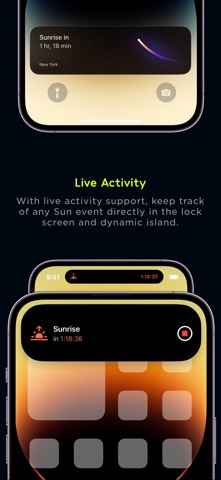
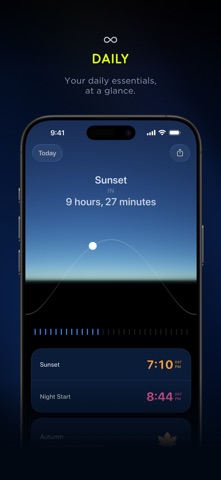
Lumy is ready for OS 27. Ask Lumy - Ask about the sun, moon, golden hour, daylight and more in natural language. Questions are understood on device, while Lumy’s own solar engine calculates the answer. On-screen awareness - Looking at a place in Maps? Ask Siri to “Open this in Lumy” and the place you’re viewing comes straight into Lumy. Siri shortcuts - Ask for the next blue hour, get notified about sunset, or start a sun timer that can continue on your Lock Screen as a Live Activity. Weather insights - See what the forecast could mean for golden hour, photography and the light outside. Spotlight - Find upcoming sun and moon events and j…
Store metadata collected 2026-10-19 UTC · US storefront · Source record. Free may include in-app purchases. Public data does not update revenue estimates.





03 / Market context
Keep revenue, downloads and store rankings separate from advertising performance.
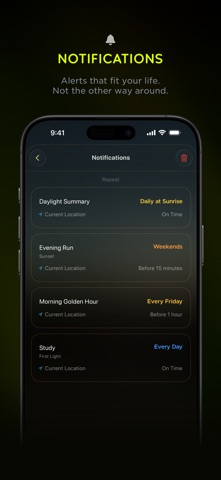
Everyday I work a late shift for work and happen to miss the sunset and golden hours because of my schedule. Now that I have this app I am able to know when it’s sundown and golden hours and take breaks accordingly so I can see the last light each day with the notifications feature in this app. Thank you for making this app. I like that there is an Apple Watch app version too which gives me notifications on my wrist. I also use the watch face on my Apple Watch and I have this app as a widgets on my phone next to my weather widgets. I love this app truly. I would like to know more about moon phases in this app or even have notifications about the moon phases each day. That would be a feature I would like to see. Glad this app is only a one time fee. Also I really like the app logo and design please do not change it. I like how this app looks like Apples native weather app.
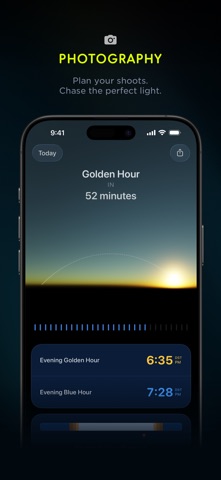
Other have described what an amazing app this is and how useful it is to photographers. That’s true. I use it when I travel and am taking photos to help me keep track of the different types of light in the day. I find this especially useful with landscapes, when I find a really pretty spot and want to know when to come back for that great golden hour light. But that’s not why I’m writing this review. I run or walk every day and use the Lumy complication on my Apple Watch so I always know when sunrise or sunset is. That lets me get up at the right time or get home from work in time. When I updated to WatchOS 10, everything changed, and I emailed the developer to ask what had happened. He was incredibly responsive, released a minor update to address my problem, then talked me through the settings to get it just right. How often to you get that kind of support these days? I am so impressed.
I’ve been using Lumy for nearly 5 years and it is by far the best sun tracking app available. It has come a long way since its inception, now offering various tools like the sun arc, showing its position in the sky relative to time, the sun compass showing its position relative to the phone holder, new time details like daytime and nighttime durations as well as widgets for your Home Screen. This of course on top of all the old features that have been polished to fit the new UI and general design. This app is super simple and ultra customizable. Once you set your location, you can then select which light periods you want to see and even what your app icon looks like! There is also integration for Apple Watch 4 and newer. I have an Apple Watch 3 so I don’t get to take advantage of this yet but hopefully soon. There are various Watch Faces/Complications you can add to your Watch via the Lumy App! I look forward to the future of Lumy. It is an invaluable tool for photographers, whether I’m shooting a portrait session or going out for another attempt at the Milky Way, Lumy has been there for me! Try it out for yourself and you’ll see! No app is perfect but this one definitely deserves 5 stars for ease of use, design, and features. One wish: I wish there was a sun compass widget for iPhone. That would look sick on the Home Screen and would be super useful!
Lumy is a modern sun tracker + outdoor activity planner. - Perfect lighting for photos or videos? Done. - Sunrise hike or sunset walk? Easy. - Outdoo...
| Name | Price | Type |
|---|---|---|
| A Little Light (Small Tip) | $0.99 | One-time |
| More Light (Medium Tip) | $3.99 | One-time |
| All the Light (Huge Tip) | $9.99 | One-time |


