App Profile: Columbia Commercial Mobile
Android / Games / Puzzles
Columbia Commercial Mobile
Installs:
Rating:
4.64
Total Reviews:
5.9k
Top Countries:
US
< $5k
/mo
< 5k
/mo
Reviews: What People Think About Columbia Commercial Mobile
Darrell Staaleson
Rating: 3/5
App will not accept the stamped endorsement on the back of the check. Other review noted we need to sign. Are you serious? I haven’t signed a business check for 20 years. And you might have informed me of this idiotic requirement when I called about the problem. That way I could have avoided wasting hours of productive time. This is the reason I left BofA. No impressed at all. After reinstalling the app and reentering all my data, the mobile deposit worked on 1 deposit. Then failed. Let’s hope Umpqua doesn’t waste any more of my production time. I recommend that you test your apps before you publish. I do not appreciate being your beta tester.
klg7/2
Rating: 5/5
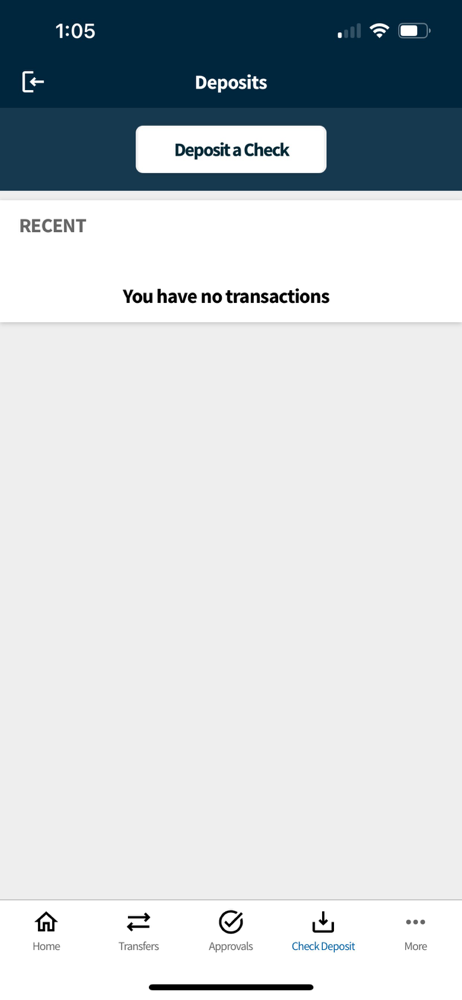
Love using this app to deposit checks remotely! However, I do it infrequently enough that I have to go through the help menu each time as to me it’s not intuitive to press the ‘+’ menu behind which the button is to photograph the front and back of the check. Just wish the deposit button were in the front menu.
laurielava
Rating: 1/5
I wish I could share a screen shot to show you all what their interface looks like. They do not show you the name of the companies that have debited your account. All you see is “authorized payment” as the company in your feed. You have to click on each and everyone of the “authorized payments” to see whom it was to. This is the worst mobile app I have ever used. It honestly would have been a deal breaker for me if I had seen this before opening an account.
I think the 5 star reviews is from the developers because I can’t see how this lack of visibility in reading your report is okay with folks that do a lot of mobile banking. This mobile app is an epic fail.
Update: I have called to voice my dissatisfaction about a year ago to that number and told my bank manager and got a passive who cares sort of response and I was just a complainer. It was obvious you do lip service here for PR only.
About Columbia Commercial Mobile
Start banking wherever you are with our Mobile Banking app!
We’re bringing the bank to your business with Columbia Commercial Mobile, Mobile Banking! Available to Commercial Online Banking customers, Columbia Commercial Mobile allows you to make deposits, check balances, make transfers, and pay bills.
Available features include:
Accounts - Check your latest deposit account balances and search recent transactions by date, amount, or check number.
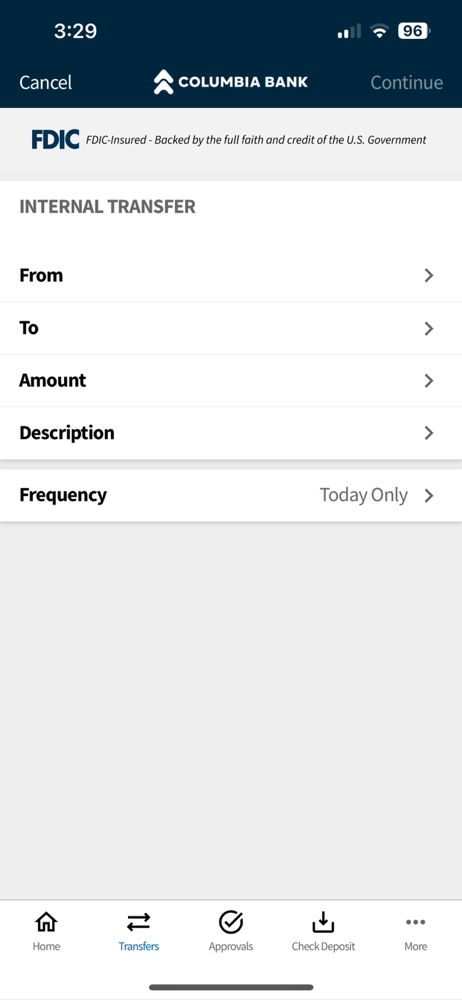
Transfers - Easily transfer funds between your deposit accounts.
Bill Pay - View, pay, or cancel bill payments to your existing vendors and payees.
Mobile Deposit - Deposit checks to permitted accounts. Snap, Tap, and Go.
To take advantage of Columbia Commercial Mobile, you must be enrolled in Commercial Online Banking. As Mobile Banking and Mobile Deposit are permittable services, please verify with your Company Administrator that you have appropriate permissions before using Columbia Commercial Mobile.
If you are a Company Administrator and are not able to sign on or permit Columbia Commercial Mobile to your users, have questions, or would like assistance getting started, please contact Customer Service at 866-563-1010.
All features may not be available in the tablet application.
We’re bringing the bank to your business with Columbia Commercial Mobile, Mobile Banking! Available to Commercial Online Banking customers, Columbia Commercial Mobile allows you to make deposits, check balances, make transfers, and pay bills.
Available features include:
Accounts - Check your latest deposit account balances and search recent transactions by date, amount, or check number.
Transfers - Easily transfer funds between your deposit accounts.
Bill Pay - View, pay, or cancel bill payments to your existing vendors and payees.
Mobile Deposit - Deposit checks to permitted accounts. Snap, Tap, and Go.
To take advantage of Columbia Commercial Mobile, you must be enrolled in Commercial Online Banking. As Mobile Banking and Mobile Deposit are permittable services, please verify with your Company Administrator that you have appropriate permissions before using Columbia Commercial Mobile.
If you are a Company Administrator and are not able to sign on or permit Columbia Commercial Mobile to your users, have questions, or would like assistance getting started, please contact Customer Service at 866-563-1010.
All features may not be available in the tablet application.
File size: 95678464
Launched countries: US
Minimum OS version: 15.0
Release Date: 1388090487000
Published by Columbia Bank (OR)
Website url:
Publisher country: US