Check the acquisition promise
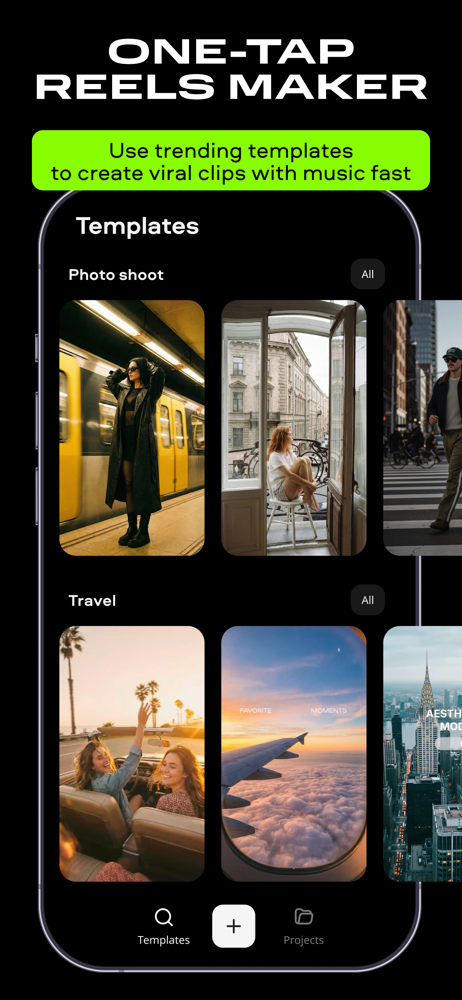
Read the store headline, screenshots and description. What problem is the app promising to solve?
Study the storefront ↗
Movavi Emea LLC · iOS
Explore the ad evidence, study the storefront, and build your next acquisition hypothesis.
01 / Creative research
Read the store headline, screenshots and description. What problem is the app promising to solve?
Study the storefront ↗Explore apps with direct store-link matches. Compare their hooks and formats without assuming the same approach works here.
Browse observed advertisers ↗Store rankings and revenue estimates describe market context. They do not establish ad spend, conversions or ROAS.
Review the market context ↗02 / Storefront & product
Study the product story and store experience behind the acquisition funnel.


03 / Market context
Keep revenue, downloads and store rankings separate from advertising performance.
So far this is the best free and user-friendly, film and television editing app turned into meta-for the new generation with the basics and updated basics which is needed for bloggers influencers gamers they need to take the data, e.g. video and photos to compile together to create a bigger project. And this app can piece it all together, professionally if needed good job of all t Movavi. I tried the computer trial version to get an intro to see if I was interested in purchasing, but before I could even enjoy the app, the installer would not install correctly and when it did a crash several times, so I decided to use a clean brand new laptop, and it worked, but my trial was already over. so I did not get a full chance to actually experience what the love Abi software home PC version is truly light. Plus from what I seen I would not have been able to export a sample without a watermark or any of the other anchors to make a consumer buy, which would’ve run the quality to be able to even gauge whether it’s worth the purchase or not. Now the price point is fair in the holiday specials have been more than fair, but until I get a chance to actually see what is software can do I don’t purchase.
This will be my second review now since making the lifetime purchase version and I absolutely have no regrets! I am still new to editing videos/clips/ intro’s… etc. But this app is making all my edits look way better than I had imagined and it’s very user friendly and easier than expected to utilize. The only gripe or complaint I would have is one that I've seen many other people in the reviews also write about and that would be their music selection isn’t very modernized I guess you can say however, they do have a wide variety and large selection of sounds and music just again probably not what most would expect. However for anyone also struggling with this I did find a way around this problem as all I had to do was use the voice recording option and tell my Alexa to play whatever song I wanted on my preferred volume setting during my edits and then you can go back to the app and adjust the voice edit or song you want by the volume settings in the app to correlate with whatever edit you’re doing (clip, montage, etc..) and it turned out way better than expected! After I fine tuned the volume setting you couldn’t even tell my music was actually just a recording I uploaded to the app itself! So if anyone is reading this with the same problem I had I hope this review really helps. You might have to position your phone in different spots depending on what speaker or in my case my Alexa you’re using and or volume on that device but it only took me 2 tries to perfect it honestly and now I know just about how it should be done per my standards every time and overall vastly enhances my videos and montages! In the end to summarize it would be nice to be able to have a function where in the app you can upload your music from other apps as I don’t use Apple Music even though I do have an iPhone but I do personally use SoundCloud so an editing app where you could utilize your own preferred music platform that we use would be an absolutely amazing new function especially for anyone who bought the lifetime subscription.
You replied to my review once with a solution on how to get it on my other phone but I cannot find the reply or a solution now can you please tell me how to do it again. I still do love the app even with the pick up time to time. I have a new phone now that I want to access it with. I love the app most of the time. However, there are times when I have a video on my phone and I try to load it into Movavi and create and edit this video. But when I go to play the video so that I could edit, the only thing I get is my voice no picture whatsoever just my voice. I don’t know how to fix that and it doesn’t do it all the time but it’s just very aggravating when it does it when you pay for the service. I understand technology has hiccups just like I do. Let me say again I like the software the app when it works like it’s supposed to and it’s well worth the money if it does it like it’s supposed to all the time. But I have another problem I lost the phone that I had forever license on in the river and now I need to transfer that license to my other phone can you help me with that please and thank you for letting me vent a little bit but otherwise it’s a great software. KRS in TN
Movavi is your go-to reels maker and video editor for creating awesome content in just a few taps. Whether you're sharing a vlog, filming your workout...
| Name | Price | Type |
|---|---|---|
| Monthly Premium Subscription | $1.99 | Monthly |
| Weekly premium subscription | $2.49 | Weekly |
| Monthly movie clip editor | $3.49 | Monthly |
| Monthly movie clip editor | $3.49 | Monthly |
| Monthly movie clip editor | $4.99 | Monthly |
| Monthly movie clip editor | $5.49 | Monthly |
| Weekly | $5.99 | Weekly |
| Weekly | $5.99 | Weekly |
| Weekly | $6.99 | Weekly |
| Monthly | $13.99 | Monthly |