Check the acquisition promise
Read the store headline, screenshots and description. What problem is the app promising to solve?
Study the storefront ↗
Canon Inc. · iOS
Explore the ad evidence, study the storefront, and build your next acquisition hypothesis.
01 / Creative research
Read the store headline, screenshots and description. What problem is the app promising to solve?
Study the storefront ↗Explore apps with direct store-link matches. Compare their hooks and formats without assuming the same approach works here.
Browse observed advertisers ↗Store rankings and revenue estimates describe market context. They do not establish ad spend, conversions or ROAS.
Review the market context ↗02 / Storefront & product
Study the product story and store experience behind the acquisition funnel.



03 / Market context
Keep revenue, downloads and store rankings separate from advertising performance.
Use this with the C50 and works great. But no anamorphic support even though the camera supports it? Live view shows the squeezed image even though the camera is desqueezing the image.
We love this app. It works really well with our canon C 400 minus a few caveats. These caveats are the only thing keeping me from a five star review. The tap to focus auto focus feature only works if the canon USB monitor is plugged in. If it is not plugged in then when you tap to focus, the focus zone goes right to the top left corner and you can’t move it using the iPad. also, there is no way to view the video feed with a video assist or LUT or anything like that. You can only view the video in the color space that it’s being recorded in. This holds us back quite a bit. Other than that, we have full control and the signal works great when paired with a wireless router.
This app is nearly perfect as it gives the ability to control the necessary predominant camera functions with virtually zero lag. I gave this app a 3-Star because it’s of the camera compatibility. I strongly believe this app needs include the entire R series line. Canon has spent nearly a decade trying to please indie filmmakers by providing cinema-grade features in their mirrorless cameras only to not include those cameras in this app. That's a big mistake because most filmmakers are using the R series cameras. Please consider what I'm saying.
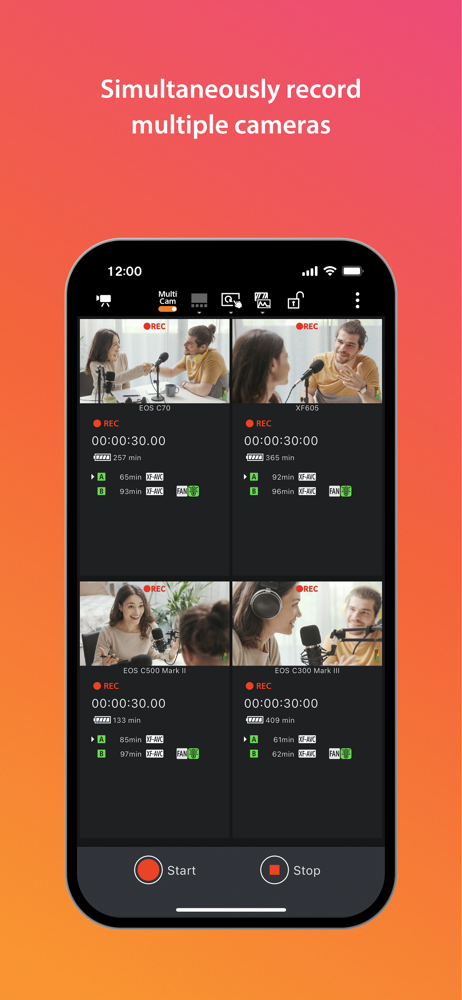
Canon Multi-Camera Control is an app that lets you display live view images of up to four Cinema EOS, professional camcorders, or remote cameras, simu...