Check the acquisition promise
Read the store headline, screenshots and description. What problem is the app promising to solve?
Study the storefront ↗
Christopher Coudriet · iOS
Explore the ad evidence, study the storefront, and build your next acquisition hypothesis.
01 / Creative research
Read the store headline, screenshots and description. What problem is the app promising to solve?
Study the storefront ↗Explore apps with direct store-link matches. Compare their hooks and formats without assuming the same approach works here.
Browse observed advertisers ↗Store rankings and revenue estimates describe market context. They do not establish ad spend, conversions or ROAS.
Review the market context ↗02 / Storefront & product
Study the product story and store experience behind the acquisition funnel.
The store evidence
US store price
$4.99
US rating
4.3 / 5
US rating count
9,712
Current version
16
2026-10-13 · Developer notes
Synthesized stations are better than ever, with more natural speech, clearer pronunciation, and improved playback reliability. - Choose from Enhanced and Premium system voices across English accents. - Customize your listening experience with voice and playback controls. - Clearer loading feedback when starting synthesized stations. - Improved alert sharing. - Weather information stays visible if a refresh fails. - Additional fixes and stability improvements.
Store metadata collected 2026-10-19 UTC · US storefront · Source record. Free may include in-app purchases. Public data does not update revenue estimates.





03 / Market context
Keep revenue, downloads and store rankings separate from advertising performance.
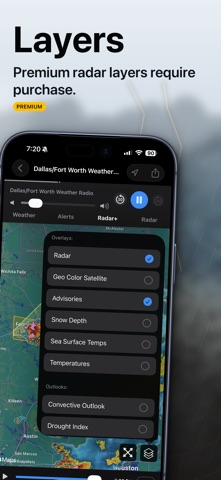
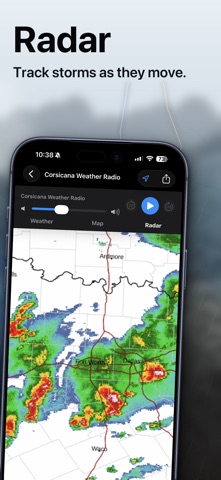
The NOAA Weather Radio app is an exceptional weather app that offers a plethora of features to help users stay up-to-date with the latest weather conditions in their area. One of the key features that sets this app apart from other weather apps is its ability to connect to a multitude of radio stations, allowing users to receive real-time weather updates and alerts from trained meteorologists. Another great feature of this app is its high-resolution radar maps, which provide users with accurate and detailed information about weather conditions in their area. These maps are updated regularly and can be accessed quickly and easily through the app. The NOAA Weather Radio app is also user-friendly, with a simple and intuitive interface that makes it easy to navigate and access all of its features. Users can customize the app to their preferences, choosing which radio stations and radar maps they want to view and receiving alerts for specific weather events. Overall, the NOAA Weather Radio app is one of the best weather apps available, providing users with accurate and up-to-date information about weather conditions in their area. Its wide range of features, including radio station connections and high-resolution radar maps, make it a must-have app for anyone who wants to stay informed about the weather.
This app allows you to to get a live stream of any NOAA Weather Radio in the US, plus some Canada and tropical radio feeds as well. It also allows you to receive weather alerts that you customize for your specific county or other location of interest. Here is the only thing I wish there was a workaround for: Part of why I purchased this app is so I can have it wake me up if there is severe weather or flash flooding at night. I typically turn my phone on airplane mode when I go to sleep, and it doesn’t look like alerts will come through when the phone is on airplane mode. So, on nights where there is severe weather or flooding expected, it looks like I will need to keep my phone off of airplane mode, but then will also need to temporarily turn other notifications for email, texts, and phone calls off so that if there is a severe weather warning at night, it can wake me up and I don’t have to worry about text messages waking me up! Also, you have the option of paying an additional 99 cents as an in-app purchase for additional information on the products issued by the NWS/SPC for your area, which is very helpful.
Fixed it... On the alerts page, it tells you to swipe left or press edit to turn on/off notifications or to delete selected locations. Are your locations grayed out? Mine were. Using edit, only lets you delete the locations. If you swipe left on them, you’ll notice a button to actually turn the notification on or off. There must’ve been a version that added this feature and defaulted them to off, because I know that I never turned them off myself... I turned them back on this way, and now instead of being grayed out, they’re bold n black / asserted. About an hour later, since there is weather going on, I got my first alert after doing this. If you’re having the same issue, give it a try. It may make you love the app again... Now just can’t hear the weather radio audio. Just spins. The radar takes a bit to load as well. The app needs some updates, but at least Iam getting the alerts again...😁
Rewind & Replay Live NOAA Broadcasts — Never Miss a Life-Saving Alert. NOAA Weather Radio is the most complete NOAA Weather Radio All Hazards app on...
| Name | Price | Type |
|---|---|---|
| Tropical Cyclone Map Overlay | $2.99 | One-time |
| Weather Radio Premium Upgrade | $6.99 | One-time |
| Enhanced Hi-Def Radar+ | $9.99 | One-time |
| NOAA Synthesized Stations | $9.99 | One-time |
| Weather Radio Premium Upgrade | $12.99 | One-time |
| Weather Radio Premium | $17.99 | One-time |