Check the acquisition promise
Read the store headline, screenshots and description. What problem is the app promising to solve?
Study the storefront ↗
俊红 柴 · iOS
Explore the ad evidence, study the storefront, and build your next acquisition hypothesis.
01 / Creative research
Read the store headline, screenshots and description. What problem is the app promising to solve?
Study the storefront ↗Explore apps with direct store-link matches. Compare their hooks and formats without assuming the same approach works here.
Browse observed advertisers ↗Store rankings and revenue estimates describe market context. They do not establish ad spend, conversions or ROAS.
Review the market context ↗02 / Storefront & product
Study the product story and store experience behind the acquisition funnel.



03 / Market context
Keep revenue, downloads and store rankings separate from advertising performance.
After trying out other webcam programs, I found the features and quality on iVCam to be the best. I use an iPhone 11 clamped to my monitor with a Smartrig multifunctional clamp, smartphone mount and ring light and it blows away my Logitech C922 in image quality. I get up to 4K 60 frames video with excellent low light performance. You can use iVCam with multiple devices which EpocCam will charge you extra for and I’ve found the latency to be much better than NDI HX Camera which is a $20 app. It is also the only app I found that allows you to use the mouse wheel or keyboard keys to control zoom in/out. This is a great convenience when you want to size yourself in a screen or crop out edges of a green screen without having to reach around a mounted iPhone to pinch and zoom on a tiny screen that is facing away from you when using the better rear camera lenses. I tried a lot of demos of these apps and finally bought the full version of iVCam and feel it’s maybe the best $10 I’ve spent on an app. If you’re a Windows user with an iPhone that you can spare during web calls then you already have a better webcam than most of the dedicated ones out there that are scarce and/or over-priced during these work-from-home times. This is frankly a no-brainer.
Like the headline says. I really liked the app. Very responsive. Good quality of video. Although, I would recommend good lighting to improve the quality of the white balance and light capture. I was streaming out of the batt I’m 1080pm using OBS with two cameras (phones). Computer app was working flawlessly. I really like it and will continue using it. The down side here and the reason I don’t give 5 stars is related to the payment. I paid the 9.99 full version. Based on the information here. This app is compatible with family sharing. Meaning that I should not have to pay 9.99 for each device as long as they are under my family sharing. I would restore the purchase but, but still get the ads and watermark. I had to pay an extra 9.99 for it to go away on my other iCloud account. So that is already 20$ dollars. The only reason I paid it. Is because it is a fraction of the price of a good webcam or digital camera. Still you get the quality. I would say it is even better. Lots of things can be done with it. The app does what it promises. It is a good one to use and easy. I recommend it.
I got this app because I wanted a better webcam than what was integrated in my laptop (I.e., I wanted a 1080p one, not a 720p one), and the Logitech webcam that was recommended by a friend had tripled in price. So I thought about using my iPhone with a webcam app. I looked at reviews, downloaded a few trial version apps from the App Store, and this one had the best video. I started to use it as a 1080p web cam and was initially very disappointed that the video and computer’s mic audio pickup were not synchronized - there was a significant delay in video from the audio. The PC app had an option for GPU acceleration of video decoding that I hoped would help, but in trying it out, it was not working. So I could only get decent synchronization at the lowest video resolution settings. I was about to give up and accept that I wasted $10 when I noticed the help email address on the website. So I sent the log of the app operation and my issues to the developer. The developer responded in a couple of days and we went back and forth a few times. But their suggestions didn’t seem to help. However after a few more days, a new version of the IOS and the Windows apps came out. The GPU acceleration option was now working, and HEVC (H.265) encoding was now included as an option. Using both HEVC and GPU acceleration, I am getting good audio syncing up to 720p at the medium quality setting. Though this is less than I had hoped for, it is so much better than the built in webcam that I am giving the app 4 stars. Also, my experience may be related to my particular laptop because I got much less delay when I tried the app with my desktop. So your results will probably be better than mine. Overall this is a good app and the developer provides good support.
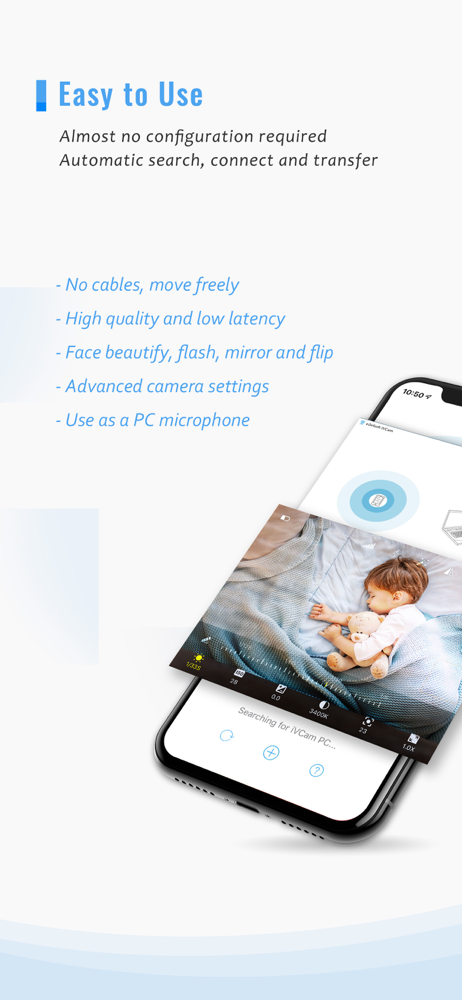
Why buy a webcam since you already have an iPhone/iPad? iVCam turns your iPhone/iPad into an HD webcam for Windows PC. You can also replace your old...
| Name | Price | Type |
|---|---|---|
| BASIC ANNUAL | $7.99 | Yearly |
| PREMIUM ANNUAL | $12.99 | Yearly |
| PERMANENT | $24.99 | One-time |