
Check the acquisition promise
Read the store headline, screenshots and description. What problem is the app promising to solve?
Study the storefront ↗
TwistedWave Software Ltd. · iOS
Explore the ad evidence, study the storefront, and build your next acquisition hypothesis.
01 / Creative research
Read the store headline, screenshots and description. What problem is the app promising to solve?
Study the storefront ↗Explore apps with direct store-link matches. Compare their hooks and formats without assuming the same approach works here.
Browse observed advertisers ↗Store rankings and revenue estimates describe market context. They do not establish ad spend, conversions or ROAS.
Review the market context ↗02 / Storefront & product
Study the product story and store experience behind the acquisition funnel.


03 / Market context
Keep revenue, downloads and store rankings separate from advertising performance.
I’ve been using twisted wave for a consistent audiobook narration business for sometime and have zero complaints, but after this update some very weird things have been happening. One of which is when I select multiple files and try to share them to an outside source say Dropbox or Google Drive the files just don’t send. I tried this for a while and into no avail. This is definitely a bug. This bug is probably the strangest of all. When I hold down a file long enough, it gives me four options in a pop-up one of which is “send to Thomas“. I have absolutely no idea why that would be the case. They definitely need to iron this out or I’m gonna have to drop this for privacy concerns and for the fact that it’s just not convenient anymore to send files out.
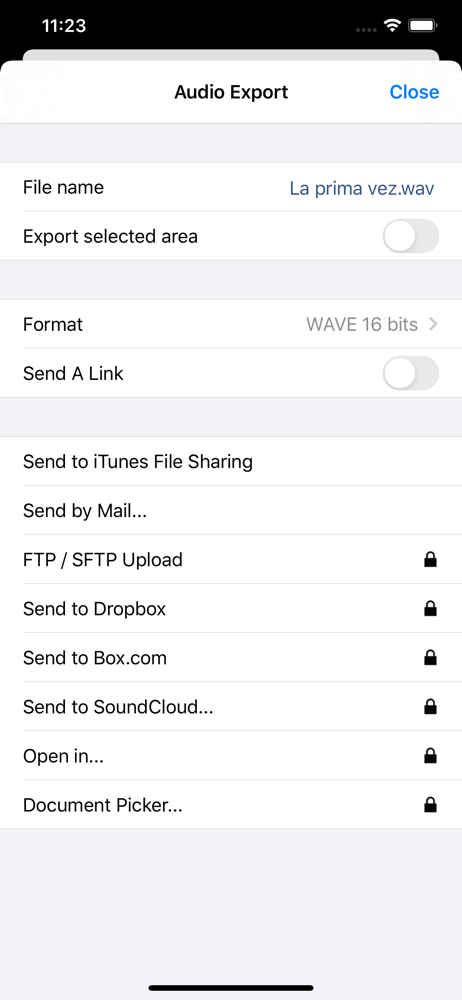
Update 2021: I paid for this app in 2016. I have almost 100GB of uncompressed audio almost (~300 files) on 2 iOS devices. I have spent around 30 hours trying to develop solution for USB audio share/export that does NOT involve local network or slow upload to “cloud”.Instead of SIMPLE USB transfer like I can with photographs, this app has application file system sandbox which PREVENTS USB export!!This is a major failure of the app developer. People pay for this application for power features and functionality. SMB network share -barely- works! SFTP network share is totally broken.After 30 hours troubleshooting my only solution was to create a SMB/CIFS file server I started in a docker container inside my local linux PC and transfer via local network LAN This is way above skills that should be required to transfer audio files!!Why is there no USB file transfer?? Please! add this missing feature! I started using Twisted Wave Recorder around 2016 on iPhone 6. It was good and I made a lot of high quality recordings, but struggled to export the audio files.2019, I purchased a iPhone XS and was unable to find replacement audio app that offered the core recording features in Twisted Wave.However, the audio export is still garbage, in 2021!! The developer needs to create a simple plist file and ship in an application update which will allow share/export via USB cable to be possible. This is basic application maintenance!! Application sandboxing in iOS is such a hassle now in iOS that this is mandatory for proper usage of this and many applications now. (VLC app for example does not have this issue with USB, and also handles audio files!)
I purchased this app just about a year ago because of the tools within the app. All of a sudden, I open the app and everything is locked up again as if I didn’t buy it. So, to verify again, I open all my purchased apps and yes, Oct 2018. The original purchase write up didn’t say it was only for a year and if that’s the case, I’m still owed. I’m not sure if they will reply because of the other reviews are still negative “missing” answers from the CREATORS of the app. I guess I have to take my business to a customer service pride company who provides the same services. So Sad!
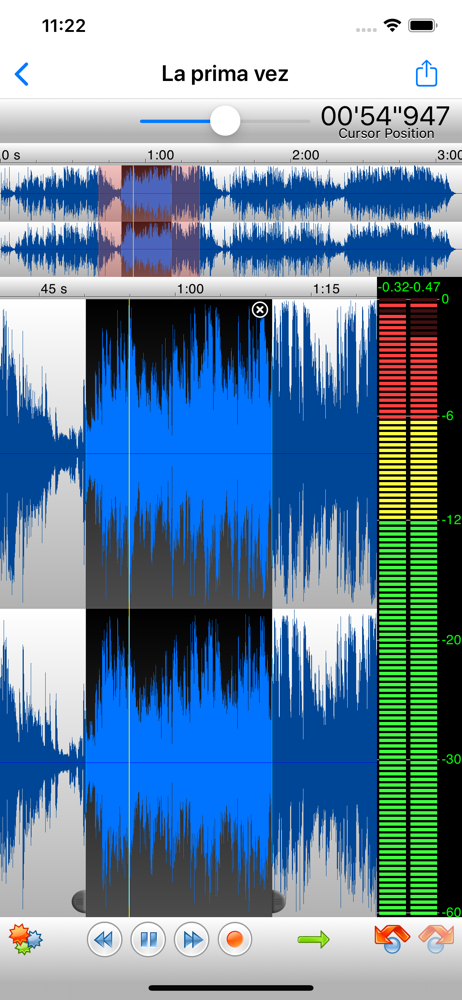
TwistedWave is a very fast and easy to use audio editor and recorder. Even when working with huge files, it will remain very fast and fluid, and will...
| Name | Price | Type |
|---|---|---|
| unlock all export options | $3.99 | One-time |
| unlock all editing functionalities | $5.99 | One-time |


