
Check the acquisition promise
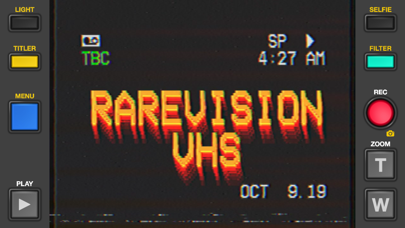
Read the store headline, screenshots and description. What problem is the app promising to solve?
Study the storefront ↗
Rarevision · iOS
Explore the ad evidence, study the storefront, and build your next acquisition hypothesis.
01 / Creative research
Read the store headline, screenshots and description. What problem is the app promising to solve?
Study the storefront ↗Explore apps with direct store-link matches. Compare their hooks and formats without assuming the same approach works here.
Browse observed advertisers ↗Store rankings and revenue estimates describe market context. They do not establish ad spend, conversions or ROAS.
Review the market context ↗02 / Storefront & product
Study the product story and store experience behind the acquisition funnel.
The store evidence
US store price
$5.99
US rating
4.7 / 5
US rating count
6,729
Current version
1.7.1
2025-11-07 · Developer notes
Guaranteed worst video quality in the business! Here's what we fixed: • Fixed a bug with the titler text style • Video stabilization preference now remembered
Store metadata collected 2026-11-03 UTC · US storefront · Source record. Free may include in-app purchases. Public data does not update revenue estimates.



03 / Market context
Keep revenue, downloads and store rankings separate from advertising performance.
This app pretty much pays for itself. There’s so many options for customization that you’ll spend hours up to days and days discovering so many fun things. This app beats the rest of the bunch because it imports video footage fast and easy. If you do have clips that are longer than a 1 minute or 2, be patient and make sure that you have your device at least 80 percent charged with the screen option for it to not go off at all while it’s recording your footage. The only part that I would suggest is a sound leveler option between the original sound and the glitch sounds keeping the original sounds loud enough along with the glitch sound effects. Otherwise, this app is the best authentic looking VHS looking app you’ll find if you’re really a big fan of the old school VHS glitch looks. It’s great for importing footage and creating an old school look, but if you are filming yourself keep in mind that good lighting is key for the best results.
I love this app so much and it’s honestly the best 4 dollars I’ve ever spent JDJSJF With that being said, the only thing I can recommend is a way to edit videos after they’ve been recorded !! I wish there was a way to change the way how glitchy it was or add the text after you’ve already finished the video in case you forgot too or didn’t think to do it until after you finished. I think this would also be really helpful when importing videos. Whenever you import videos, it’s all sped up and it’s incredibly hard to change filter or add title when it’s going insanely fast and you can’t pause. I think a scroll bar that allows you to look through a video when it’s finished would be really nice !! It could allow you to go back to a certain part of the imported video or recorded video and allow you to make changes and make it however you want. Hopefully this random rant makes sense, just a thought I had Again, fantastic app, and I’m really happy with what I got !!!
This app is amazing, I use it a lot! I love it a lot. There are some little fixes I suggest. Well, for starters, it would be awesome it have the little multicolored interference like some other users have said to make it look more 80s. I also think the font/date should be a but more 80s as well. You can kinda tell it’s fake. Other than that, this app is awesome. I also need help with something else. Some might find this easy to fix, but I’m not good with app updates or anything, heh.😂 But I would really appreciate it if someone could tell me why my phone isn’t updating for the app. I will go to menu and I will press the “Tap here to have full update!” Or whatever it says. So I’ll click on it but it just brings me back to the AppStore and the app. I’ll go to my little update section and it won’t say the VHS Cam needs to be updated. I’ve done all that I can to try to figure it out. I’ll go to settings, I’ll look in the VHS Camcorder settings, but I can’t seem to find out how to update it. I’m afraid I’m over thinking all of it or it has to do with my phone. I have an iPhone 6s if that has something to do with it.. I would absolutely love to have all the filters, mess with the date, and be able to film longer. May anyone help me? Thanks!
Used by Kendall Jenner, Snoop Dogg, BTS, Ariana Grande, Khloe Kardashian, Wiz Khalifa, Victoria Beckham, Die Antwoord and featured on SNL (S41E01) and...


