Check the acquisition promise
Read the store headline, screenshots and description. What problem is the app promising to solve?
Study the storefront ↗
Amcrest · iOS
Explore the ad evidence, study the storefront, and build your next acquisition hypothesis.
01 / Creative research
Read the store headline, screenshots and description. What problem is the app promising to solve?
Study the storefront ↗Explore apps with direct store-link matches. Compare their hooks and formats without assuming the same approach works here.
Browse observed advertisers ↗Store rankings and revenue estimates describe market context. They do not establish ad spend, conversions or ROAS.
Review the market context ↗02 / Storefront & product
Study the product story and store experience behind the acquisition funnel.



03 / Market context
Keep revenue, downloads and store rankings separate from advertising performance.
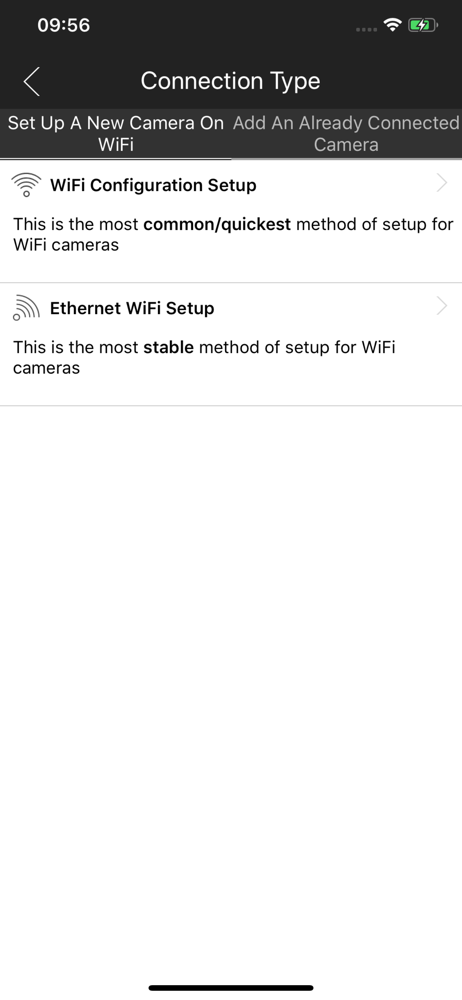
I just bought the 720 camera and connected it. I followed the prompted guide on how the app works and it seems pretty straight forward. No issues thus far. I only have one camera, but if you tap the top right button to select your camera or add camera, it doesn’t seem to be difficult if you have multiple cameras and there is a feature to monitor multiple feeds at once. I’ll prob get one more camera in the future. I will be using this mainly as a baby monitor. It was a great deal on Groupon during Black Friday and I couldn’t pass it up. Does what I need it to do, see my baby via my phone ( instead of a stand alone monitor I’ll have to carry around.) I don’t plan on using the camera while away from home so the issues about logging onto the app while connected through a different internet source (cell or other WiFi) doesn’t apply to me. I also had difficulty setting up the device via WiFi so I used the Ethernet cable and it was quick. I could unplug the camera and move it with no problems reconnecting. I noticed a few people mentioning network re-setups was difficult, I would just factory reset the camera to default and reconnect. Seems faster- per the manual online- (reset button/light is next to the Ethernet plug, press and hold for 10 seconds- for the WPS, push once and release reset).
If all you need is a camera to record a motion event day or night, the cameras work good. However, if you want an app in order to access and change settings, view events, add a new camera, etc., THIS APP SERIOUSLY STRUGGLES! The ease of use lacks tremendously. You have to constantly bounce back and forth between the menus and options in order to figure out how to make something work correctly. I find myself having to keep adding my cameras into the Live View mode because some other option/function has removed them. Most recently, one of my cameras (camera A) pushes a notification of an event. When I click on that event on my smartphone’s home screen, the app tries to load another one of my camera’s (camera B) recordings. I am then prompted that there is no recording on camera B. I contacted customer support and they had me double-check different settings for camera A. All which turned out to be set correctly. Amcrest prides themselves on having US based customer support, but giving an Indian the name “Dexter”, “Mikey”, “Joanie”, “Trish”, etc. when there clearly is a couple of oceans between America and where their accent places them, does not fool me. Step up your game Amcrest. There are other products out there that work seamlessly and have a better UI than your app.
The app works very well with the camera, although I would strongly recommend a connected, ethernet cable set up, versus a wireless one. The wireless attempt failed for me several times before I finally gave up and went the old school method. The camera quality is good, but with a few shortcomings: 1). The resolution in portrait mode looks really bizarre on an iPhone X. The fix for this is to turn your phone to landscape, and you’ll notice the resolution will look much better. We should always watch video in landscape anyway, right Steve Jobs? 2). This is not yet optimized for iPhone X, which is a shame. The camera will look much better when it’s built for the native resolution of the newer iPhones. 3). Finally, I don’t have a great connection when I’m trying to view the camera when I’m not on my LAN and out in the real world. I haven’t set up port forwarding on the LAN IP for the camera yet, and I’m not sure if that will change a thing with the app, but viewing in HD is extremely slow. Perhaps not so much a complaint about the app but the cameras ability to communicate with my network? Hard to say. Lastly, an annoying feature of the app is that you continually have to select the pan/tilt tool in order to pan around; by default it doesn’t seem to be selected, and doesn’t return to that function without selecting it. What this means is that you will be dragging your finger across the image several times before realizing you haven’t selected the pan/tilt tool.
Amcrest View is used in conjunction with Amcrest IP Cameras as well as HDCVI DVR & NVR systems. Configure your cameras together with the Amcrest View...