
Check the acquisition promise
Read the store headline, screenshots and description. What problem is the app promising to solve?
Study the storefront ↗
Chengdu Wangqi03 Technology Ltd. · iOS
Explore the ad evidence, study the storefront, and build your next acquisition hypothesis.
01 / Creative research
Read the store headline, screenshots and description. What problem is the app promising to solve?
Study the storefront ↗Explore apps with direct store-link matches. Compare their hooks and formats without assuming the same approach works here.
Browse observed advertisers ↗Store rankings and revenue estimates describe market context. They do not establish ad spend, conversions or ROAS.
Review the market context ↗02 / Storefront & product
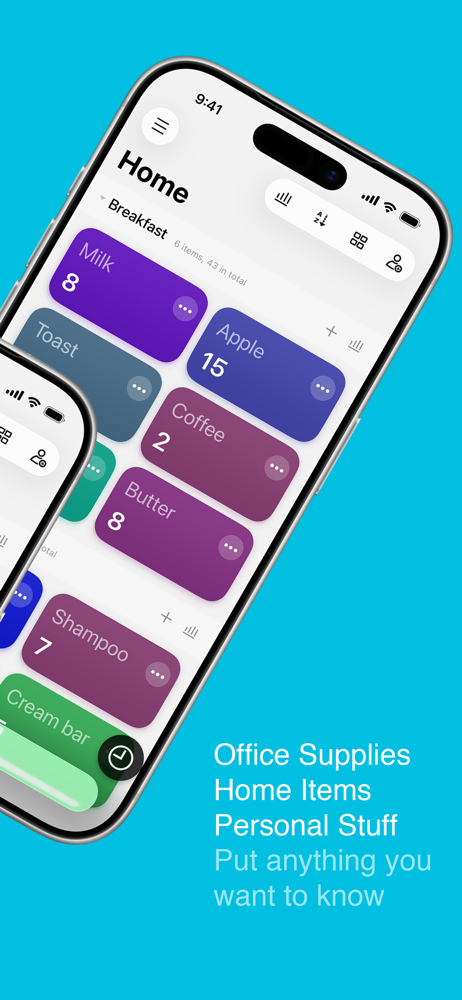
Study the product story and store experience behind the acquisition funnel.



03 / Market context
Keep revenue, downloads and store rankings separate from advertising performance.
I wanted a way to keep track of my yarn inventory. I love how easy it is to create groups of items and then add the name and count for each item. What kept from making this 5 stars was two things: 1. I wish when we tapped the color to choose it, it brought up the list of color options. It is time consuming to tap until you find a color you like and if you are tapping too fast, you can’t go back without going through the entire list. On the plus side, there are LOTS of color options for color coding. 2. I wish there was a way to customize what your count represents. For example, the app gives options like pieces, bags, etc, but doesn’t give a customize option.
I love this app it’s very colorful and that helps in organizing things. However, I wish after you created a list or item you could go back and edit the names of said list or items. When you tap edit the only options you are currently given are to delete or to move. Please look into this for 5 stars easily. Edit: I found out how to rename but I discovered that you had to drag the list to the left in order to bring up that option. Wish it weren’t so hidden or if there were at least a tutorial, please look into making it a little bit more user friendly!
works well, using this as a pantry management, as other apps for that purpose have been overly complicated for my needs. Two main pain points: 1) color palette isn’t great and is a wee bit harsh on the eyes; assigning random colors just makes color a useless piece of visual information when it could’ve been so much more. Ideally if we could set a color for each list, group, or individual entry that’d be nice. 2) lack of drag and drop functionality, especially painful to not be able to drag between groups since you’d have to go in and edit each entry.
Portable Inventory helps you to keep track of the count of anything you want. Personal stuff, office supplies, product storage, etc. You can add diffe...
| Name | Price | Type |
|---|---|---|
| Complete Version | $1.99 | One-time |
| Pro Version | $7.29 | One-time |
| Pro Version | $9.99 | One-time |


