Check the acquisition promise
Read the store headline, screenshots and description. What problem is the app promising to solve?
Study the storefront ↗
Kai Aras · iOS
Explore the ad evidence, study the storefront, and build your next acquisition hypothesis.
01 / Creative research
Read the store headline, screenshots and description. What problem is the app promising to solve?
Study the storefront ↗Explore apps with direct store-link matches. Compare their hooks and formats without assuming the same approach works here.
Browse observed advertisers ↗Store rankings and revenue estimates describe market context. They do not establish ad spend, conversions or ROAS.
Review the market context ↗02 / Storefront & product
Study the product story and store experience behind the acquisition funnel.




03 / Market context
Keep revenue, downloads and store rankings separate from advertising performance.
It took me a little bit to get it figured out how to get MPE midi data out of my iPad and into Ableton’s instruments, but once I did it worked awesome. Ableton supports MPE as of version 11 in a few of their most popular instruments including Wavetable, Simpler and Sampler. Once you get midi in from KB-1, you can map the notes, and x/y touch positions of slide and glide to any parameter you want in the Ableton instruments. The app is very well designed, I just wish there was some documentation somewhere.
I left a 1-star review on Feb 21 that I need to update/correct to a 5-star. In that review I said I couldn’t get KB-1 to connect to any instrument, but that I thought the app had a lot of potential. I emailed the developer at the same time, and he responded very quickly and pointed me to the solution. I didn’t check it out until now, and it did solve the problem. The app now works perfectly and it is as awesome as I expected it to be! The fix is that the destination app needs to have background audio (or the setting to allow the app to run in the background) must be set to be on. I admit that’s a no-brained that I should have looked for, but I assumed that would be the default operation for those apps. Apparently it’s not. Changing that setting was all that was needed. Now KB-1 works great and I am completely satisfied.
This type of tool should’ve been standard for all music applications that come out today on iOS. Especially the DAWs. This app is very well implemented as a standalone and Auv3. The settings page for Auv3 could use an improvement to show more info on-screen. Someone left a recent review that stating this tool didn’t work in Cubasis. Maybe it didn’t once but, it works well now! Now if Cubasis would give me the option to make KB1 the default keyboard, things would be golden! Reward yourself with the future touch keyboards for iOS.
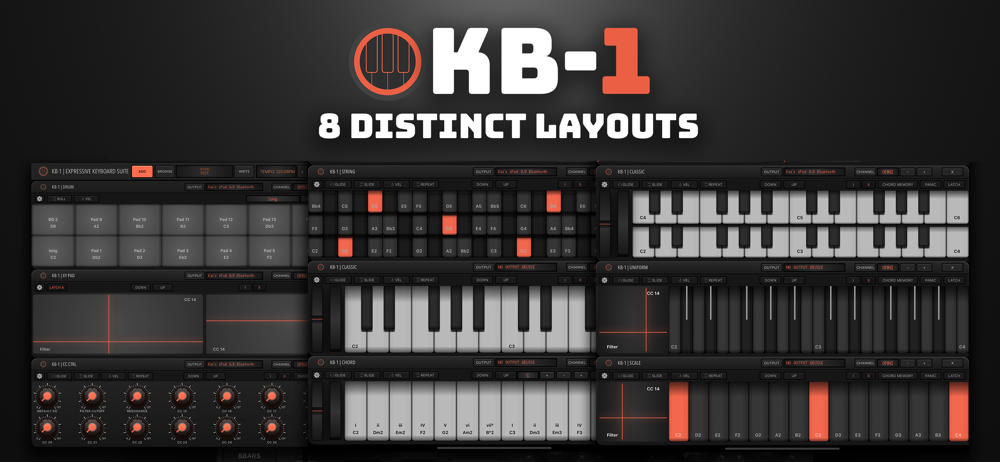
KB-1 MIDI Keyboard KB-1 is a suite of expressive virtual keyboards and controllers designed for a multitude of scenarios. Play multiple instruments...