Check the acquisition promise
Read the store headline, screenshots and description. What problem is the app promising to solve?
Study the storefront ↗
Jessica Yuan · iOS
Explore the ad evidence, study the storefront, and build your next acquisition hypothesis.
01 / Creative research
Read the store headline, screenshots and description. What problem is the app promising to solve?
Study the storefront ↗Explore apps with direct store-link matches. Compare their hooks and formats without assuming the same approach works here.
Browse observed advertisers ↗Store rankings and revenue estimates describe market context. They do not establish ad spend, conversions or ROAS.
Review the market context ↗02 / Storefront & product
Study the product story and store experience behind the acquisition funnel.




03 / Market context
Keep revenue, downloads and store rankings separate from advertising performance.
I recently downloaded the app and installed it both on my iPhoneX max and iPad Pro. It works perfectly on my iPad Pro, but on my phone I cannot use the long pressed features. Therefore, I cannot add customized quick text or ger the emoji’s to come up. it also will not allow me to use customized fonts. it all works perfectly on my iPad Pro so I’m not sure what the issue is. I have gone through all the settings that I can think of and nothing works. I tried to contact customer support, but the page is in Chinese and I can’t read it. Update... I would love this keyboard if the long press issue was corrected, but unfortunately it hasn't been. So many awesome features. What a waste.
1st Even paying for the Pro version you still get ads. It might need an ad free Pro version. 2nd. All the third party keyboards are often ignored and replaced with the default ios keyboard for any Apple apps and others that don't support third party keyboards but this one seems to be replaced more than others. I can't figure out why but other keyboards seem to do better at that. Overall the keyboard is great with more options and functionality than others I've tried. I just like a keyboard to be there when expected and no ads after paying to help support the developer.
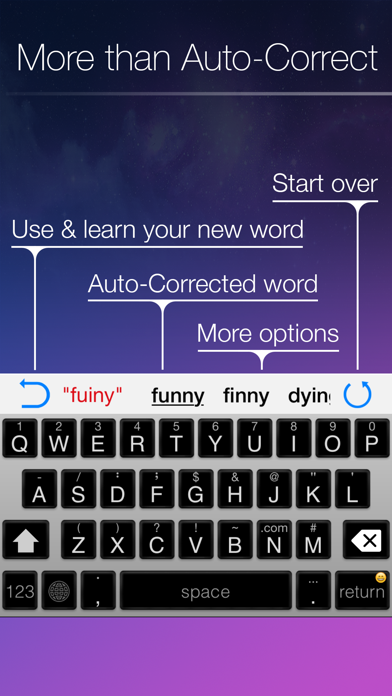
I cannot say enough good things about this keyboard. I know I have tried at least a dozen other keyboards (more like 20) and this one makes them all look like a failed kindergarten effort. SO MANY FEATURES!! This utility has it all. Cursor positioning, auto correct, word suggestions, AN EXTRA ROW FOR NUMBERS, symbols readily available from the main keyboard, word/phrase insertion, and so much more. I bought it for my iPhone, and it restored my purchase for my iPad too. My typing speed has increased orders of magnitude, as everything is right there without toggling between keyboards. And I can insert email addresses and passwords in a snap with the saved phrases I input. And the themes and layouts are so professionally done and simply gorgeous. I only have the most minor of suggestions for improvement. It feels weird to swipe along a row of letters to position the cursor. I would prefer to swipe the space bar like the other keyboards do. Also, I would like to see a left and right arrow key for small changes to the cursor position...they are present on the landscape keyboard but not in portrait mode.
=============== Note: Blink Keyboard does not upload anything. All the words/phrase learnt from typing is saved in your phone and will be removed when...