Check the acquisition promise
Read the store headline, screenshots and description. What problem is the app promising to solve?
Study the storefront ↗
Directed · iOS
Explore the ad evidence, study the storefront, and build your next acquisition hypothesis.
01 / Creative research
Read the store headline, screenshots and description. What problem is the app promising to solve?
Study the storefront ↗Explore apps with direct store-link matches. Compare their hooks and formats without assuming the same approach works here.
Browse observed advertisers ↗Store rankings and revenue estimates describe market context. They do not establish ad spend, conversions or ROAS.
Review the market context ↗02 / Storefront & product
Study the product story and store experience behind the acquisition funnel.




03 / Market context
Keep revenue, downloads and store rankings separate from advertising performance.
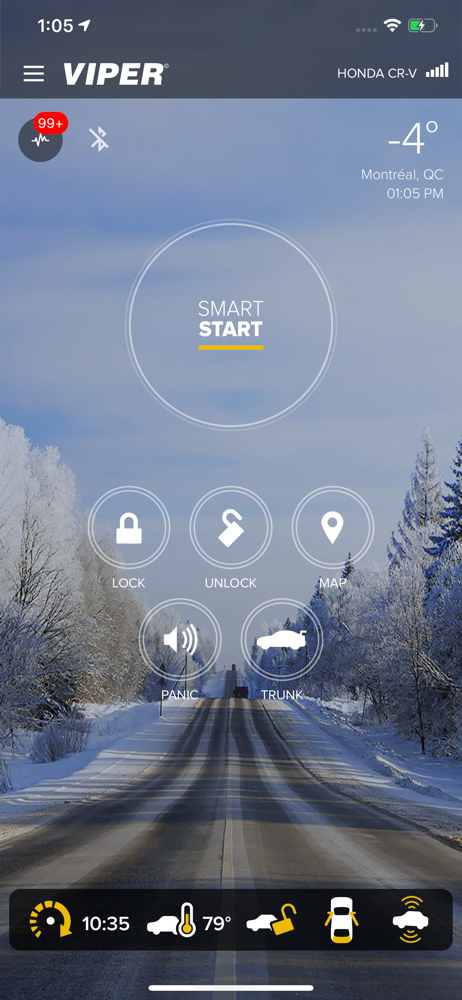
Not long ago I had the SmartStart add-on added to my older Clifford system and basic functionality has been fine. I chose this option over replacing the 2-way remote fob. Starting/stopping, locking/unlocking all have been reliable over the 1st few weeks of use. However, this time has highlighted some (seemingly) simple improvements that would improve usability of this product. (1) Make an Apple Watch complication. Now the biggest inconvenience is pulling out your phone, opening it, locating the app in order to lock/unlock your doors. Was surprised to find I couldn’t add SmartStart as a complication to an Apple Watch face. This would be a significant usability improvement. (2) When the car has been remote started, it would be nice if the dashboard included a countdown timer showing how long until the unit auto-shuts off. My Clifford 2-way remote provided thistle. (3) On the iPhone app, the status screen should hold the previous status info until you click the refresh button. Also would like to be able to click on the individual status categories and see history. This would be especially useful on the Battery Voltage Status... as I recently had a weak battery and with very cold weather affecting a car’s battery especially when in a weakened state, it would be nice to have this info available. (4) Lastly, add Face ID/Touch ID to the passcode functionality. Hope to see these features in the near future.
The iPhone app has quite a few features, but I feel like some basic UI stuff is missing from the Apple Watch app. First, one thing I REALLY WANT is on the main dashboard of the iPhone app I wish it would tell me if the car is locked or unlocked without having to lock or unlock it first or go to the my car status information. For the Apple Watch, this app seriously needs a complication. The app also should tell us if it’s locked, unlocked, engine running and for how many more minutes. It would be awesome if the complication could give a countdown on the 15 minute runtime. I loved the viper for its phone and watch integration, but I find myself using my key fob most often because the iPhone is annoying to get out when I’m rushing around in the mornings and I never know what I’m going to get with the watch app. Did the car actually start? Is it locked or not? How much time do I have left? With the Apple Watch only gaining more popularity, app developers need to continue focusing on developing their Apple Watch apps as well. Please update yours with a few more features and it would be a solid 5!
So I guess I’ll just review the app since my review for the actual viper system belongs else where. However I love the app, well built, well designed. You swipe up to start your car, you can lock it, sound alarm, open trunk, all that stuff. One of my particular favorite features is the ability to set a passcode to get into the app. So no one can start your vehicle (considering they don’t have your key fob for your remote start) with out a password. Nor can they unlock or anything. Which is a big thing for me because there’s things in my car that I wouldn’t want stolen (assuming you do as well) and it’s nice to know that I’m the only one that can access the app and do that myself. And if you do not have the GPS add on for your system and your only using the free 150ft start. I have to tell you it works from well over 150ft. At least for me it does, so that’s nice too. Overall I’m pleased with the app, there are some bugs and glitches that could be addressed but that doesn’t effect my overall rating and convenience of the app itself.
Start, locate and control your car from virtually anywhere with your iPhone or Apple watch! "Making the cloud-connected car a reality" - Edmunds.com...