
Check the acquisition promise
Read the store headline, screenshots and description. What problem is the app promising to solve?
Study the storefront ↗
HOTSALES GLOBAL TRADE LLC · iOS
Explore the ad evidence, study the storefront, and build your next acquisition hypothesis.
01 / Creative research
Read the store headline, screenshots and description. What problem is the app promising to solve?
Study the storefront ↗Explore apps with direct store-link matches. Compare their hooks and formats without assuming the same approach works here.
Browse observed advertisers ↗Store rankings and revenue estimates describe market context. They do not establish ad spend, conversions or ROAS.
Review the market context ↗02 / Storefront & product
Study the product story and store experience behind the acquisition funnel.




03 / Market context
Keep revenue, downloads and store rankings separate from advertising performance.
I am very frustrated with this “calendar” frame. I’m realizing it’s not very family friendly. I can’t easily add a note or a list. My partner and I don’t like having a ton of apps on our phones so I was hoping this could be the all in one app to communicate things. Main reasons being a note that says when bills come out, and a note that we can edit for grocery shopping. Well, that’s where my problem is. You can’t simply add in a note. If I want to make a grocery shopping list, I have to add each food item individually as a task, which is super annoying. Really wish there was a section you could just free type or make a bulleted list. Disappointed, as this frame was not an inexpensive buy.
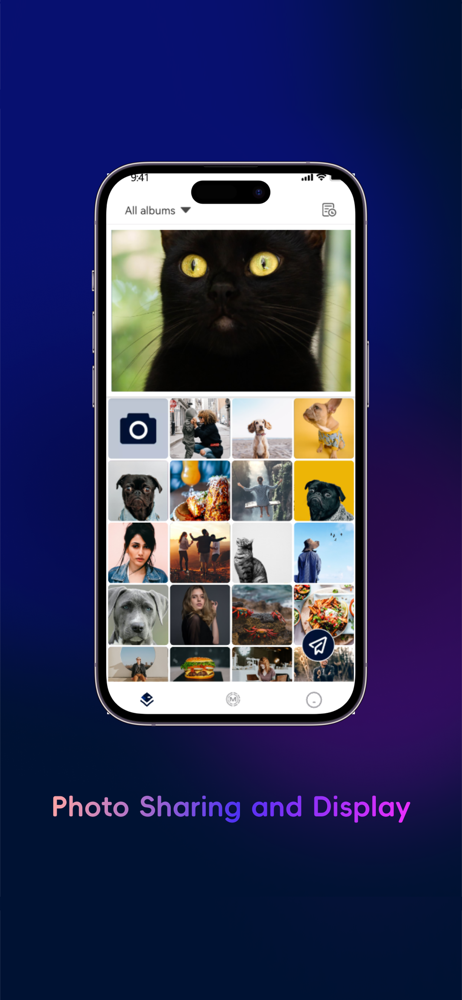
I love this picture frame. It was the easiest thing to set up and the easiest thing to load every time I take pictures. I just load them onto this frame. I have thousands of pictures on this frame and then I just delete them off my phone. it’s wonderful I highly recommend!!!!
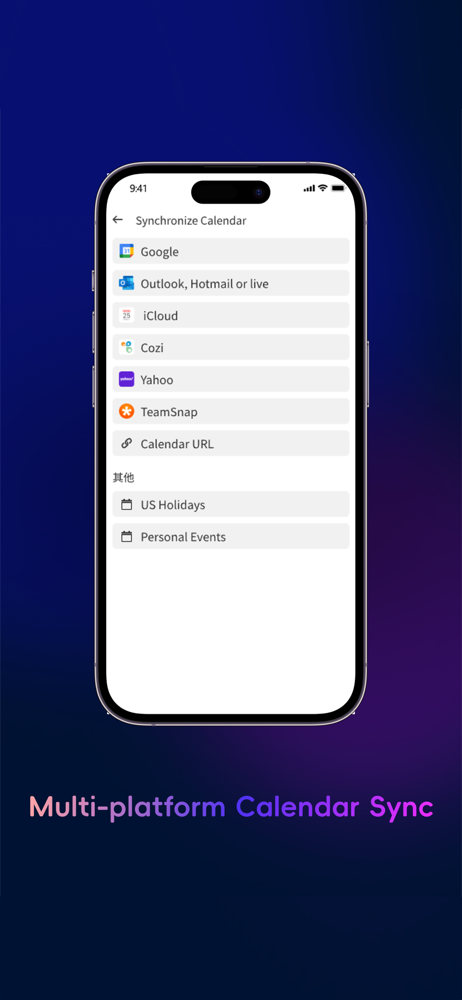
I bought this new in the box from someone on Facebook marketplace thinking it was a different brand… I was cautiously optimistic because the website seemed legit and the price tag was comparable to “name brand” calendars. I was initially impressed with the touch screen and the overall look and feel of the calendar and the app. The actual device seems to be pretty well made. However, the more I use it, the more buggy I find the software is (items you update just won’t save or weirdly duplicate or won’t delete) and the calendar sync is a little odd because each synced calendar creates a new member profile, instead of being associated with a profile you create. As far as I can tell this means you can’t have two calendars for one person (like home and work). The url calendar sync function didn’t work for me at all. Right now the chore notifications aren’t chiming - I’ve checked all my settings and can’t find a problem. The timer feature is small and hard to use. The biggest issue is that the calendar isn’t syncing with the app for the actual calendar - the whole reason I wanted a digital calendar. I do like that all features come free and there are no hidden subscription costs. However, I don’t like that you can’t modify the Home Screen to contain only the features you use. Also, there is an Alexa skill for this but all it does is turn the screen on and off, which is deceptive because comparable calendars have skills where you can run features like the timer or adding something to a list. Do not pay full price for this. Go for a reputable company and spend the money to get a product that does what it says.
AiMOR App — The Smart Hub for Every Family AiMOR App is your all-in-one smart home companion, designed to work seamlessly with AiMOR smart calendar di...
| Name | Price | Type |
|---|---|---|
| AiMOR Plus subscription year | $19.99 | Yearly |
| AiMOR Plus half year | $19.99 | Semi-Annual |


