Check the acquisition promise
Read the store headline, screenshots and description. What problem is the app promising to solve?
Study the storefront ↗
文 张 · iOS
Explore the ad evidence, study the storefront, and build your next acquisition hypothesis.
01 / Creative research
Read the store headline, screenshots and description. What problem is the app promising to solve?
Study the storefront ↗Explore apps with direct store-link matches. Compare their hooks and formats without assuming the same approach works here.
Browse observed advertisers ↗Store rankings and revenue estimates describe market context. They do not establish ad spend, conversions or ROAS.
Review the market context ↗02 / Storefront & product
Study the product story and store experience behind the acquisition funnel.




03 / Market context
Keep revenue, downloads and store rankings separate from advertising performance.
So you might be wondering or having trouble getting the camera to connect to the app so here’s some tip) check your WiFi) or (fix the copper) behind the drone for more 🛰️ satellites connecting) or (reinstall the app) or (helping you to guide your way,go to your app ‘settings’ and go to the ‘Wi-Fi’ and if you see a word starts with ‘FLOW’ and you unrecognized it means the drones WiFi but you need to get controller and drone on to work press that drone WiFi and wait for the WiFi to connect to the app until it’s fully secured, go to the app and press ‘Start’ and you see the drone camera working!) I had that problem too😭🔫😅 I hope this helped ya!
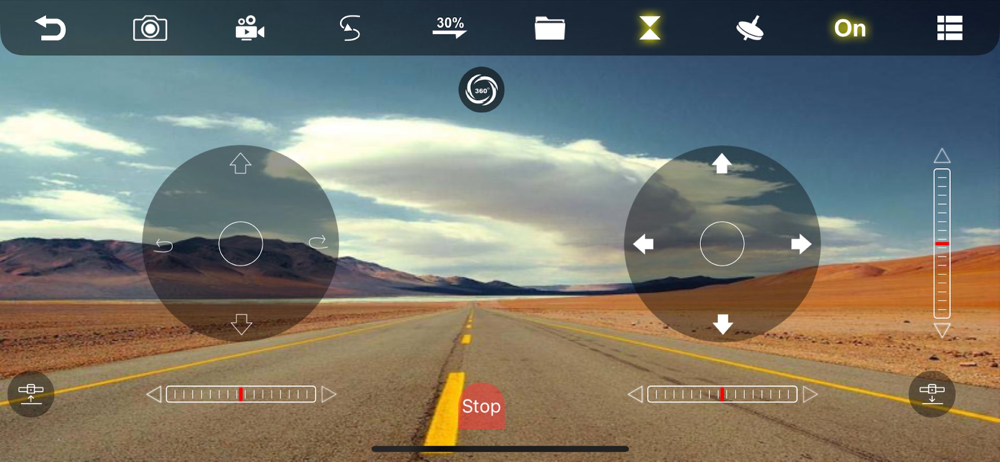
So overall if ordered or using a drink like the YCRC Drone, to use it you need to connect to the drone. You will need to turn ON the drone and go to your Wi-Fi settings, then add a new Wi-Fi connection, the drones Wi-Fi is like this "FLOW_xxxxxx" so basically search for a Wi-Fi connection that starts with "FLOW_". If you connected it, and donwload this app, WiFi UAV, go to the app and make sure your connected to the drone by Wi-Fi. If you finished the steps, click start. You will already see your drones camera, but the drones camera will mostly be bad and maybe not 1080P or 4K. But you still will be able to see pretty much anything. You will also see some controls on the sides. To get the drone to get in running, click the button on the bottom left, then you can learn to run it. Make sure you have the instruction manual to see what buttons does what. Then you can use it. Everything of the app is OK and easy to learn but if your downloaded it, it can be sketchy since it an Chinese Third-Party app, so it might secretly collect data, but it might ask you for location so maybe enter your approximate location. But it doesn't really do anything else and according to the App Store, it seems no data is being really tracked. If you have an Anti-Virus, that is very good, but one thing it can add is more features of an app in 2024 and a signal strength reader to show your connection to the drone from the device. It works great with iOS 17 and older and might with higher OS. So pretty good I meant to give a 3.5 stars but I just did 4
The app does the job well, but the icons aren't intuitive for someone brand new to RC aircraft, and there's nowhere explaining what they all do. The information that came with my drone has an image with icons, but they don't match the app. It'd be great if there was something online that clearly explained all the functions of the app and what they do.
This is an APP that connects and controls the UAV via WiFi, 1. Photographs and videos; 2. Real-time image transmission; 3. Gesture capture and video r...