App Profile: NSW Radar Alert
Android / Games / Puzzles
NSW Radar Alert
Installs:
Rating:
0.00
Total Reviews:
0
Top Countries:
AU
< $5k
/mo
< 5k
/mo
Reviews: What People Think About NSW Radar Alert
About NSW Radar Alert
NSW Radar Alert is an application which detects speed cameras or radars (mobile cameras, static speed cameras and red light cameras) using information published by roadsafety.transport.nsw.gov.au
This information covers the Sydney region as well as other locations throughout New South Wales.
======================
GETTING STARTED
1. If you just installed the app you will need to grant permissions (when requested) for NSW Radar Alert to access your current location.
2. Explore the settings page and set the following:
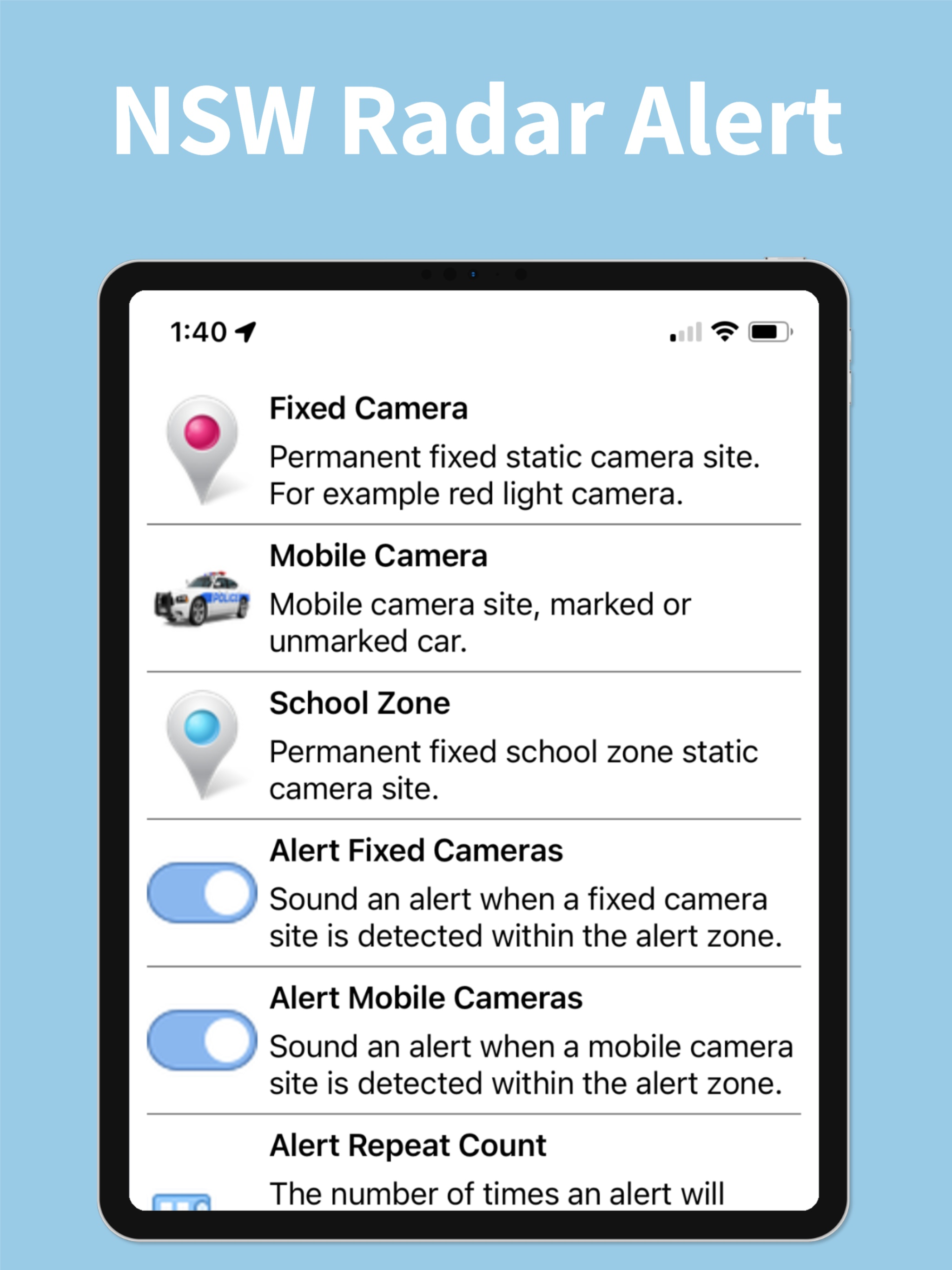
Alert Mobile Cameras (on/off) - NSWRA alerts you when approaching a mobile camera location. These locations are updated daily.
Alert Fixed Cameras (on/off) - NSWRA alerts you when approaching a static fixed camera location or red light camera location. These locations are updated regularly.
Alert Repeat Count - The number of times NSWRA will sound an audible alert when a camera location has been detected within your alert zone.
Alert Zone - NSWRA will alert you when your current location is within the alert zone setting (in metres) of a camera location.
Alert Test - A sample test alert to introduce you to NSWRA.
Auto Centre Map (on/off) - Automatically centre your current location on the map and follow your bearing.
3. The help section provides additional information regarding the symbols which appear on the map.
4. Touch any pin on the map to display detailed information for the selected camera location.
======================
--- Features ---
- Detects fixed camera locations
- Detects mobile camera locations (paid version)
- Automatic alert zone
- Map follow me
- Voice alerts for detected locations
- Vibration alerts for detected locations
- Voice alerts for estimated speed (paid version)
- Background mode
- Detect silent mode and vibrate only
Be careful on the road and good luck!
This information covers the Sydney region as well as other locations throughout New South Wales.
======================
GETTING STARTED
1. If you just installed the app you will need to grant permissions (when requested) for NSW Radar Alert to access your current location.
2. Explore the settings page and set the following:
Alert Mobile Cameras (on/off) - NSWRA alerts you when approaching a mobile camera location. These locations are updated daily.
Alert Fixed Cameras (on/off) - NSWRA alerts you when approaching a static fixed camera location or red light camera location. These locations are updated regularly.
Alert Repeat Count - The number of times NSWRA will sound an audible alert when a camera location has been detected within your alert zone.
Alert Zone - NSWRA will alert you when your current location is within the alert zone setting (in metres) of a camera location.
Alert Test - A sample test alert to introduce you to NSWRA.
Auto Centre Map (on/off) - Automatically centre your current location on the map and follow your bearing.
3. The help section provides additional information regarding the symbols which appear on the map.
4. Touch any pin on the map to display detailed information for the selected camera location.
======================
--- Features ---
- Detects fixed camera locations
- Detects mobile camera locations (paid version)
- Automatic alert zone
- Map follow me
- Voice alerts for detected locations
- Vibration alerts for detected locations
- Voice alerts for estimated speed (paid version)
- Background mode
- Detect silent mode and vibrate only
Be careful on the road and good luck!
File size: 54355968
Launched countries: AU
Minimum OS version: 13.0
Release Date: 1549359648000
Published by Todd Sandery
Website url: http://sara.redirectme.net/nswra_marketing.html
Publisher country: