
Check the acquisition promise
Read the store headline, screenshots and description. What problem is the app promising to solve?
Study the storefront ↗
Iriun Oy · iOS
Explore the ad evidence, study the storefront, and build your next acquisition hypothesis.
01 / Creative research
Read the store headline, screenshots and description. What problem is the app promising to solve?
Study the storefront ↗Explore apps with direct store-link matches. Compare their hooks and formats without assuming the same approach works here.
Browse observed advertisers ↗Store rankings and revenue estimates describe market context. They do not establish ad spend, conversions or ROAS.
Review the market context ↗02 / Storefront & product
Study the product story and store experience behind the acquisition funnel.

03 / Market context
Keep revenue, downloads and store rankings separate from advertising performance.
So i have been looking for a program for years to turn my phone into a webcam for my pc. I have finally found the perfect app to do so. I have been using this app for about a year now, i think. This app has never had a single issue for me and this app has always worked great without issues. I have bought the in app purchase for this app too, since the cost was not that much. All other camera apps i have used before this one had issues. Plus all the other apps i have used for this sort of things had resolutions and many features behind a monthly payment or just expensive in app purchases. Which was required to have features, Such as controlling it with my PC. Best webcam app i have used honestly and i like it. Keep up the good work, you are doing great.
I have the app connected from my iPad to my Windows PC. It works nicely if you’re just running the app on both computer and iPad. Problem is that on the computer the program window will be small and you can’t resize it. When I tried using it as a webcam for zoom and jamkazam the results were the same. The visuals in both kept repeatedly blinking from the picture to black. I felt like a stroke warning should have been issued before I made my attempts. On zoom I tried sharing my screen and it worked, but again the screen was small and I couldn’t resize it. I paid $6.99 for screen control on my iPad but there are only a few things you can do: Flip camera, mirror, and brighten. I can’t really use brighten because my iPad doesn’t have a flashlight. I hope that if this app gets funded even more so that there would be more screen control options such as video filters, fix the blinking, and let’s me resize the window on my computer.
For the life of me I don’t understand why this doesn’t have USB support. It literally would’ve been, and I’m not exaggerating, the premium version of any other cam app here if it had this one small feature with the USB. The problem with WiFi is the lag and the latency. People wouldn’t have minded just plugging in their phone or that just being an option along with the wireless one. Other than that, I love that video quality change is free, I really can’t complain about a lot. But because of that minor problem I will still find myself using the other cams. Too bad, as I really liked the free features here. I’ll give it ⭐️ ⭐️ ⭐️/2
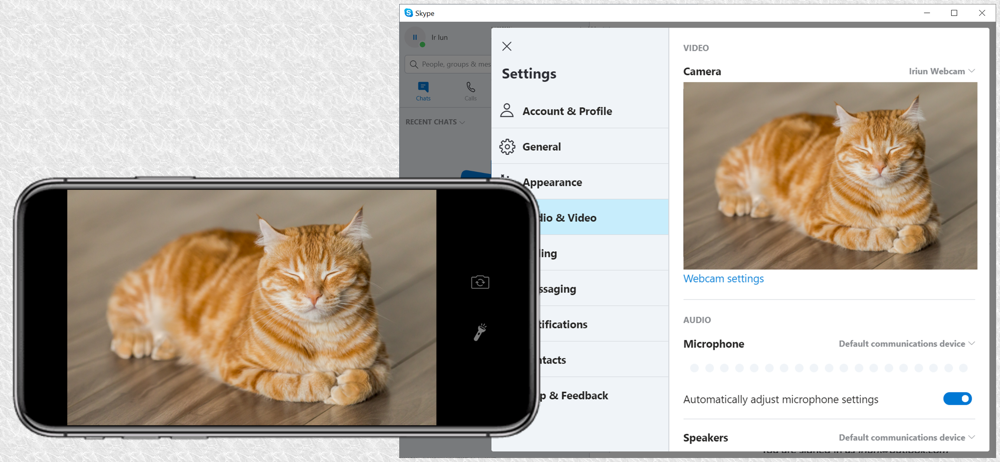
Use your iPhone's camera as a wireless webcam in personal computer. Install needed drivers and enjoy iPhone's sharp image with your favourite PC and M...
| Name | Price | Type |
|---|---|---|
| Pro version | $6.99 | One-time |


