
Check the acquisition promise
Read the store headline, screenshots and description. What problem is the app promising to solve?
Study the storefront ↗
Easy Tiger Apps, LLC. · iOS
Explore the ad evidence, study the storefront, and build your next acquisition hypothesis.
01 / Creative research
Read the store headline, screenshots and description. What problem is the app promising to solve?
Study the storefront ↗Explore apps with direct store-link matches. Compare their hooks and formats without assuming the same approach works here.
Browse observed advertisers ↗Store rankings and revenue estimates describe market context. They do not establish ad spend, conversions or ROAS.
Review the market context ↗02 / Storefront & product
Study the product story and store experience behind the acquisition funnel.



03 / Market context
Keep revenue, downloads and store rankings separate from advertising performance.
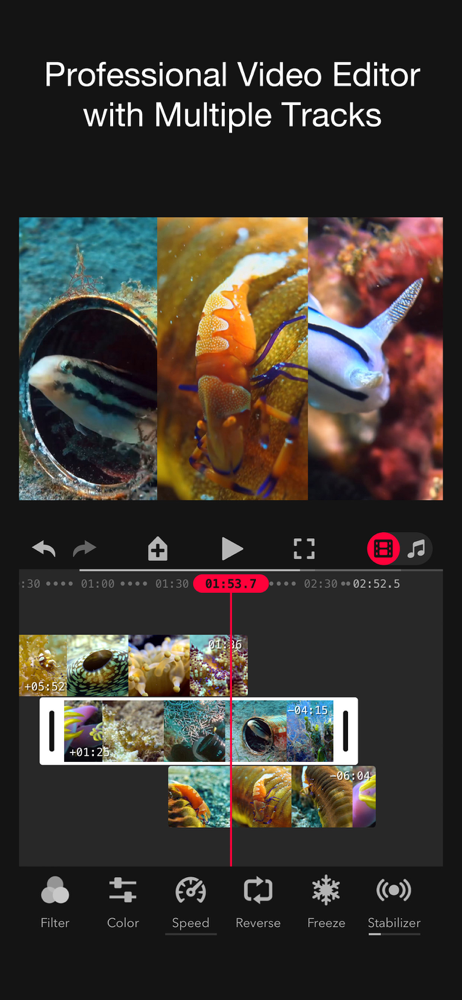
I’m using this on both an iPhone and iPad 12.9 (with LIDAR). The bokeh effect is greatly improved with LIDAR and the editing suite it comes with is very impressive. The ability to add key frames, chroma key, stabilizer, etc is something that Adobe doesn’t even have on Premier Rush yet (and this is a one time payment). I had an issue with Bluetooth remote shutters not working with the iPad version (which I prefer to shoot in because of the LIDAR and extra processing power - which does make a difference). I emailed the developer, and within the week, they had a fix pushed out on the App Store - that is amazing customer service. In my ten+ years on the iOS ecosystem, I’ve reached out to many developers over the years, and I don’t think I’ve ever seen such a quick response. Thank you!! If I had any suggestions, it would be to add mouse/keyboard shortcuts. A mouse works with the app, but you cannot scrub through the timeline while editing, and there are no right-click functions. I use my iPad Pro as one of my main computers, so adding this functionality would take this already amazing app over the top. It’s not a big deal as the touch controls are good, but it would make it feel just that much more powerful. All in all - great app, highly recommend!
I put money into this app shortly after it was released on the strength of the history of the Focos app. One of the Focos Live shortcomings, for instance, I was most disappointed over is, according to the change log, fixed in the recent update. I’m going to try it out as soon as finish this review! So my review is this: If you like the power of the Focos app, reward the developer by investing in the Focus Live app in faith that whatever shortcomings you might find will be addressed eventually if they can be addressed at all. And just as importantly, in the meantime, have fun! The Pro tools already support creativity beyond the core Focos “bokeh” capability. The included audio tracks are most welcome in an app of this sort. The video editing tools are robust even if things like basic transitions are (currently) manually done (if I’m not missing something). Enjoy the creative possibilities and never leave the app! TL;DR. Just buy it. 🙂 EDIT: Completely my fault for missing the transitions feature. Thank you for correcting me! I got sloppy in my testing and in my verbiage; one of the things I was thinking about when I wrote my review was video fades in and out, say for a single short clip to be uploaded to Instagram (of course I could still be missing something!). But I still messed up my review and I appreciate the correction.
Bought the app just for the “bokeh” effect (the blurry background effect), super legit, not dslr quality but I prefer filming with my phone for the convenience factor and I’m a beginner with shooting video so this does a fantastic job achieving that effect without needing the bulky camera or an expensive lens if you already have a newer iPhone. I have 2 feature requests I really wish they would add however: 1) being able to use the size/autofocus bokeh feature from a video you recorded with native camera app instead of having to record from the Focos app, you can manually edit it with imported video, but it just works so much better and smoother if shot initially in app and I really wish that feature would carry that over to imported videos 2) and this is by farrrr my biggest feature request, please please please add bokeh effect to the wide angle lens, not manually editing the blur, but with the size/autofocus like with the other 2 lenses. That would make this app absolutely amazing. Overall this app is absolutely fire if you’re looking to achieve a more professional looking video in combination with the ease of using your phone
Take cinematic videos same as iPhone 13 for all dual / triple / LiDAR camera iPhones and iPads. Focos Live offers master class video editing capabilit...
| Name | Price | Type |
|---|---|---|
| Monthly subscription | $1.99 | One-time |
| Focos Live Pro Weekly | $1.99 | Weekly |
| Focos Live with Free Trial (Weekly) | $2.99 | Weekly |
| Focos Live Premium (Weekly) | $2.99 | Weekly |
| Weekly with Free Trial | $3.99 | Weekly |
| Focos Live Pro Weekly | $3.99 | Weekly |
| Weekly no Free Trial | $3.99 | Weekly |
| Focos Live Pro Weekly | $3.99 | Weekly |
| Weekly Bundle with Free Trial | $9.99 | Weekly |
| Weekly Bundle no Free Trial | $9.99 | Weekly |


