Check the acquisition promise
Read the store headline, screenshots and description. What problem is the app promising to solve?
Study the storefront ↗
Beijing Xiaoxiong Bowang Technology Co., Ltd. · iOS
Explore the ad evidence, study the storefront, and build your next acquisition hypothesis.
01 / Creative research
Read the store headline, screenshots and description. What problem is the app promising to solve?
Study the storefront ↗Explore apps with direct store-link matches. Compare their hooks and formats without assuming the same approach works here.
Browse observed advertisers ↗Store rankings and revenue estimates describe market context. They do not establish ad spend, conversions or ROAS.
Review the market context ↗02 / Storefront & product
Study the product story and store experience behind the acquisition funnel.






03 / Market context
Keep revenue, downloads and store rankings separate from advertising performance.
This app holds my apple account hostage, blocking me from making any other purchases and even stops me from redeeming FREE PROMO codes until i pay the $7.50 for the subscription that i never wanted or used . I never authorized the charge to my account and now every time i Try to make a purchse or redeem codes a window pops up trying to charge me for es files exporer that blocks all other purchases and even blocks the redemption of free promo codes . When i request a refund to try and get rid of the window i am swiftly denied of course because there has been no transaction to refund , because i refuse to pay the unauthorized amount they continuously try to charge me . Apple support claims They cannot do anything about the transaction unless i pay them first and i dont have the money to pay Es file explorer and i refuse to pay even if i did . I never been able to over charge my account in the past so its beyond me how i can get a negative balance in the first place. So now im im a position where i have to pay the subscription charge for something i Never authorized or wanted or i have to delete my account and start a completely new account loosing all my personal data . So think twice before you even use a free trial from these folks because they may just take your apple account hostage just like mine and youll find yourself account hijacked just like me...
Great interface, fast, able to move large files around very easy and in the background which is very helpful when you don’t want to sit and watch file transfer bars all day. Two problems tho... the interface for setting up an smb for an airport time capsule doesn’t seem to match what info you can type in. it has a required space to type in a URL. well, my time capsule doesn’t give me a URL. inputting IP or .local doesn’t work. It’s too much to go into but a different app called REMOTE FILE MANAGER (QuickApps Inc) has a much simpler set up that’s almost automatically configured. It’s just not supported anymore for anything else really. Second, is an endless loop of a message when trying to connect to GoogleDrive that you need to configure GD to work with this app. No duh... HOW? it never takes you thru the steps of doing that. If anyone can enlighten me with the knowledge I am lacking, PLEASE DO!
Noticed some things that I haven't seen before. Under System Files, This app is showing me my photo library. I noticed something that I haven't seen another apps do with photos. This app identifies photos by number. When viewing a photo, at the top of the screen this app displays x/y, where x is the current photo's place in the list and y is the total number of photos. The list is in reverse chronological order. This is helpful to me when backing up thousands of photos using a sync/charge cable to a desktop computer. Thank you to Developer for adding SMB fileshare access alongside Google Drive access!!! Wishlist To Developer: can you give us the following under System Files? * a LIST VIEW alternative to just displaying by thumbnail, where the filename column has an adjustable width that allows the user to see full filenames up to 127 characters at least? * DISPLAY FILENAME of a currently viewed photo? Or display prediction of what the filename would be if the iPhone were to export that photo to a desktop computer via sync/charge cable?
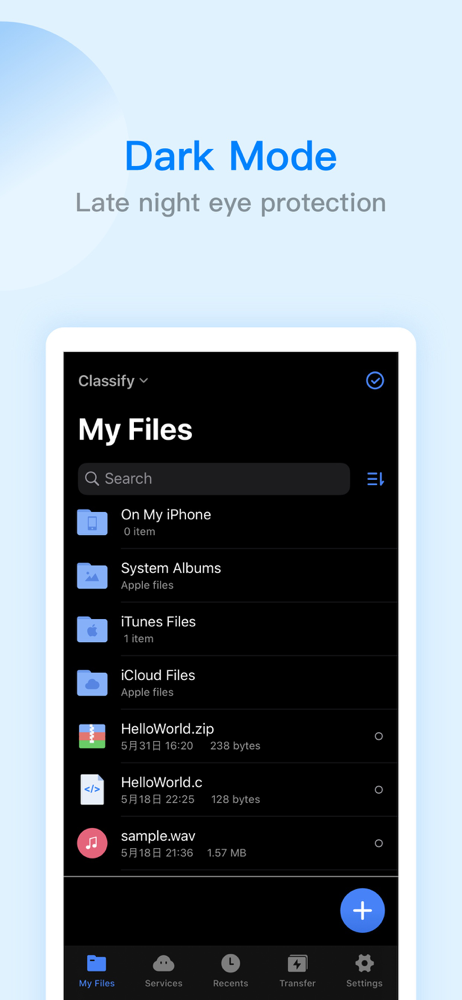
ES File Explorer is a local and network file management tool that can help you manage files easily. 【The main function】 -File management You can crea...
| Name | Price | Type |
|---|---|---|
| ES remove ads | $1.99 | One-time |
| ES lifetime vip | $4.99 | One-time |
| ES lifetime vip | $6.99 | One-time |
| ES Pro(1 month) | $6.99 | Monthly |
| ES Pro(1 month) | $6.99 | Monthly |
| ES Pro(1 year) | $29.99 | Yearly |
| ES Pro(1 year) | $29.99 | Yearly |