Check the acquisition promise
Read the store headline, screenshots and description. What problem is the app promising to solve?
Study the storefront ↗
TP-Link Systems Inc. · iOS
Explore the ad evidence, study the storefront, and build your next acquisition hypothesis.
01 / Creative research
Read the store headline, screenshots and description. What problem is the app promising to solve?
Study the storefront ↗Explore apps with direct store-link matches. Compare their hooks and formats without assuming the same approach works here.
Browse observed advertisers ↗Store rankings and revenue estimates describe market context. They do not establish ad spend, conversions or ROAS.
Review the market context ↗02 / Storefront & product
Study the product story and store experience behind the acquisition funnel.




03 / Market context
Keep revenue, downloads and store rankings separate from advertising performance.
I’ve been an early technology adapter since the early 1980s. I’ve been through four or five Wi-Fi systems over that period of time and I have never had better Wi-Fi than under this Deco stem from TP Link. From the app on my iPhone to the five units around our house and the one unit outside on the back deck, everything works perfectly all the time. In fact, I have not yet experienced a single downtime since I installed the system over a year ago, which is kind of unprecedented. This is clearly as good as it gets and I am extremely satisfied. The app on the phone is also unquestionably the gold standard. I have had Linksys and Netgear systems in the past and their reliability and phone app didn’t come close to the TP Link Deco system. I ran a very busy and successful meeting and events business from my home and could not have been happier with this system. Set up was extremely easy, and once that was done, for all intents and purposes, you never had to do anything else. Everything updated and function perfectly and automatically. and the fact that you can bring in the system at a variety of levels (models) depending upon your needs makes it an even better and more cost-effective solution. Need to add a note, no problem. Just plug it in and walk away. I promise you will not regret this purchase.
If you are a person who is blind looking at a Deco mesh system, or especially if you are a Tp-Link developer, continue reading. Otherwise, just know that this app is fantastic for managing your devices. If the only reason you wouldn't buy Decos is because you're afraid that it's not going to have a great app, do not let that be a reason not to buy them. It is great other than one consideration, it does not entirely reliably show if devices are connected to the network or not. This is a very small issue though. There are just a few minor accessibility issues that I hope get fixed. First, when scrolling through clients on any list of clients, be that the main list or on any of the nodes, often times the focus of VoiceOver will jump around, and navigation will be slow and inconsistent. Double tapping also doesn't work a lot of the time. This can get annoying, but it can be worked around relatively easily with a bit of patience. For Tp-Link developers, I believe this is caused by the app constantly refreshing itself but not updating the accessibility tree properly or at all. The second issue is that on the reboot screen, the specific buttons to unselect and select specific Decos to be rebooted are neither labeled with the name of the Deco nor properly expose VoiceOver native selected or unselected markers, or even a custom developer selected or unselected marker. However, other than this, there are no issues with accessibility that I have found in the app. The app is great overall.
I like the app but I didn’t like that I had to name almost every one of my devices. My old mesh system app my devices were listed as the name I gave it, this app simply calls all phones “phone” for example, even tablets and other devices were originally listed as “phone”. You have to connect every device one by one or look at the address of each device and name them in the app. Also the parental control info is lacking, it reports “time connected” for each person only. Tablets and phones are connected continuously all day until shut off or you leave the network, so not useful information in my opinion because it doesn't tell me how much time a user is using a device, only the total time of all the devices assigned to them are connected to Wi-Fi. I also want to know how much internet traffic (kb/mb) per hour/day/week/month each device and/or user is using. That way I can tell if there is a device/person that needs to be restricted. Hopefully this information will be added, I see a total is in the monthly report for traffic per user set up in the parental control, but that doesn’t tell the whole story. Some months we get close to xfinity’s max GB (1229) and others not even close, I’d like to know where that data is being used and when. All in all, good app but I think it could be made better especially since I’m paying for it. The Deco 6E system I got is great so far after one week, the speed is awesome and devices switch seamlessly as you move about.
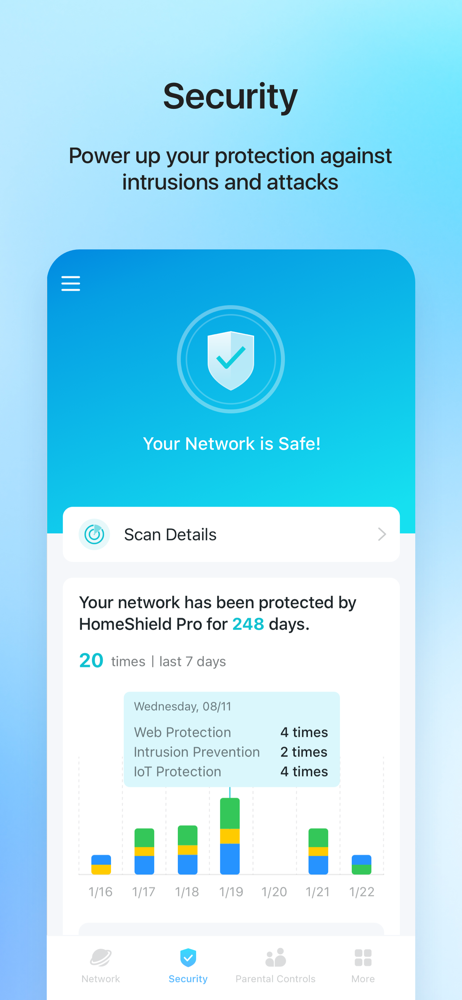
Welcome to the Deco App — the perfect way to set up your mesh WiFi in minutes and control your whole network. Our simple-to-follow guide walks you th...
| Name | Price | Type |
|---|---|---|
| Adv Parental Controls Monthly | $2.99 | Monthly |
| Security+ Monthly | $4.99 | Monthly |
| HomeShield Pro Monthly | $5.99 | Monthly |
| Adv Parental Controls Yearly | $17.99 | Yearly |
| Security+ (Annual) | $35.99 | Yearly |
| HomeShield Pro Yearly | $54.99 | Yearly |
| Total Security Package (Annual) | $129.99 | Yearly |
| Total Security Package (Annual) | $129.99 | Yearly |
| Total Security Package (Annual) | $129.99 | Yearly |
| Total Security Package (Annual) | $129.99 | Yearly |