Check the acquisition promise
Read the store headline, screenshots and description. What problem is the app promising to solve?
Study the storefront ↗
Yonac Inc. · iOS
Explore the ad evidence, study the storefront, and build your next acquisition hypothesis.
01 / Creative research
Read the store headline, screenshots and description. What problem is the app promising to solve?
Study the storefront ↗Explore apps with direct store-link matches. Compare their hooks and formats without assuming the same approach works here.
Browse observed advertisers ↗Store rankings and revenue estimates describe market context. They do not establish ad spend, conversions or ROAS.
Review the market context ↗02 / Storefront & product
Study the product story and store experience behind the acquisition funnel.




03 / Market context
Keep revenue, downloads and store rankings separate from advertising performance.
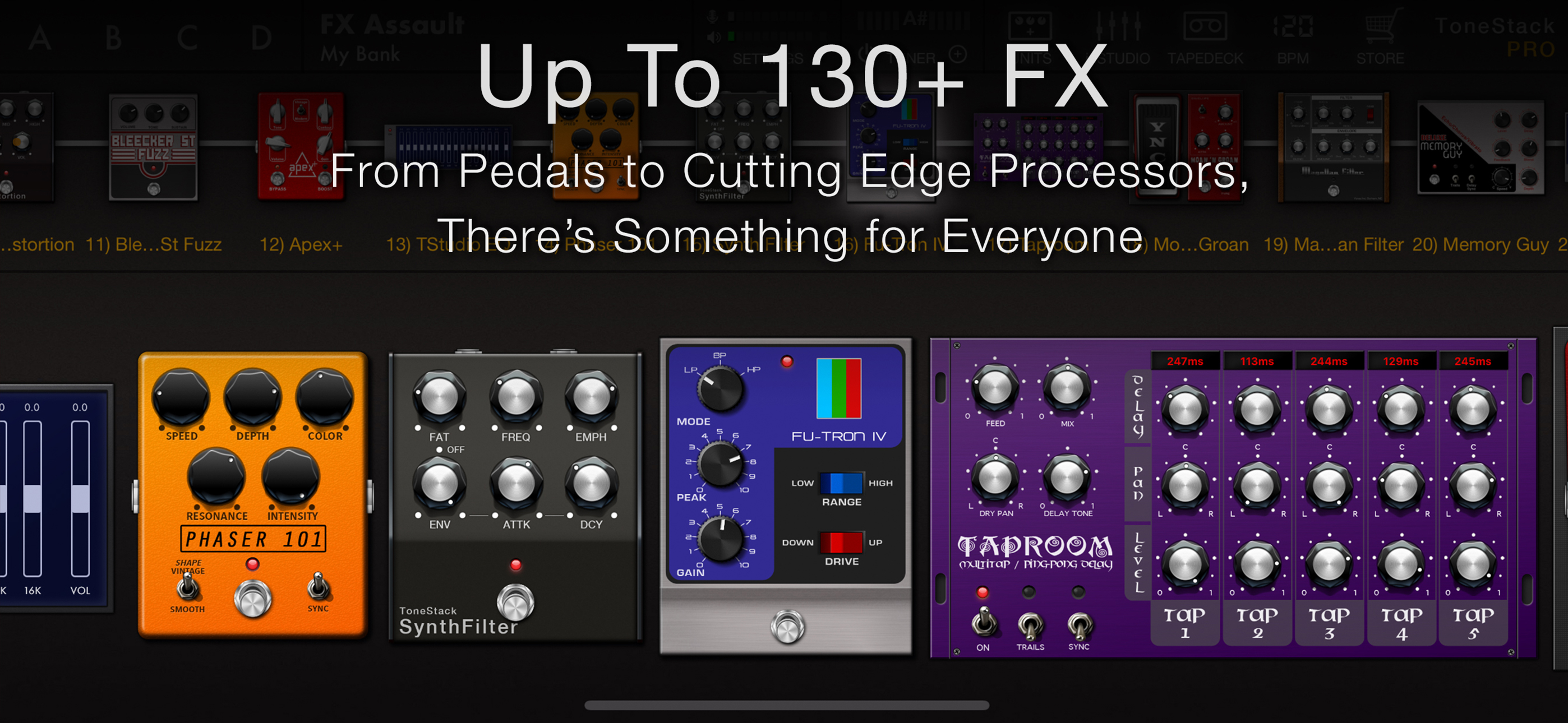
ToneStack Pro is a strong contender in the amp & effects simulator landscape. It delivers excellent value, very good sound quality, and an easier preset/rig-building workflow than many rivals. If you’re switching between Amplitude, Bias FX, or similar apps, ToneStack Pro won’t make you feel like you stepped backward. 1. Sound Quality ToneStack Pro’s DSP and modeling are well-polished — clean tones, punchy overdrive/distortion, lush reverbs and delays. In many cases, the sound is equal to, and sometimes better than, what I’ve heard in Amplitude and Bias. Especially for mid-gain and ambient textures, ToneStack Pro often wins out in richness and stereo presence. 2. Preset / Rig Building Ease Building your tone (amp + cab + effects chain) is intuitive. Drag-and-drop for signal flow, easy mixing/matching of cabs & amps, a pretty straightforward preset manager, and good options for editing. Compared to apps like Bias, where sometimes dialing in settings feels fiddly or buried in menus, ToneStack Pro makes this process more accessible. 3. Feature Set • Large library of amps, cabs, and effects (70 amps, 68 cabs, 140+ effects in the full collection).  • AUv3 support and running multiple instances is great. Try running 3 instances of Amplitude or others in one session on a brand new computer, and watch your cpu die. 4. Workflow & Usability Preset management is solid: saving, organizing, sharing presets is easy. The interface is clean, responsive. Dragging effects into the chain, switching amps, adjusting effects all feel well designed. This smoothness helps reduce the “tweak fatigue” that sometimes comes with other amp sims. Honestly, I own all of the apps named, Genome, Tonex, almost all of them. This app is much better.
TL;DR:My highest recommendation for an application. Buy this application and rest assured that you’re going to get outstanding sounds, great ease of use and very smooth functionality. I’ve been using this application for over two years and should’ve written a review before now. This application is one that I use on an almost daily basis I have all of the main brand-name iOS apps, NAM, TONEX, TH-U; but I come back to this application for the sheer usefulness of it. Being able to set up and prototype of line with multiple apps, multiple cabs to fine-tune or determine what sound works best is invaluable usefulness to me. Additionally when you insert a element amp cab affect you can rest assured it is almost always set up correctly for insertion into the line without just being over the top or having to waste a lot of time trying to figure out the best way to use the effect. This app just works. It works the way you expect it and it fits into my workflow effortlessly. I encourage you to buy this application as I believe that you will find a lot of usefulness for not a lot of money. You don’t need the pot of gold extension, but it does offer a lot of amps, that you will find useful and more effects. Highest recommendation.
UPDATE: It appears as though they fixed the issue I was originally having. I’m going to do some testing and report back. ORIGINAL REVIEW: I’m rating 1 star because this app is effectively useless to me after discovering such a stupid not working feature. When you use this app within another app (as an audio unit) they remove the tempo syncing options from the ui. The app is supposed to sync to the tempo of the app it’s being used within. THIS DOESN’T WORK! So no app sync within garage band, cubase 3, aum or any other audio app. I wanted to use this in aum with another app “autopad” which would let me have a click and pad going with my electric sounds. This is rendered impossible. Such a bummer because the sounds this app can create are phenomenal. If it did everything it claimed to be able to do then I would be super happy with it. I would be fairly close to being able to replace my heavy and expensive pedalboard with an ipad. But a very important feature is broken. This app appears to have been abandoned as posts about this very topic on their online forum have not been responded to for about a year. Devs: if you fix this I will change this review to 5 stars. While your in there can you provide the option to still have midi tap temp available while functioning as an audio unit?
The long awaited amps & effects powerhouse is finally here: meet the all-new ToneStack PRO! Featuring next generation DSP, a load of all-new amps & ef...
| Name | Price | Type |
|---|---|---|
| Pot o’ Gold | $59.99 | One-time |