Check the acquisition promise
Read the store headline, screenshots and description. What problem is the app promising to solve?
Study the storefront ↗
Brainware LLC · iOS
Explore the ad evidence, study the storefront, and build your next acquisition hypothesis.
01 / Creative research
Read the store headline, screenshots and description. What problem is the app promising to solve?
Study the storefront ↗Explore apps with direct store-link matches. Compare their hooks and formats without assuming the same approach works here.
Browse observed advertisers ↗Store rankings and revenue estimates describe market context. They do not establish ad spend, conversions or ROAS.
Review the market context ↗02 / Storefront & product
Study the product story and store experience behind the acquisition funnel.




03 / Market context
Keep revenue, downloads and store rankings separate from advertising performance.
My go-to tide chart for every trip! As someone who spends a ton of time on the water chasing fish all over Florida, Tide Graph has become one of the most important apps on my phone. Whether I’m fishing Boca Grande, Tampa Bay, the flats, the beaches, or backcountry waters, I rely on it every single day. The app is simple, accurate, and incredibly easy to use. I can quickly see exactly what the tide is doing, when it’s changing, and plan my fishing around those key feeding windows. Being able to check conditions in different locations across the Florida coast has saved me countless hours and helped put more fish in the boat. At TJT Outdoors, understanding tides is a huge part of what we do, and Tide Graph has become our go-to tool for planning trips, scouting locations, and making on-the-water decisions. It’s one of those apps I don’t even think about anymore—it’s simply part of my daily routine. If you fish, boat, kayak, or spend any time on coastal waters, this app is a must-have. Highly recommended! ⭐⭐⭐⭐⭐
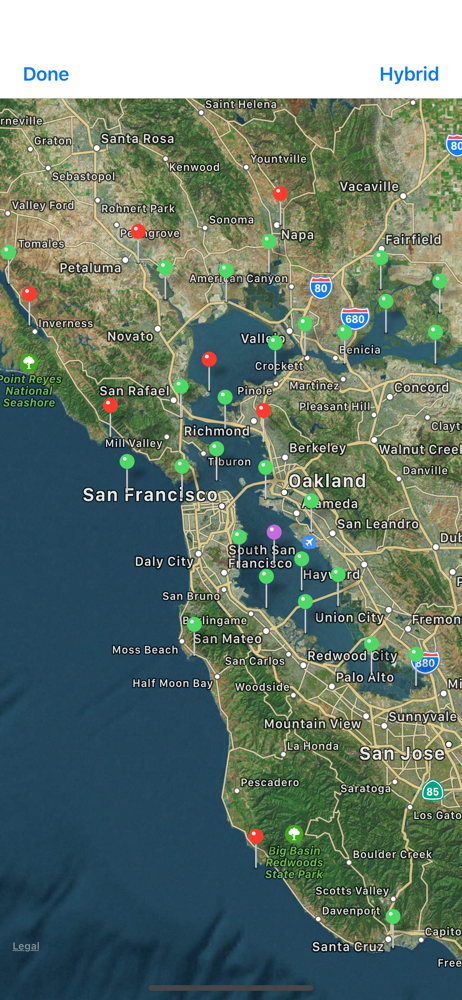
Many people don’t realize that tides can be different, even at nearby locations. For example, in San Francisco Bay, the tides can be delayed or advanced from those on the coast because of the time it takes for the water to flow in and out of the 1600 square mile estuary. This app has always provided accurate Tide data for each of the stations. I pay attention to, on the coast, inside Monterey Bay, and inside San Francisco Bay.
I don’t see a way to update a review or change it or delete it. I had an issue, couldn’t solve it, wrote a crummy review in frustration. I finally contacted them and after many emails back and forth we were able to resolve the issue, which was “user issue” not the app. So 5 stars for a great app and 5 stars for customer service and if there’s a way to delete it let me know.
- Provided over 10 billion predictions - Supports iOS 11+, Watch OS 4.3+, iPhone 7+ Tide Graph uses the harmonic predictions from thousands of US coa...
| Name | Price | Type |
|---|---|---|
| 2023 Tides and Currents | $0.99 | One-time |
| 2016 Tides and Currents | $0.99 | One-time |
| 2017 Tides and Currents | $0.99 | One-time |
| 2018 Tides and Currents | $0.99 | One-time |
| 2019 Tides and Currents | $0.99 | One-time |
| 2021 Tides and Currents | $0.99 | One-time |
| 2020 Tides and Currents | $0.99 | One-time |
| 2022 Tides and Currents | $0.99 | One-time |
| 2026 Tides and Currents | $0.99 | One-time |
| 2024 Tides and Currents | $0.99 | One-time |