Check the acquisition promise
Read the store headline, screenshots and description. What problem is the app promising to solve?
Study the storefront ↗
PIXO Incorporation · iOS
Explore the ad evidence, study the storefront, and build your next acquisition hypothesis.
01 / Creative research
Read the store headline, screenshots and description. What problem is the app promising to solve?
Study the storefront ↗Explore apps with direct store-link matches. Compare their hooks and formats without assuming the same approach works here.
Browse observed advertisers ↗Store rankings and revenue estimates describe market context. They do not establish ad spend, conversions or ROAS.
Review the market context ↗02 / Storefront & product
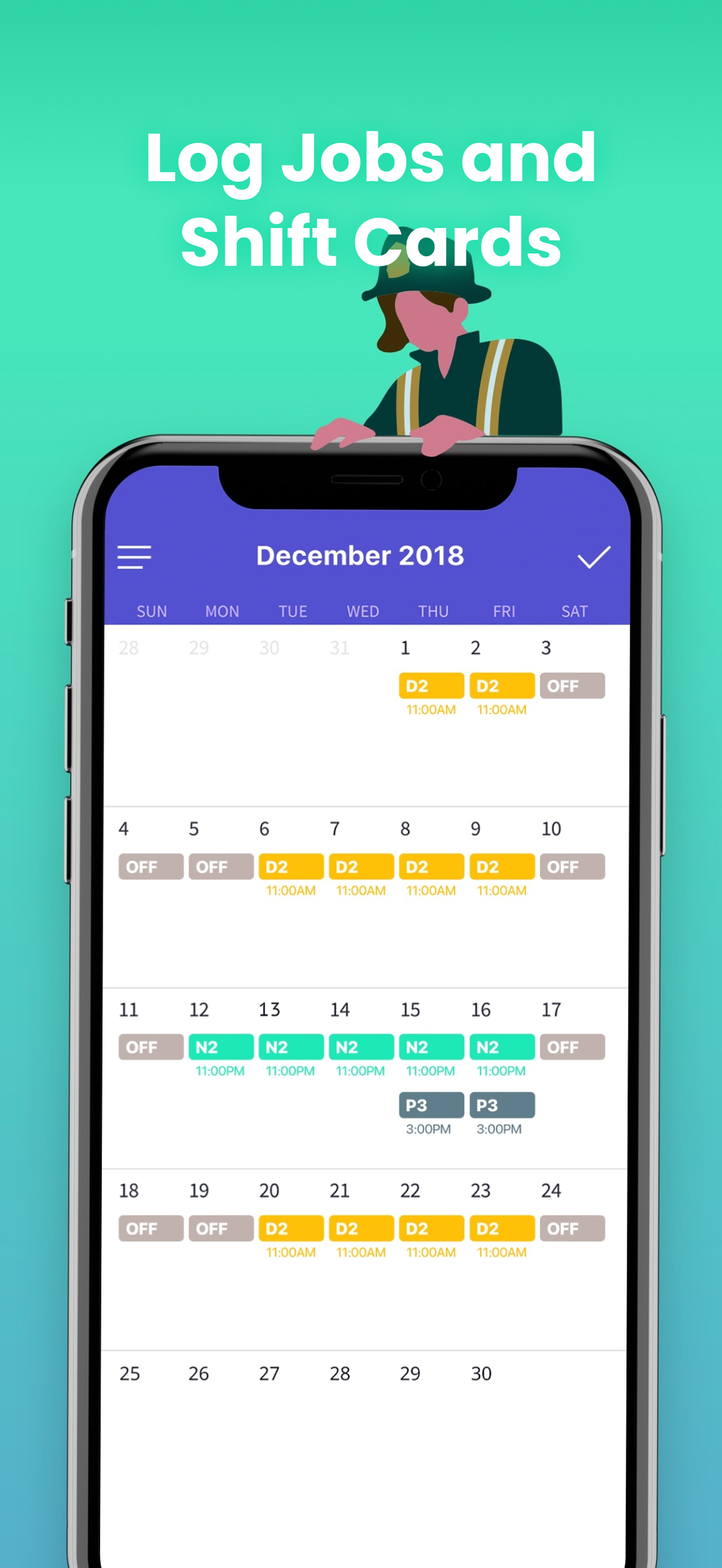
Study the product story and store experience behind the acquisition funnel.




03 / Market context
Keep revenue, downloads and store rankings separate from advertising performance.
This has really helped me get my schedule in check. I’ve worked many jobs at once along with school and frequent doctor’s appointments, and this app can definitely handle fitting all of those things into one place! Two things I would like to see after using this app (with the paid memebership; it’s only $1.99 a month- which is well worth it on my opinion) are… 1. More color options to label your shifts. There’s already quite a few colors on there but I would like to see something more resembling a palette rather than the two dozen options they give you, many of which are just different shades of a base color (for example red is one color, but there are three other shades going from a dark orange to a burgundy). 2. The ability to pick which shifts display on your calendar instead of it defaulting to alphabetical order. In fact the ability to reorganize shifts in the menu from the pop out tab would be perfect. I hate that if I can only fit two shifts per calendar day, that the app decides that the third is less important because it’s lower in alphabetical order and time. Other than those two minor things, this app is full of great features and definitely the best scheduling app I have ever used, and definitely the cheapest paid one that also has a free version (albeit with limited shifts). I will continue using this for the far foreseeable future as long as the service still remains available.
I absolutely love this app. Once I figured out everything I could do with it, it’s a life saver! I am on a 4 week rotation so every week my days off are different and every day my shifts are different. And I have the memory of a tadpole so I always forget what time I’m working the next day. For me to get my schedule at home from the work program is like a 7 minute operation. I have to sign in 3 times before I even get to the page with the schedule and once I’m there usually it makes me cycle the page 2-3 times because it times out in a millisecond. Then the print is so small I have to rotate my phone to make it so I can see all week. Usually I have my rotate turned off so I have to go into the control panel and turn that off so I can rotate my phone again and actually see my schedule. So it’s a hassle to say the least. But this app is so easy to use and checking my schedule is a 2 second task now. Which for me is well worth the 2 bucks a month. Not to mention now I can plan my vacations around my good days off and my kids school schedules. So I can see if a certain week I want lines up with my weekend off so I can slip in 2 more days on my pto. The only thing I do wish is that I could fit more then 2 rotations on each day without having to scroll to see the 3rd. Oh and it would be great if the rotations could be organized by rotation name, rather then the time selected. I love color so I made all my rotations pretty colors. I don’t just have my rotation, I also put in both of my team lead rotations so at a glance I can see which of us are working what that day and who’s off. Anyhow the colors being the same all the way across would be very aesthetically pleasing as well as not having to scroll to see the third team lead.
As a travel nurse it can be difficult for me to keep track of different shifts/hospitals. This app has allowed to to plan my WHOLE life. I love using the color blocks for scheduling in different hospitals, shift requests, vacation time, and events happening around my local city. I'm easily able to put down an "off" shift for a day that I'd like to request off for some LA event, and write in the comments section why the event is so I don't end up scheudling myself on days that there's cool things happening. It's also very easy to share my calendar with friends and they're able to see what each block represents. I'll send the schedule and be like "blue days I'm available after 8 pm, Red days I'm not in town, Orange days I'm available after 3 pm, and so on and so forth. One downside is that you can't add more than two things to a day, but you are able to write a comment that can remind you of other things going on. I generally use this app strictly for shifts , vacations, and local events..anything else (birthdays, meet ups) I will use the IOS calendar. It also reminds you the night before that you have to work the next day. I love this app and would recommend it to anyone interested.
Spoke: Shift Day Work Calendar Tracking your shifts has never been easier! With Spoke, you can see at a glance when you’re working. Suitable for your...
| Name | Price | Type |
|---|---|---|
| Pro Upgrade Now | $2.99 | One-time |
| Month-Subscription | $4.99 | Monthly |
| Month-Subscription | $4.99 | Monthly |
| Monthly Subscription Trial | $4.99 | Monthly |
| Monthly Subscription Trial | $4.99 | Monthly |
| Yearly Subscription Special Offer | $24.99 | Yearly |
| Year-Subscription | $34.99 | Yearly |
| Yearly Pro Subscription Trial | $34.99 | Yearly |
| Yearly Pro Subscription Trial | $34.99 | Yearly |
| Pro Upgrade | $79.99 | One-time |