
Check the acquisition promise
Read the store headline, screenshots and description. What problem is the app promising to solve?
Study the storefront ↗
coneno GmbH · iOS
Explore the ad evidence, study the storefront, and build your next acquisition hypothesis.
01 / Creative research
Read the store headline, screenshots and description. What problem is the app promising to solve?
Study the storefront ↗Explore apps with direct store-link matches. Compare their hooks and formats without assuming the same approach works here.
Browse observed advertisers ↗Store rankings and revenue estimates describe market context. They do not establish ad spend, conversions or ROAS.
Review the market context ↗02 / Storefront & product
Study the product story and store experience behind the acquisition funnel.



03 / Market context
Keep revenue, downloads and store rankings separate from advertising performance.
I was buzzing through several ideas during a long day of driving, feeling super inspired to take some action, and seeing the pathways clearly. I was mapping it out in my head, giving myself reminders of what to write down once I stopped driving. I realized during this drive how much my particular way of thinking is similar to a flow chart. Inspired and ready to act, I realized just how effective flow charts can help in my life and business. When I googled flowchart apps, this one didn't come up. I decided to go to the app store rather than google and this app came up. I am so grateful I decided to download this over the others first off, because it hit all my crucial requirements. Its simple to use, it's basic on the eyes (allowing creativity), it's not overburdened with options and variations. It has what I need, right where I need it. It's intuitive, the nodes and connectors work pretty much how you want them to. I am stoked I came across this app and look forward to buying the pro version because it's totally worth it to me. They don't ask a high price, and I'd willingly pay double to have this app as a part of my daily work flow. As a dad, business owner and solopreneur, I'm loving this. Thanks, you guys designed a great app.
This app is simply amazing for a few reasons: 1) this app doesn't have all those complex features that many other platforms offer, which is helpful for me to just focus on creating the flow and maintain the clarity of mind. 2) the UI is intuitive, and it's very easy to use, I had no trouble understanding all the settings even without paying attention at the tutorial.Feedback wise, 1) I think it would be great if I can create a vertical-based flow instead of only horizontal -the flow can easily get a little long horizontally which takes more effort to scroll left and right and more difficult to print. 2) It will be awesome if I can use this app on my iPad and iPhone as well, looking forward to see this become a reality.
QuikFlow is limited if you compare it to MIRO — BUT I'm more productive regarding flows and mind-mapping when I work in Quikflow. I use Quikflow to brainstorm and workshop ideas. It’s the cocktail napkin you can rapidly use to document your thoughts. Essentially I use QUikflow for ideation and MIRO for planning. The layout automatically adapting to my changes is the killer feature. And QUikFlow’s mind mapping is more flexible than traditional mind-mapping tools in that you can create most graph structures, making it ideal for complex problems. The app automatically handles the layout but allows for minor adjustments. It's user-friendly and easily allows flowing nodes together, creating loops, and pasting subgraphs. Best of all, the lifetime license purchase is reasonably priced, and it is all done on the desktop - so no sharing your data.
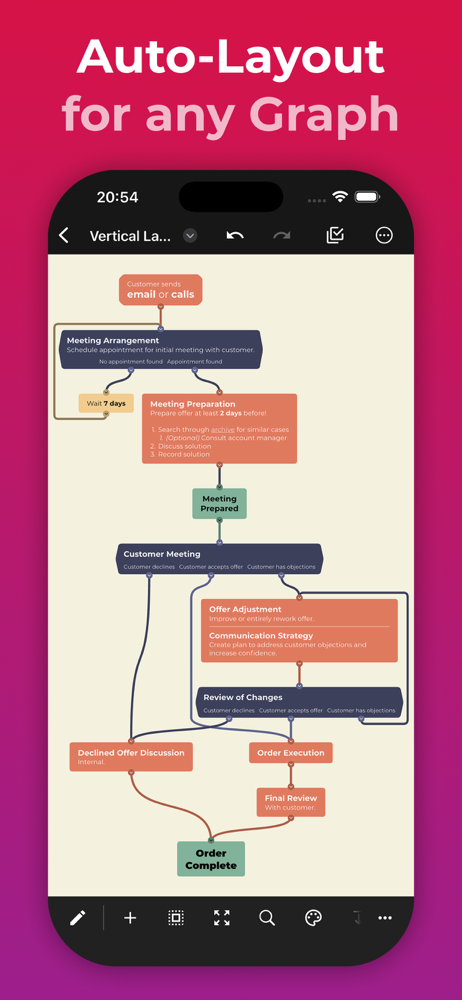
Create flowcharts (and mind maps) without worrying about layout in QuikFlow. With our innovative interactive layout algorithms, you can work as if you...
| Name | Price | Type |
|---|---|---|
| QuikFlow Pro (Monthly) | $1.99 | Monthly |
| QuikFlow Pro (Yearly) | $12.99 | Yearly |
| QuikFlow Pro (Lifetime) | $29.99 | One-time |


