Check the acquisition promise
Read the store headline, screenshots and description. What problem is the app promising to solve?
Study the storefront ↗
Lightsmith Consulting LLC · iOS
Explore the ad evidence, study the storefront, and build your next acquisition hypothesis.
01 / Creative research
Read the store headline, screenshots and description. What problem is the app promising to solve?
Study the storefront ↗Explore apps with direct store-link matches. Compare their hooks and formats without assuming the same approach works here.
Browse observed advertisers ↗Store rankings and revenue estimates describe market context. They do not establish ad spend, conversions or ROAS.
Review the market context ↗02 / Storefront & product
Study the product story and store experience behind the acquisition funnel.


03 / Market context
Keep revenue, downloads and store rankings separate from advertising performance.
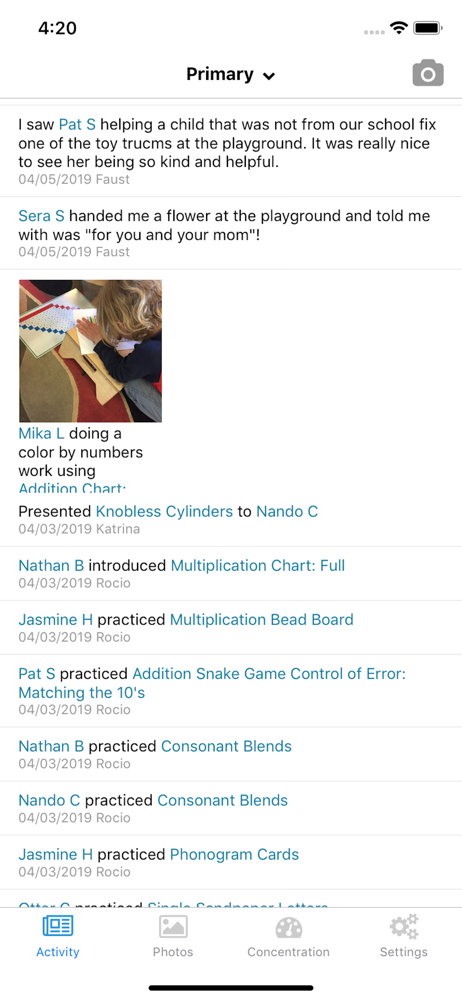
Ever since upgrading to the iPhone 13, I have an extraordinarily difficult time switching between my children on the app and sometimes can't do so at all. The app doesn't seem to fit the iPhone screen well and the arrow to switch between kids is right in the top center and is very finicky. Would be nice to maybe have an alternate drop down or way to switch.
My son’s school rolled out TC this year. It was nice to see what he what works he was doing. Now that he is finishing his last 2.5 months as a 6th year remotely, it has been invaluable. All of his works and projects are done through TC. We upload pictures of his works to share with his classmates. It is the primary tool we use for getting work and has been great. Are there things I wish it would do, yes. But for this emergency learning environment it has been ideal.
I love the way the online website is set up but the app is not user friendly or orderly like you would expect for something Montessori. To tag a child after taking a picture with the app I must exit and go online log in hit activity (not photos) and then I can tag the children. To use this photo as a profile picture I then need to go to children select the child edit click on the area for the photo and select. I must guess how the photo will be cropped. It would be nice within the app after taking the photo immediately being able to tag a child. Having a box to check to make the picture a profile picture would be amazing!
Transparent Classroom provides online record-keeping and lesson planning for Montessori guides. This app allows guides to: take and upload photos fro...