App Profile: Word Auto Highlight for Safari
Android / Games / Puzzles
Word Auto Highlight for Safari
Installs:
Rating:
0.00
Total Reviews:
0
Top Countries:
US, FR, GB
< $5k
/mo
< 5k
/mo
Reviews: What People Think About Word Auto Highlight for Safari
AndyTall
Rating: 4/5
The "Word Auto Highlight for Safari" extension is a great tool, and it works perfectly for its core function of automatically highlighting words.
However, after using similar extensions on Chrome, I noticed a few key features that would take this extension to the next level and make it a truly powerful productivity tool:
Persistent Highlight Lists: It would be great to have the option to save a list of words to highlight for specific websites or for general use. That way, I wouldn't have to re-enter them every time I visit a page.
Bulk Word Entry: Other highlighters allow you to add many words at once by using delimiters like spaces or commas. This would save a lot of time when creating new word lists.
Scrollbar Markers: Some Chrome extensions add small color-coded markers to the scrollbar, showing you exactly where the highlighted words are on the page. This makes it incredibly easy to navigate long articles and documents.
These features would make the extension much more effective for research, studying, and general information-gathering. I hope the developer considers adding some of them in a future update!
About Word Auto Highlight for Safari
Highlight your words automatically on any webpage.
Make browsing easier and more efficient with Word Auto Highlight for Safari!
This Safari extension lets you create and manage a custom list of words that are automatically highlighted on any webpage you visit. Whether you're shopping, researching, or just browsing, quickly spot the information that matters most.
Available on iPhone, iPad, and Mac - enjoy the same powerful highlighting capabilities across all your Apple devices. One purchase unlocks the app on all your devices!
Key Features:
- Easy Word Management: Add single words or bulk import multiple words at once to build your personalized highlight list.
- Automatic Highlighting: Your chosen words are instantly highlighted on every webpage you view.
- Interactive Highlight Bar: Displays a convenient bar at the bottom of the webpage, showing all found words at a glance. Tap any word to quickly scroll to its location on the page!
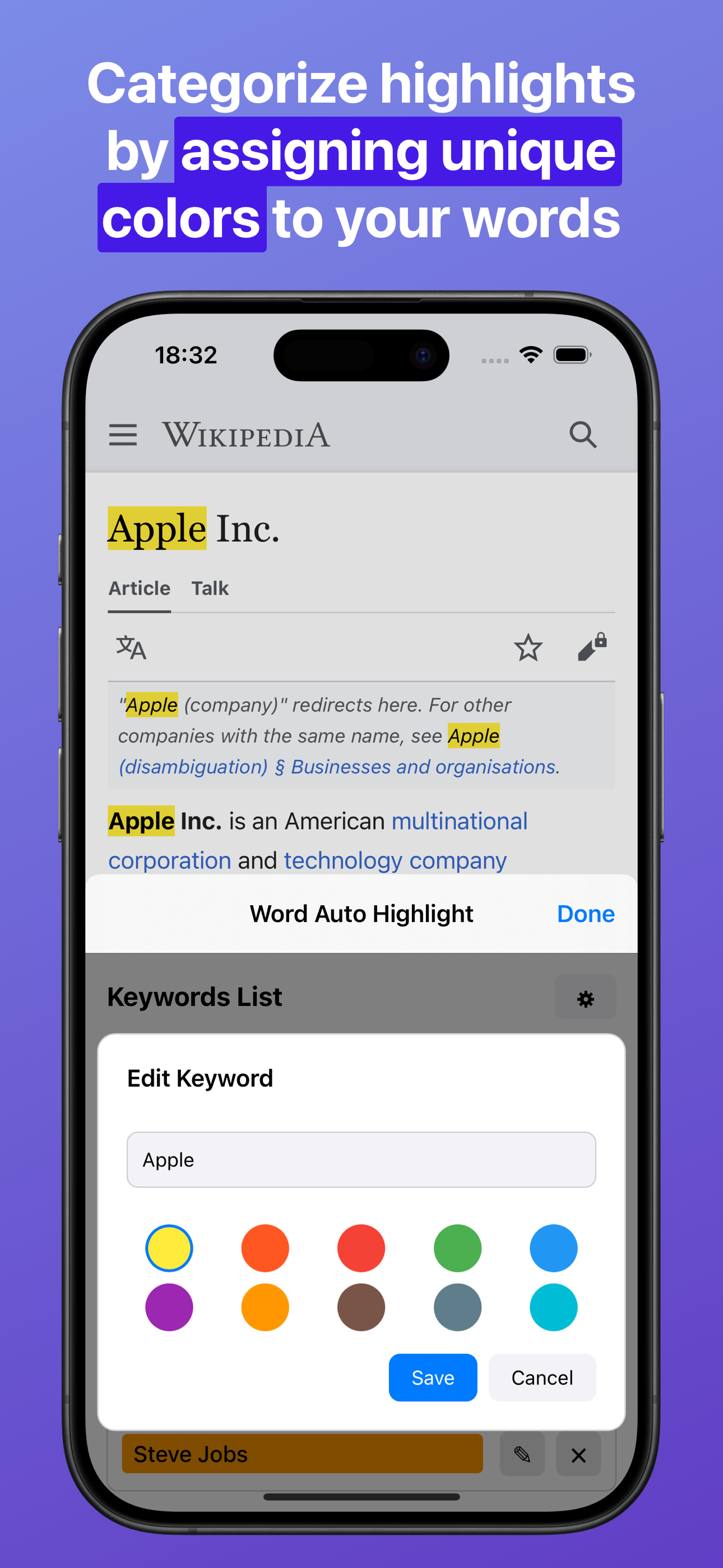
- Per-Word Highlight Colors: Assign unique colors to each word for better visibility and organization.
- Seamless Integration: Works effortlessly within Safari for a smooth browsing experience.
Your privacy is our priority - everything is processed on your device, and no data ever leaves it.
Simplify your online experience and never miss the important details. Download Word Auto Highlight for Safari today!
Make browsing easier and more efficient with Word Auto Highlight for Safari!
This Safari extension lets you create and manage a custom list of words that are automatically highlighted on any webpage you visit. Whether you're shopping, researching, or just browsing, quickly spot the information that matters most.
Available on iPhone, iPad, and Mac - enjoy the same powerful highlighting capabilities across all your Apple devices. One purchase unlocks the app on all your devices!
Key Features:
- Easy Word Management: Add single words or bulk import multiple words at once to build your personalized highlight list.
- Automatic Highlighting: Your chosen words are instantly highlighted on every webpage you view.
- Interactive Highlight Bar: Displays a convenient bar at the bottom of the webpage, showing all found words at a glance. Tap any word to quickly scroll to its location on the page!
- Per-Word Highlight Colors: Assign unique colors to each word for better visibility and organization.
- Seamless Integration: Works effortlessly within Safari for a smooth browsing experience.
Your privacy is our priority - everything is processed on your device, and no data ever leaves it.
Simplify your online experience and never miss the important details. Download Word Auto Highlight for Safari today!
File size: 1368064
Launched countries: USAUCACNFRDEGBITJPKRRUDZAOARATAZBHBBBYBEBMBRBGCLCOCRHRCYCZDKDOECEGSVFIGHGRGTHKHUINIDIEILKZKEKWLBLTLUMOMGMYMTMXNLNZNGNOOMPKPAPEPHPLPTQAROSARSSGSKSIZAESLKSECHTWTHTNTRUAAEUYUZVEVNBOKHEELVNIPYAFGEIQLYMAMZMMYEBJBFCMCGCIJOLAMLSNTZUGZMZW
Minimum OS version: 15.0
Release Date: 1735027200000
Published by Anthonin Cocagne
Website url:
Publisher country: France