
Check the acquisition promise
Read the store headline, screenshots and description. What problem is the app promising to solve?
Study the storefront ↗
Anthonin Cocagne · iOS
Explore the ad evidence, study the storefront, and build your next acquisition hypothesis.
01 / Creative research
Read the store headline, screenshots and description. What problem is the app promising to solve?
Study the storefront ↗Explore apps with direct store-link matches. Compare their hooks and formats without assuming the same approach works here.
Browse observed advertisers ↗Store rankings and revenue estimates describe market context. They do not establish ad spend, conversions or ROAS.
Review the market context ↗02 / Storefront & product
Study the product story and store experience behind the acquisition funnel.


03 / Market context
Keep revenue, downloads and store rankings separate from advertising performance.
The setup process is very easy. Merely walk around your place to let the app discover your lights. I have Hue and Nanoleaf. It seems to discover all Bluetooth and WiFi devices. Once it has done so, pick the devices that are your lights. Make sure they are in the correct assigned rooms. After the setup, you can control brightness, temperature, color, etc. You can control by room or by light. I hesitate to use the word ‘simple’. It is dead simple, but don’t get the wrong impression, it’s also a joy to use because you don’t have take hours and hours to set it up and try to figure out how the silly thing works.
Updated: Developer added a very slick slider, and the functionality has improved throughout. Detection has improved and this has become a very useful tool. Would love to see other devices outside of lights (cameras / thermostats/ etc…). I’d like to be able to reorder the main screen and also make favorites. Old:I like the auto detect of the rooms. Doesn’t always work, but the concept is good. Perhaps it could be improved over time. I am a little baffled by the functionality of the app though. Every other app uses a slider to increase the brightness of a light, this app has you repeatedly mashing a ‘+’ button. Yes I can hit the settings button and then pick a very small percentage button, but it seems so unintuitive.
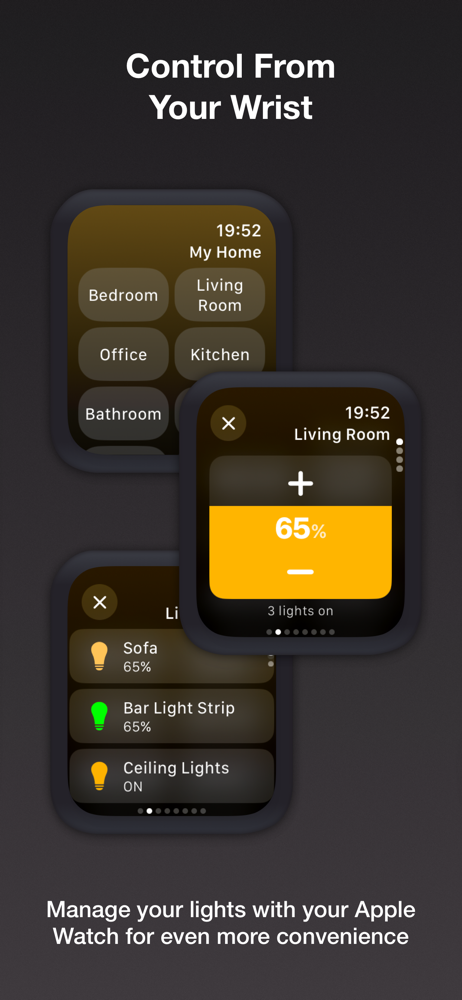
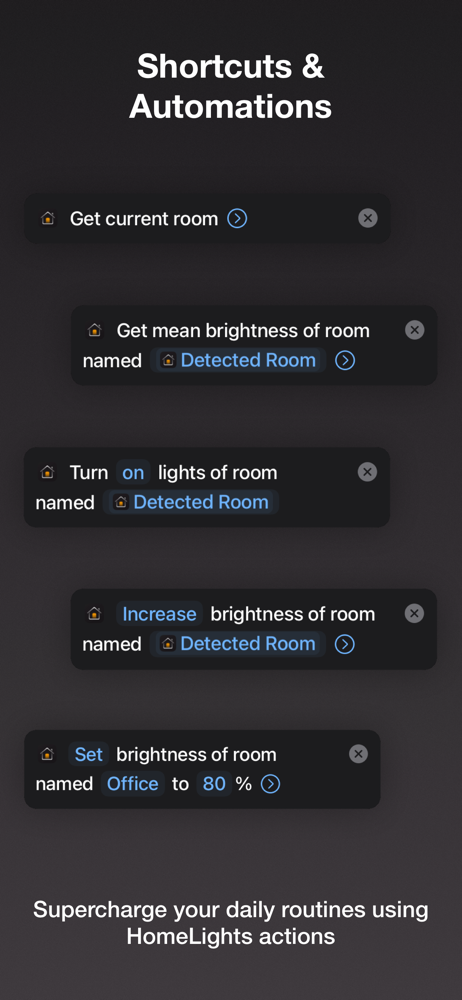
I have many all in one HomeKit apps that can do much more than the native home app. They are necessary for a HomeKit power user, but for simple tasks, they are often several clicks to just change the lights. This app gets right to the point. It just allows you to change the light settings for a given room or device. It defaults to a room, and focuses first on the ON/OFF and brightness, and secondarily on color. With the optional upgrade you can train it to automatically figure out which room you are in using the Bluetooth devices that exist in your house. This saves yet another click and makes the app more useful. It is my go to when I just want to update the lights without getting into an argument with Siri.
HomeLights is the ultimate solution to quickly and easily control your HomeKit lights! Whether you want to adjust a single bulb or an entire room, ach...
| Name | Price | Type |
|---|---|---|
| Monthly Subscription | $0.99 | Monthly |
| Monthly Subscription | $0.99 | Monthly |
| Annual Subscription | $7.99 | Yearly |
| Lifetime License | $17.90 | One-time |


