App Profile: Noteplicity
Android / Games / Puzzles
Noteplicity
Installs:
Rating:
4.27
Total Reviews:
11
Top Countries:
DE, US, FR
< $5k
/mo
< 5k
/mo
Reviews: What People Think About Noteplicity
nm19440
Rating: 5/5
Recently downloaded Noteplicity to help me get my work better organized. Previously I kept notes on a small paper notebook and was constantly frustrated trying to find information. Noteplicity allows me to take notes electronically and organize the information by topic, person, project, team . . . essentially any way I want through an intuitive, easy-to-use interface that allows me to quickly find the information I need. Only problem is that I didn’t have this app sooner! Great product that I can’t believe is free to download!
Tjst687
Rating: 3/5
I have been using Noteplicity for over a year now and I have been enjoying it. I want to thank the developers for doing such a good job on this. However, recently the app has been crashing. It won’t let me have access to my files. The second I open it, the screen is all white then it crashes. I tried to offload then reinstall the app many times but it still doing the same thing. I even deleted a lot of my files thinking it was because I didn’t have enough space but without any success. I updated to the new version but it’s still not working. It’s really frustrating because I have important notes that I I’m trying to have access to. This is very unfortunate because I really like this app.
Please fix the bug and I will change my review to 5 stars.
Thank you!
Sublime.Sass
Rating: 5/5
I have so many PDFs with hundreds of pages each. This app uploads files quickly into a hierarchical folder structure. There are SO many ways to find what I need quickly. Multi-tag tagging system, bookmarks, and favorites - all accessible from the sidebar. I can easily annotate and mark up files.
I only wish there was a ruler for quick straight line underlining and a dedicated highlighter in the pen options.
About Noteplicity
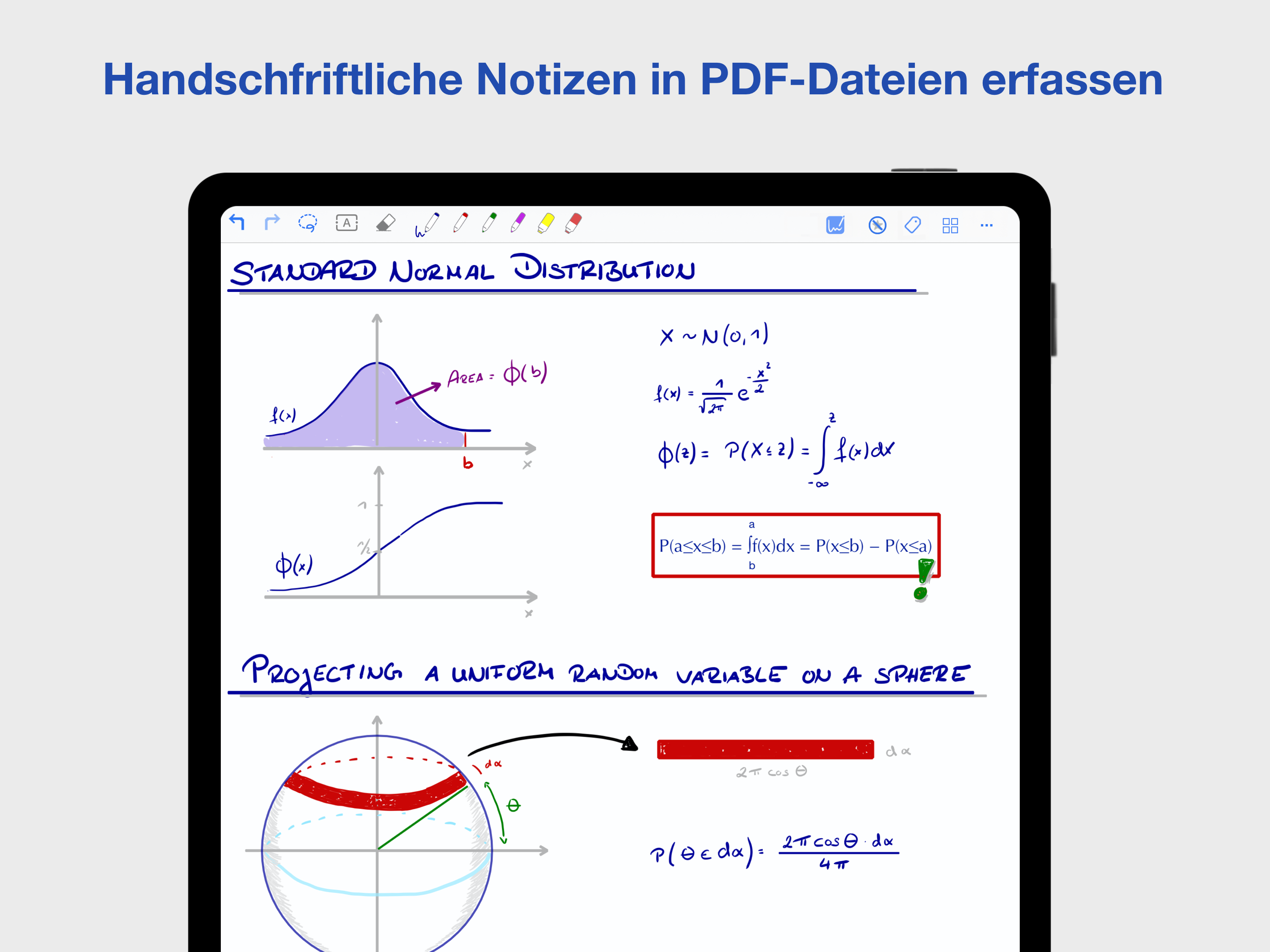
Organize your daily work and handwritten notes in PDF documents with a expandable folder hierarchy and with individual #tags
ORGANIZE YOUR NOTES AND PDF FILES IN A FLEXIBLE HIERARCHY
• Flexibly create and modify your personal directory view
• Create blank PDF files, scan your documents to PDF and import PDFs from other sources into your individual folder structure
• Display multiple folders simultanously on your screen in an expandable tree view
• Optionally disable the view as an expandable tree and always display only the current folder on your screen
• Easily move your files with Drag & Drop
• Search for file names and text based file content
• Save time with standard patterns for new file names, standard page sizes and page backgrounds
VIEW AND ANNOTATE PDF DOCUMENTS
• Annotate your PDF files with text, geometric shapes, highlight, underline and strike through
• Insert images and add your handwritten notes with Apple Pencil
• Make your notes colorful and create your own standard color palette
• Created notes are listed in a file to quickly jump to the already edited pages
• Organize pages inside your files in thumb view
• OCR: Import editable text passages from your photo library or from live scanned documents
• Use a Laser Pointer to highlight areas on your screen while presenting your documents
TAKE YOUR HANDWRITTEN NOTES
• Have great writing experience with Apple Pencil and capture your notes in easy to share PDF files
• Scribble: Convert your handwritten notes to text while adding text annotations
• Add perfect geometric shapes as you draw with automatic shape recognition
• Delete your notes by simply crossing them out with your pencil
• Define how many individually customizable pens are displayed in the menu bar while editing your notes
• Save annotations as templates in your personal library and reuse them easily at any position in a document
ORGANIZE YOUR FILES AND NOTES WITH INDIVIDUAL #TAGS
• Create and manage your personal #tags and apply individual colors
• Easily assign your #tags to your files
• Filter your data in a directory view or in a certain tree of #tags
• Create bookmarks in your files, name them individually and access them inside and outside of your documents
• Bookmarks, favorite- and recent files are always easily accessible in a sidebar
USE iOS MULTITASKING AND MANAGE MULTIPLE WINDOWS IN PARALLEL
• Use iOS multitasking features with Split View, Slide Over and Stage Manager and manage multiple windows simultaneously
• Open Noteplicity and pair it simultaneously with other apps on the same screen
• Work in parallel in multiple Noteplicity windows and edit multiple documents simultaneously
• Drag & drop files and folders between two Noteplicity windows
• Copy pages between two windows by Drag & Drop in Thumb View
SYNC AND SHARE YOUR FILES
• Save your files to iCloud Drive and make them available on any device
• Use Noteplicity also on your iPhone, to display and manage files synchronized with iCloud
• Distribute your notes to any operating system thanks to PDF format
• Share your notes by AirDrop, E-Mail or iOS Folder App
Noteplicity is optimized for Apple Pencil.
ORGANIZE YOUR NOTES AND PDF FILES IN A FLEXIBLE HIERARCHY
• Flexibly create and modify your personal directory view
• Create blank PDF files, scan your documents to PDF and import PDFs from other sources into your individual folder structure
• Display multiple folders simultanously on your screen in an expandable tree view
• Optionally disable the view as an expandable tree and always display only the current folder on your screen
• Easily move your files with Drag & Drop
• Search for file names and text based file content
• Save time with standard patterns for new file names, standard page sizes and page backgrounds
VIEW AND ANNOTATE PDF DOCUMENTS
• Annotate your PDF files with text, geometric shapes, highlight, underline and strike through
• Insert images and add your handwritten notes with Apple Pencil
• Make your notes colorful and create your own standard color palette
• Created notes are listed in a file to quickly jump to the already edited pages
• Organize pages inside your files in thumb view
• OCR: Import editable text passages from your photo library or from live scanned documents
• Use a Laser Pointer to highlight areas on your screen while presenting your documents
TAKE YOUR HANDWRITTEN NOTES
• Have great writing experience with Apple Pencil and capture your notes in easy to share PDF files
• Scribble: Convert your handwritten notes to text while adding text annotations
• Add perfect geometric shapes as you draw with automatic shape recognition
• Delete your notes by simply crossing them out with your pencil
• Define how many individually customizable pens are displayed in the menu bar while editing your notes
• Save annotations as templates in your personal library and reuse them easily at any position in a document
ORGANIZE YOUR FILES AND NOTES WITH INDIVIDUAL #TAGS
• Create and manage your personal #tags and apply individual colors
• Easily assign your #tags to your files
• Filter your data in a directory view or in a certain tree of #tags
• Create bookmarks in your files, name them individually and access them inside and outside of your documents
• Bookmarks, favorite- and recent files are always easily accessible in a sidebar
USE iOS MULTITASKING AND MANAGE MULTIPLE WINDOWS IN PARALLEL
• Use iOS multitasking features with Split View, Slide Over and Stage Manager and manage multiple windows simultaneously
• Open Noteplicity and pair it simultaneously with other apps on the same screen
• Work in parallel in multiple Noteplicity windows and edit multiple documents simultaneously
• Drag & drop files and folders between two Noteplicity windows
• Copy pages between two windows by Drag & Drop in Thumb View
SYNC AND SHARE YOUR FILES
• Save your files to iCloud Drive and make them available on any device
• Use Noteplicity also on your iPhone, to display and manage files synchronized with iCloud
• Distribute your notes to any operating system thanks to PDF format
• Share your notes by AirDrop, E-Mail or iOS Folder App
Noteplicity is optimized for Apple Pencil.
File size: 23207936
Launched countries: USAUCACNFRDEGBITJPKRRUDZAOARATAZBBBYBEBMBRBGCLCOCRHRCZDKDOECEGSVFIGHGRGTHKHUINIDIEILKZKEKWLBLTLUMOMGMYMXNLNZNGNOOMPKPAPEPHPLPTQAROSASGSKSIZAESLKSECHTWTHTNTRUAAEUYUZVEVNBOKHEELVNIPYAFGEIQLYMAMZMMYEBHCYMTRSBJBFCMCGCIJOLASNTZUGZMZW
Minimum OS version: 13.0
Release Date: 1595401200000
Published by Torsten Duerr
Website url: https://www.noteplicity.com
Publisher country: