Check the acquisition promise
Read the store headline, screenshots and description. What problem is the app promising to solve?
Study the storefront ↗
Synium Software GmbH · iOS
Explore the ad evidence, study the storefront, and build your next acquisition hypothesis.
01 / Creative research
Read the store headline, screenshots and description. What problem is the app promising to solve?
Study the storefront ↗Explore apps with direct store-link matches. Compare their hooks and formats without assuming the same approach works here.
Browse observed advertisers ↗Store rankings and revenue estimates describe market context. They do not establish ad spend, conversions or ROAS.
Review the market context ↗02 / Storefront & product
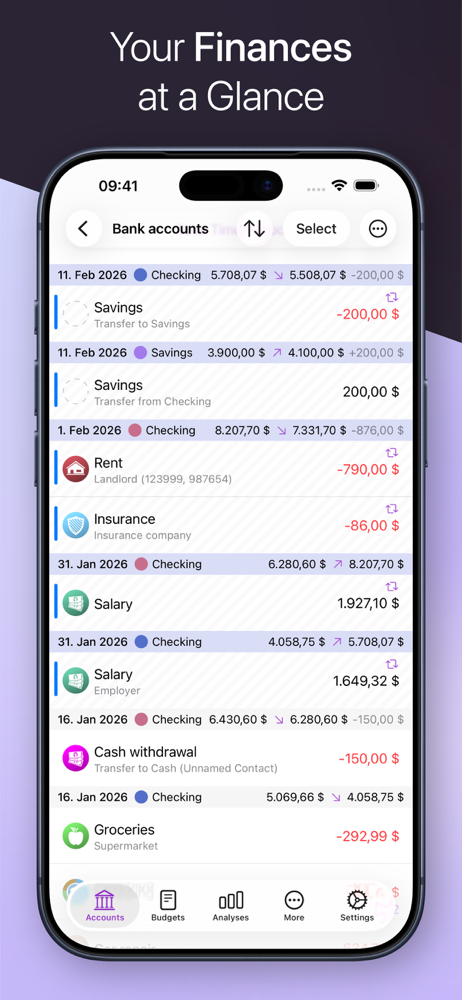
Study the product story and store experience behind the acquisition funnel.


03 / Market context
Keep revenue, downloads and store rankings separate from advertising performance.
I’ve been using iFinance for maybe 10 years or so and over a few upgrades. None were perfect but about the only decent register for a Mac. I usually don’t buy upgrades when I’m satisfied with what I have but this time I decided to give it a spin. Boy was that a mistake. Version 5.5 is about as confusing and non-functional as they get. Not sure what country these developers are in or if the even know anything about finances. When you enter a payment you’d think it would be the “title” for the transaction but you’d be wrong. The title is now entered into the “Purpose” field which most people would think that would be a comment on what the transaction is for. Syncing between an iPhone and the laptop is impossible for me. The migrating notice displays and never ever does anything after an hour. Want to reconcile your account? You can forget that too. There is no place to enter your banks beginning and ending balance. How do you reconcile without that little piece of information. Glad some of you had good luck but for me this one is going in the trash and going back to version 4. A true waste of $20
I use credit cards to keep my credit score up, but always pay them off monthly. I also track various store credit accounts and savings accounts. I’ve used iFinance since version 4 to balance my finances every week, and it’s still essential at the start of 2024. I don’t use the IAP of online connections to banks, that way every transaction I enter is one I recognize. When a transaction hasn’t been paid off, I can flag it so it stands out later. Recurring transactions like savings deposits are easy to set up automatically. When I pay a credit card from my debit account, it’s as easy as selecting last month’s payment and duplicating it for today, then changing the amount. The transactions have a line for a check number, but I don’t use checks, so I copy & paste transaction confirmation codes from the bank there. It’s easier than keeping the emails in case there is any question if I made a payment later. Developers- adding additional, customizable info lines would be helpful. Other positives are how I can add images to bank accounts, allowing me to see at a glance what card is what account. Again, devs, adding a custom line I can see in the main window would help, since I have one card that I only use on automotive stuff, and another that’s just for medical bills. I’d like to see that info readily. The best part of this app, which I didn’t find in others, is nesting. I can have one folder containing savings accounts, all individual but totaled together. In another folder, I can have a sub folder of debit accounts, with a second folder of credit card accounts. That way, I get a subtotal of liquid cash and a subtotal of outstanding debt, with the top-level folder showing the combined value of the two, positive or negative. This is also how I budget, since I add an additional folder for future recurring transactions I know will come out of the budget, like the monthly Apple One subscription. It stays in the Upcoming folder until it’s active under the actual charge account. This iFinance 5 app is essential for my personal needs.
I like it so far, however, a few parts seem confusing to me. For example, figuring out how to set up an annual budget is easy, but it doesn't seem as easy to set up an overall monthly budget with categories. I can't find a way to do this. Instead, it seems I have to make a "custom budget" for each individual category, but then when I move to the next month, I can't change the amount to budget for that category without it going back and changing the previous budget's amount as well. This is quite frustrating because this is something I can do EASILY using other budgeting software, like Mint. Things don't cost the same amount every single month. I should be able to budget $100 for groceries in July and then $200 in August. I should also be able to easily make an overall monthly budget. These are HUGE oversights in my eyes.
iFinance helps you keep track of your income and spending in the most convenient and fastest way. iFinance's convenient evaluations and charts provide...
| Name | Price | Type |
|---|---|---|
| Online Services (monthly) | $5.99 | Monthly |
| Online Services Plus (monthly) | $6.99 | Monthly |
| Online Services (annual) | $49.99 | Yearly |
| Online Services Plus (annual) | $69.99 | Yearly |