
Check the acquisition promise
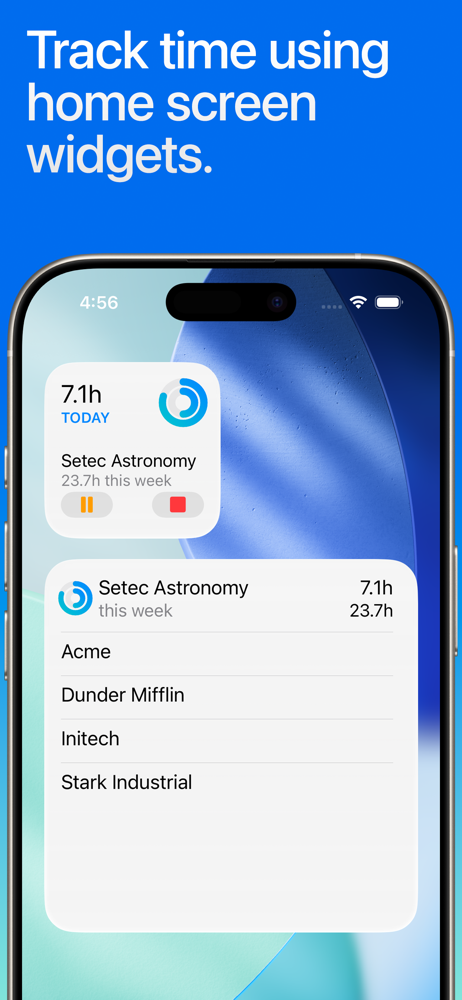
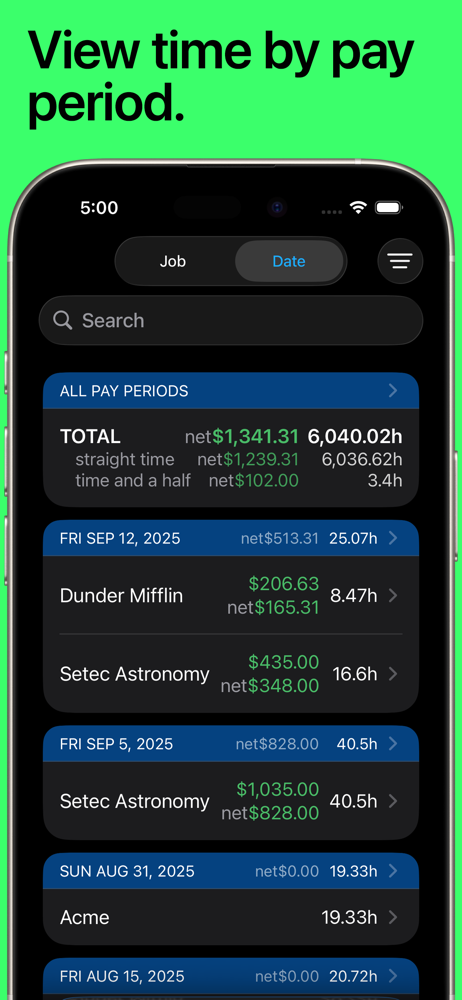
Read the store headline, screenshots and description. What problem is the app promising to solve?
Study the storefront ↗
Cribasoft, LLC · iOS
Explore the ad evidence, study the storefront, and build your next acquisition hypothesis.
01 / Creative research
Read the store headline, screenshots and description. What problem is the app promising to solve?
Study the storefront ↗Explore apps with direct store-link matches. Compare their hooks and formats without assuming the same approach works here.
Browse observed advertisers ↗Store rankings and revenue estimates describe market context. They do not establish ad spend, conversions or ROAS.
Review the market context ↗02 / Storefront & product
Study the product story and store experience behind the acquisition funnel.


03 / Market context
Keep revenue, downloads and store rankings separate from advertising performance.
I normally don’t pay for apps and only use the free edition. I have used the free edition for several years now and decided to upgrade to the pro addition for a one-time fee of $15. I was tired of deleting the data in order to add more. I was also not happy with only having three jobs that I could add. I use this mainly for my Etsy business. I used to use it for a merchandiser job that I worked for an individual, stocking items at Walmart. Anyway, I keep track of how long I spend online with my business (updating the website, listing items, buying shipping labels, etc.), shipping items, drafting patterns, sewing for different projects, etc. I really like using Notes and Tags so that I can keep track of each project and how long it takes. I can also export data if I wanted to use it in a spreadsheet on my computer. Now that I have the pro edition, I don’t think I will need to be exporting the data. I like how easy it is to clock in and out and start and stop breaks. I usually work 8 to 10-hour days. When working on a project, this will tell me how long it took to make something and then I can set a price for it. For instance, if I work six hours on a project, I will try to sell it for $60. I wish I could sell it for more, but people aren’t willing to pay so much for handmade items, unfortunately. Most people want to buy something for $20 that takes 10 hours to make. That is slaved labor! * One feature that I wish they would add, is selecting several entries to be able to edit which job it is. Instead, when you select several entries, all you can do is delete them, or add tags to them.
I have multiple individual projects that I must keep track of, all for the same general client. This has solved so many problems for me I can’t even begin to tell you. I can clock in and clock out, add entries manually, change time window if I need to, and utilize tags to make sure that I’m keeping track of specific activity within each job. It allows me to look at weekly activity, monthly, etc. and also eliminates the need to keep manual timesheets on paper which I tend to lose and I’m not very good about remembering. It’s also designed for the way that work normally happens, which means that I get pulled in for five or 10 minutes to work on an email, or maybe a longer period of time for a bigger part of the assignment, and then switch gears to something else. I’m able to do this almost effortlessly and it keeps track of my time to the minute. So I’m not guessing whether I spent 5, 10, or 20 minutes on something. You DO have to be disciplined in order to use it effectively, but I’m getting better at it and I’m finding that it really is a wonderful way to keep track of billable time. I keep my iPhone in a stand with the app open and whenever I switch to a particular task I clock in, and then when I’m done I clock out. It keeps everything organized and I am super happy with it. I suppose the interface could be sexier, but it gets the job done and I can’t think of an application that would do it any better than this one.
What prompted me to write this review is missing three days worth of punches, and not having any sort of alternate follow up available to be able to figure out when and where I was. This is an app I’ve used for years and actually love it quite a bit. It does everything you need it to do very well, and seamlessly in most cases. I go between locations/buildings quite a bit throughout the day, so it knows where I am and how long I was there, helps keep me aware of how much time I’m spending in one place or another. I even use it for things that are not job related just to help me keep track of how long I spend at certain locations (gym) which is a great time planning tool. It’s very frustrating though when I go for days at a time having it work great, then for some inexplicable reason it decides not to track anything. The Geo fencing is good, but if it’s not, then you end up running the risk of not having punches tracked. For whatever reason this seems to coincide when I do manual entries, the Geo fencing doesn’t kick in afterwards. Much as I would like to say this is a set-and-forget kind of app, you do actually need to be on top of it to make sure it’s not missing things which to me sort of defeats the purpose. That way you can remember quickly what it was and manually add it.
QUICK AND EASY time entry and editing make time tracking painless • Record time using timers, complete with support for Breaks and Pauses, including a...
| Name | Price | Type |
|---|---|---|
| Premium Monthly | $4.99 | Monthly |
| Unlimited Monthly | $6.99 | Monthly |
| Premium Annual | $29.99 | Yearly |
| Premium Annual | $29.99 | Yearly |
| Unlimited Annual | $47.99 | Yearly |
| Unlimited Annual | $47.99 | Yearly |


