
Check the acquisition promise
Read the store headline, screenshots and description. What problem is the app promising to solve?
Study the storefront ↗
Eastwood · iOS
Explore the ad evidence, study the storefront, and build your next acquisition hypothesis.
01 / Creative research
Read the store headline, screenshots and description. What problem is the app promising to solve?
Study the storefront ↗Explore apps with direct store-link matches. Compare their hooks and formats without assuming the same approach works here.
Browse observed advertisers ↗Store rankings and revenue estimates describe market context. They do not establish ad spend, conversions or ROAS.
Review the market context ↗02 / Storefront & product
Study the product story and store experience behind the acquisition funnel.




03 / Market context
Keep revenue, downloads and store rankings separate from advertising performance.
Kind of an odd title, I’m well aware, but one that’s perfectly suited to the odd relationship I’ve had with this app over the past ~2 years since initially purchasing it (followed promptly the in-app premium feature upgrades). Considering it’s been some time since, I can’t quite remember whether I’d been afforded the opportunity to utiize it in getting to and from my job even once, before it stopped registering the location or ETA’s from any of mysaved addresses. I’d I had to venture a guess this couldn’t have been anymore than 36 hours later. This first run was short lived. The next small handful since, wherein I’ve decided to chance another minor defeat would consistently prove to be just that. Now, another span of months since last trying, I was feeling adventurous and had my biannual go… and it’s working! Now, it might be worth mentioning that each past attempt had been carried out on an iPhone 6S, which – following its natural course, had largely drgraded into petroleum – I recently replaced with an iPhone 12 Mini. Also worth noting, that 6S, being the old bat that she was, didn’t take kindly to change, running iOS 12.1 from 2018 until roughly two months prior to passing (after which point I believe it was 14.3). Could any of these factors been the culprit, or at least played a contributing role? Who knows. You know, at the onset of this monologue, which I clearly have no better thing to do than continue on with, I was going to give this app two stars, but that was long ago, and I was a different me, living a very different life. One which existed for approximately two years, but no less than a year and a half carrying with them the burden of not knowing their ETA, even though they’d paid to know their ETA, not once… nor twice… but on THREE separate occasions. Anyways, I just checked the app again, and it appears to be working? FIVE STARS!
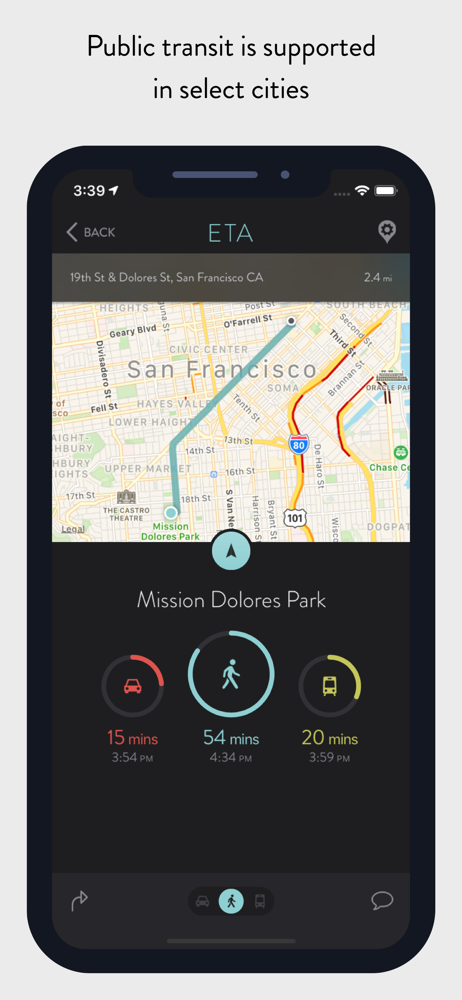
ETA is a great concept. The app does give an eta on my saved destination but it needs work on the Apple Watch Complication. These are my feedback notes and I hope the developer(s) sees them. First, the Complication does not automatically update when I raise my wrist. I have to open the app on the watch, go to the main screen, force press to get the option to refresh. The app will save what screen you are on when you use the Complication but when you leave with the destination screen selected, the only force touch option is “Set Complication”. If we can’t get the functionality to have the Complication update in real time or every minute or every time you raise your wrist, then we need a second force touch option, to force refresh, when you are in a destination screen. Honestly, the ability to have it update automatically in real time is more preferred. Second, in the new Infograph face, what does the numbers mean? The graph for the Complication has min 0 and a variable max. The indicator dot on the graph line does not move. The variable max number does not match the ETA timer. An example, I have a 40 minute commute and the Complication is set to 0 - 13. What is the 13? It’s not miles. I have no idea what the function is for. This needs context. If it was explained, I’m sorry for not seeing it. Third, the developer website only loads the message “Mcrypt PHP extension required.”. This comes off on both Chrome and Safari browsers. I wanted to give my feedback there instead of a review and I couldn’t find a developer email.
Update: Increased a star because a lot of gripes have been fixed! The app has been working consistently now, and ETA is always updating reliably. I still wish I could get the app to use google maps for time estimates since Apple maps estimates are more hit and miss for me. In fact if I could see the maps, google maps, and waze estimates at the same time then that would be killer app status. So I always click through to google map directions to get their estimate. But if you just want to see multiple ETAs at once, then this shines at that! Old review below ———— I really want to love this app. In fact this app is on my home screen even though I have issues. Often, I will open it and it will remember my location being somewhere else and I will have to force close for it to update. If I don’t notice, I’ll hit the button for directions and it will give me a route starting from the wrong location, since it sends coordinates to the connecting map apps instead of real addresses and “current location” Watch apps and widgets don’t update every time I look at them, creating a few extra steps to get them to work or else just give up and open maps directly. Sometimes the app won’t update at all and I need to force close and restart it Reason I still use it is that it’s nice to see drive times to multiple locations at once. Makes me learn traffic tendencies better even if I am not interested in going to everything on my list. And when it works it’s fantastic, although I still always open the link to google maps to ensure the routing is right, as it uses Apple maps as a backbone which isn’t always as accurate for times. Why can’t I choose which map service to give time estimates for. Good app, but lots of room for improvement
** ETA supports the latest iOS and watchOS features including informative iOS Home Screen widgets and powerful complications for your Apple Watch watc...
| Name | Price | Type |
|---|---|---|
| Theme Library | $1.99 | One-time |
| Calendar Sync | $1.99 | One-time |


