
Check the acquisition promise
Read the store headline, screenshots and description. What problem is the app promising to solve?
Study the storefront ↗
Cozyla · iOS
Explore the ad evidence, study the storefront, and build your next acquisition hypothesis.
01 / Creative research
Read the store headline, screenshots and description. What problem is the app promising to solve?
Study the storefront ↗Explore apps with direct store-link matches. Compare their hooks and formats without assuming the same approach works here.
Browse observed advertisers ↗Store rankings and revenue estimates describe market context. They do not establish ad spend, conversions or ROAS.
Review the market context ↗02 / Storefront & product
Study the product story and store experience behind the acquisition funnel.




03 / Market context
Keep revenue, downloads and store rankings separate from advertising performance.
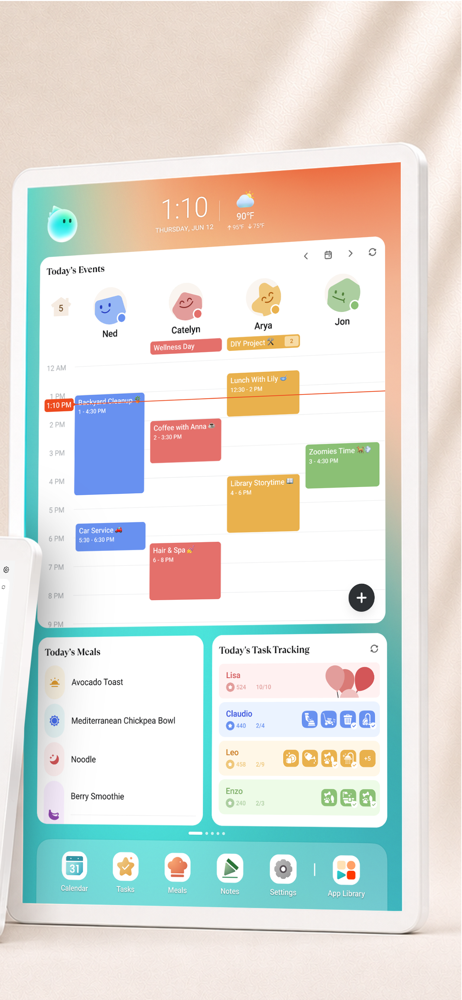
I rarely leave reviews, but the new AI features in Cozyla have genuinely changed the way I manage my life. Within minutes, it took me from having a completely empty calendar to a fully organized, color-coordinated schedule planned out for the next couple of months. As someone with ADHD, the visual organization alone brings me an incredible sense of relief. Instead of feeling overwhelmed trying to keep track of everything in my head, I can finally see my family schedules, routines, appointments, and tasks clearly in one place. It makes daily life feel calmer, more manageable, and far less chaotic. The combination of the smart AI planning and the visual layout is what makes this app stand out for me. Cozyla has become more than just a calendar, it feels like a real support system for my home and family life.
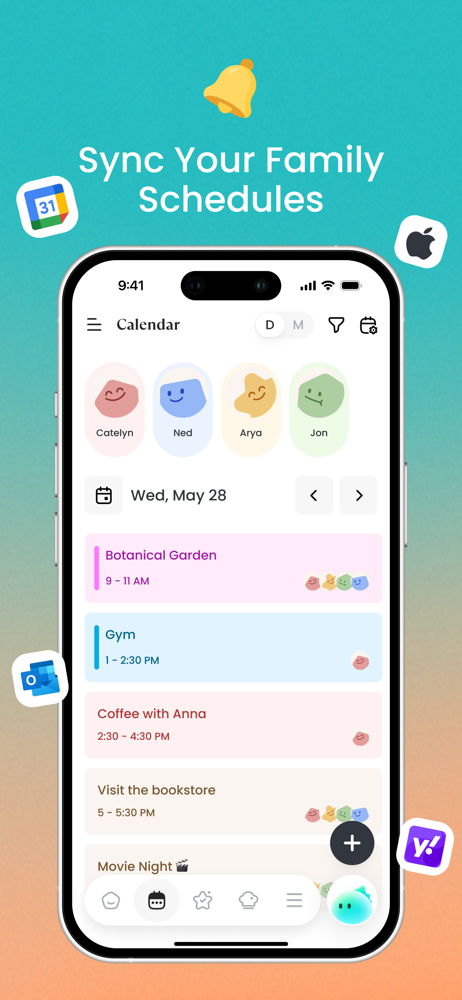
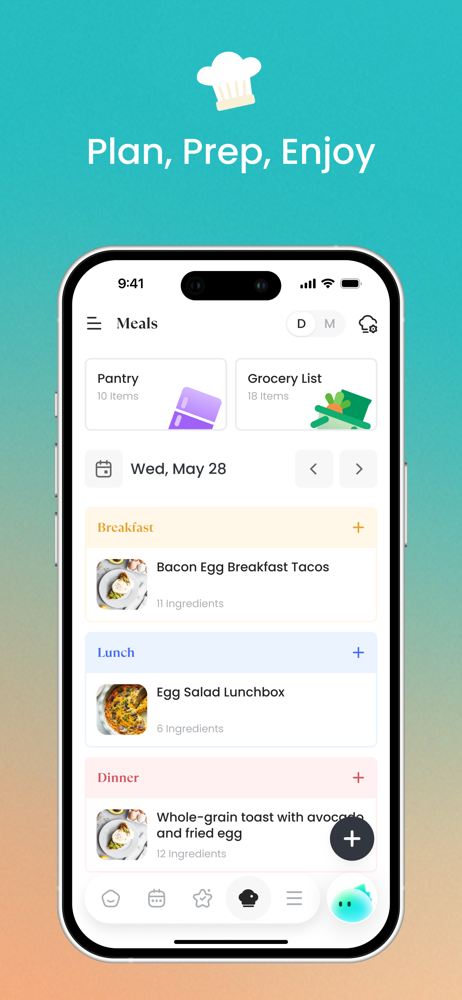
We’ve had it about 6 months now and it has been worth the purchase. While the shared calendar is great my favorite part has been the grocery list function, whenever something runs out it’s easy for anyone to add the item to the list and has saved me many phone calls from the grocery store asking if there’s anything we need. Being able to make different lists for different stores is great. While you can have the items saved and just click to add/remove there is no option to alphabetize your items which makes it difficult to find the items to add. Also love that you can upload photos as the screen saver without having to pay a subscription like other calendars! Lastly I didn’t think my 3yo would care about the chore/reward function but it’s become the holiday of his night checking off his chores/daily routine activities.
I’ve really been loving the Cozyla app along with the digital calendar. It’s incredibly easy to use, which makes keeping everything organized feel simple instead of stressful. The layout is clean and straightforward, so everyone in the family can jump in without needing a tutorial. One of my favorite parts is that the whole family can add their own events, reminders, and tasks into the app. It keeps everyone on the same page and makes coordinating schedules so much easier. No more missed appointments or last-minute surprises. Between the shared access, ease of use, and how smoothly everything syncs, it’s become a must-have in our daily routine for keeping life running a little more smoothly.
Cozyla+ keeps your family's whole life together in one warm, easy place—calendar, tasks, meals, and photos, all in sync. Built for real family life. L...
| Name | Price | Type |
|---|---|---|
| Routie Super (Monthly) | $5.99 | Monthly |
| Calendar Super Monthly | $6.99 | Monthly |
| Calendar Essential (Monthly) | $7.99 | Monthly |
| Routie Super (Annual) | $49.99 | Yearly |
| Calendar Super (Annual) | $59.99 | Yearly |
| Calendar Essential (Annual) | $79.99 | Yearly |


