
Check the acquisition promise
Read the store headline, screenshots and description. What problem is the app promising to solve?
Study the storefront ↗
Shayes Apps LLC · iOS
Explore the ad evidence, study the storefront, and build your next acquisition hypothesis.
01 / Creative research
Read the store headline, screenshots and description. What problem is the app promising to solve?
Study the storefront ↗Explore apps with direct store-link matches. Compare their hooks and formats without assuming the same approach works here.
Browse observed advertisers ↗Store rankings and revenue estimates describe market context. They do not establish ad spend, conversions or ROAS.
Review the market context ↗02 / Storefront & product
Study the product story and store experience behind the acquisition funnel.




03 / Market context
Keep revenue, downloads and store rankings separate from advertising performance.
I tried a few similar apps and this was the winner. I bought the upgrade. Easy to enter. COMPACT listing on screen widget which allows 3-4 events to show. I have 2 widgets in first screen of iPhone with enough room to add 2 rows of apps/groups below. My keep-it-simple husband, after viewing my set up downloaded the basic app and is quite satisfied. NOTE: For me, it was a bit confusing that I had to “move” events with my finger for chrono order. New entries go to the bottom. Maybe I’m doing something wrong BUT dropping to the bottom makes sense if someone wants to prioritize reminders vs listing in chrono-order. EG upcoming vacation in 2 months is above next week’s dental appointment. TIP: when moving a record, after holding finger to activate move feature, direct your finger to move the record along the left side of screen. For me, easier than getting past the other records. After dropping, give it a few seconds to anchor. It’s easy to think it did not move properly.
This is EXACTLY the countdown app I was looking for. I wanted a countdown app that is fully supports the latest iOS developments. This app delivers in spades with: pointer support (including hover state and right -click context menus); ios 14 widgets (including customization of data-point selection and color) and Siri Shortcut support. It includes support for all of Apple’s platforms including iPhone, iPad, watch and Mac. And it features iCloud sync of events to keep events on all those devices in sync. Many aspects of the app are highly customizable including: customize the data shown for events (days, hours, minutes, seconds); choose which events are displayed in widgets; column view of events; sort order of events and much more. The app received a huge compliment being included in MacStories’ Federico Viticci’s Must-Have Apps of 2019. It has a “clean” UI reminding me of an app Apple might build (the app icon is also very professional looking). And (very important), the developer is very responsive to requests for assistance and feature requests. I highly recommend this one!
I currently use a different countdown app. I liked the look of this app, and the watch complication is very well done (and even supports the new Infograph watch face), so I downloaded it to try. Unfortunately, when counting down by days (as opposed to days+hours+minutes) there is a weird off-by-one design in the countdowns from this app. For example, if you have a countdown to your birthday, you'd reasonably expect the count to be "2" when it is two days before your birthday, "1" on the day before your birthday and "0" on your birthday itself. That makes sense and matches how people talk about the concept of "how many days until". This app is different: "2" in this app is *three* days before your birthday, "1" is two days before your birthday, and "0" is the day before your birthday. On your birthday itself, the counter reads "364" days, using the logic that it's now 364 days until your *next* birthday. I think I understand why the app was written this way: strictly speaking, on the day before your birthday, it's less than 24 hours to go, so it's not one full "day", and so this app shows it as "0" days to go. The problem is that this is not how people think of and speak about countdowns (or how other countdown apps work). To humans, the rocket launches at zero, not at negative 1. I love the rest of the features, but this sort of breaks it for me.
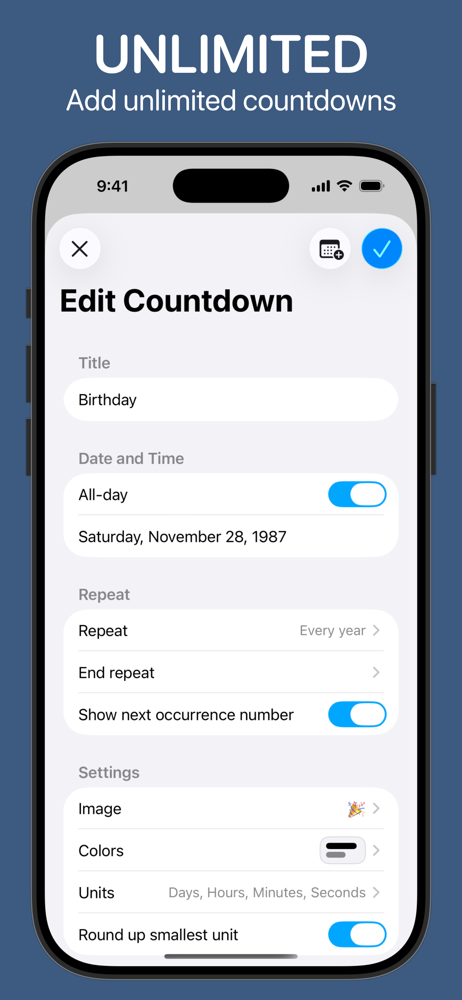
Countdowns helps you count down to something you're looking forward to, whether that's a wedding, birthday, or new iPhone! Need to count up from it in...
| Name | Price | Type |
|---|---|---|
| Countdown Premium (Monthly) | $0.99 | Monthly |
| Small Tip | $0.99 | One-time |
| Medium Tip | $4.99 | One-time |
| Countdown Premium (Annual) | $7.99 | Yearly |
| Large Tip | $9.99 | One-time |
| Lifetime Unlock | $19.99 | One-time |


