
Check the acquisition promise
Read the store headline, screenshots and description. What problem is the app promising to solve?
Study the storefront ↗
Scimonoce Software LLC · iOS
Explore the ad evidence, study the storefront, and build your next acquisition hypothesis.
01 / Creative research
Read the store headline, screenshots and description. What problem is the app promising to solve?
Study the storefront ↗Explore apps with direct store-link matches. Compare their hooks and formats without assuming the same approach works here.
Browse observed advertisers ↗Store rankings and revenue estimates describe market context. They do not establish ad spend, conversions or ROAS.
Review the market context ↗02 / Storefront & product
Study the product story and store experience behind the acquisition funnel.




03 / Market context
Keep revenue, downloads and store rankings separate from advertising performance.
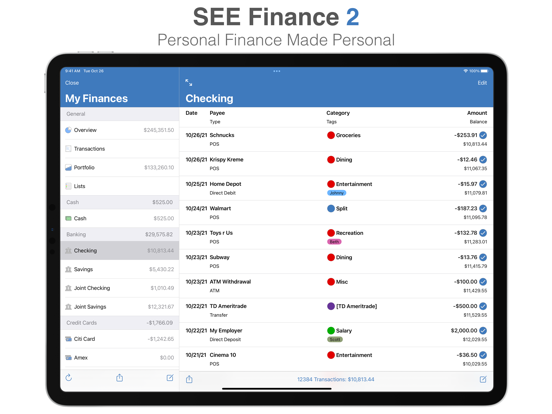
I really, really wanted to love this - I definitely want to use iCloud for syncing, and the syncing worked perfectly. But the interface is poor - others have noted some of the issues - I would add that it just looks tired, that the transaction entries don’t show enough data unless you click on them, and then you have to exit; that split entries require clicking on the little split sign rather than just seeing the split when you open the entry; that you can’t do search and replace of categories, which made the import clean-up terrible. I also think the budget function is too limited. So, as much as I really applaud these guys for a non-subscription, iCloud based syncing app, I don’t think I can use it. I am not sorry I bought the app - it was worth exploring, and I will keep my eyes on this app in hopes that it matures into something that works for me.
I use this app on all my devices and enjoy the functionality of them. I used to use Banktivity, but like this better and with no account downloading fees. Yes, there are a few things I would like added, but the developer is working hard to improve his product. The best part is the OUTSTANDING customer service! I cannot say enough. Banktivity took me about a week for a reply. SEE has been between minutes and a couple hours, closer to the minutes zone. No complaints here. Give it a try! 10/22 Been trying to get support for the last 3 weeks as Direct Access needs to be updated to download Chase accounts. Absolutely no response from See. Others have also complained. Maybe the staff is gone for another six months or forever. Can’t get a reply and most of my accounts are with Chase. Must drop my rating until/if fixed. Would be nice if See would advise their faithful users what is going on.
The handling of finances and syncing works very well for me. The set up was the tricky part in getting banks to accept online access. But the everyday use of this app is aggravating due to user interface issues. On iPhone 8+ almost always, I am unable to read the full transaction...Payee name cuts off, Category is cut off, and forget Memo. This is due to SF using System font size default. While that’s acceptable for emails, texts, and web pgs that wrap, not for financial ledgers. Sure, I can adjust it quickly in Control Center, but is that the typical experience of any iOS app? So a preference setting for this is sorely needed...it really makes it impractical to use right now. Overall, the UI has various design flaws especially with settings & prefs...it’s always dependent on the screen context instead of universal to the app; you have to change context (account, report, data file) to change that UI. And for God’s sake, can some financial app help us lefties and NOT have the new entry “+” on the right side, especially at the bottom...at least put it in the middle! Overall a good app but this is due to the years and efforts put into the Mac version...this iOS app just suffers from 1.0 and the need for better development for a mobile device.
Manage all of your financial accounts in a single place and gain control over your finances. Track all of the financial accounts you might have includ...


