Check the acquisition promise
Read the store headline, screenshots and description. What problem is the app promising to solve?
Study the storefront ↗
Saldo Apps Inc. · iOS
Explore the ad evidence, study the storefront, and build your next acquisition hypothesis.
01 / Creative research
Read the store headline, screenshots and description. What problem is the app promising to solve?
Study the storefront ↗Explore apps with direct store-link matches. Compare their hooks and formats without assuming the same approach works here.
Browse observed advertisers ↗Store rankings and revenue estimates describe market context. They do not establish ad spend, conversions or ROAS.
Review the market context ↗02 / Storefront & product
Study the product story and store experience behind the acquisition funnel.


03 / Market context
Keep revenue, downloads and store rankings separate from advertising performance.
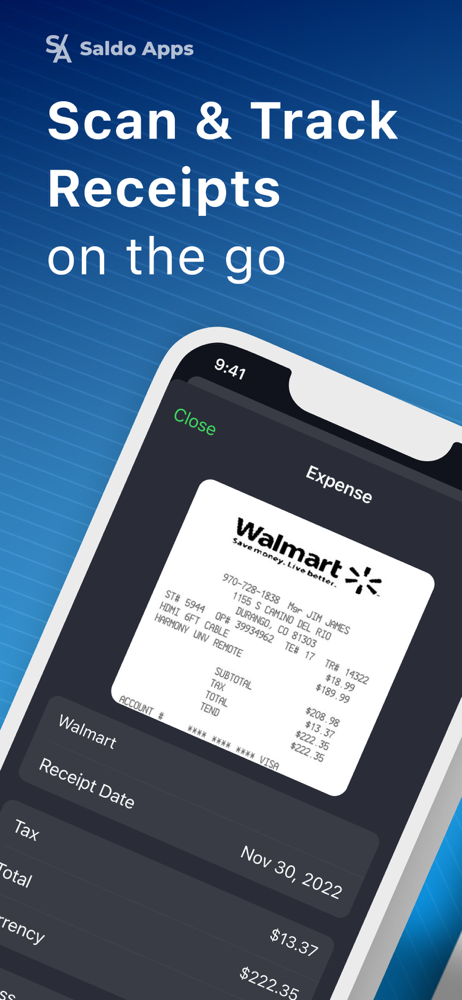
Upon downloading this he app in a great rush to get caught up on my receipts. The app appeared to be getting into position to make the scan of the receipt with the green capture field. The field had to be initiated with h the take a picture button at the bottom of the screen, and the first capture was a picture of the receipt, background and everything. So I tried it again, I am thinking that I know how he green field will capture the receipt and bring the receipt into frame and I will have a digital copy of my actual receipt. The second go to as the same, wrinkles and unevenness. I guess I expected more of a scan of the receipt than just a snap shot or pic of the receipt, especially with the green capture field moving and searching for the edges and format of the receipt. The app is pretty simple to use and after the accepted scan the price is 8.99 per month. I would like a more clear and detailed look to the receipts for ease of detail information if needed.
Great app to log your receipts but it does not support scanning multiple pages for a single receipt. Some of my receipts don’t show what the charges are for on the total page so I need to include a second or 3rd page for a receipt entry. After emailing the company for instruction, they said “yes you can, good luck” basically. When I emailed back twice more for more specific clarification they have neglected to respond. There may be better options/scanners out there, but I paid for a year upfront. I’ll be looking in to other options next year UPDATE I have now heard back from the development team and was informed of a way to log multiple pages. It requires a little more effort, which is not ideal, but it is a way to scan multiple images. I have recommended they add the ability to scan multiple pages for a single receipt entry and will try the workaround method they described to me in the meanwhile. If added, a multiple image scan for a single receipt would make this app top tier imo
I currently have credit and debit as my budget tracking app. This app exports expenses easily to credit and debit, but when I scan receipts I would say it only recognizes the correct date, total, merchant about 50 to 60% of the time. Some of the receipts it never gets correct no matter how many different ways I try to scan it. Consequently I have to manually edit many of the purchases which makes this app less efficient for me. Increasing the accuracy or helping the app to learn receipts from stores I frequent (CVS receipt seemed to confuse it) would make it a time saver. The other feature that would be helpful is to get the app to recognize which account (credit card and which one, cash, etc) was charged and include that in the information about the purchase. Currently this app seems only marginally more effective than manual entry to me so I did not purchase the subscription.
Scan receipts and create expense reports to track your business and personal accounting. Our receipt scanner app uses OCR technology for smart receipt...
| Name | Price | Type |
|---|---|---|
| Receipt Scanner Weekly trial | $0.49 | Weekly |
| Monthly Subscription | $4.99 | Monthly |
| Saldo Apps Premium Weekly | $7.99 | Weekly |
| Receipt Scanner Monthly | $9.99 | Monthly |
| Receipt Scanner Monthly, trial | $9.99 | Monthly |
| Receipt Scanner Monthly, trial | $9.99 | Monthly |
| Saldo Apps Premium Weekly | $9.99 | Weekly |
| Saldo Apps Premium (Monthly) | $14.99 | Monthly |
| Saldo Apps Premium Annual | $99.99 | Yearly |
| Receipt Scanner PRO (Annual) | $99.99 | Yearly |