Check the acquisition promise
Read the store headline, screenshots and description. What problem is the app promising to solve?
Study the storefront ↗
Kyunghyun Park · iOS
Explore the ad evidence, study the storefront, and build your next acquisition hypothesis.
01 / Creative research
Read the store headline, screenshots and description. What problem is the app promising to solve?
Study the storefront ↗Explore apps with direct store-link matches. Compare their hooks and formats without assuming the same approach works here.
Browse observed advertisers ↗Store rankings and revenue estimates describe market context. They do not establish ad spend, conversions or ROAS.
Review the market context ↗02 / Storefront & product
Study the product story and store experience behind the acquisition funnel.


03 / Market context
Keep revenue, downloads and store rankings separate from advertising performance.
최근에 해외여행 준비로 주로 해외 사이트를 접속을 자주 하는데 카페에 가서 서핑을 하다보면 느린 경우가 많았습니다. 카페에 설치된 와이파이 사용할때 와이파이를 통한 인터넷 접속이 느린건지 해당 사이트가 느린건지 궁금할때가 많았는데 이 앱으로 와이파이 실제 속도가 측정되니 무엇이 문제인지 알 수 있어서 대응하기 편합니다. 요즘 카페나 가게에 와이파이 설치가 많이 되어 있어서 설치 해두면 요긴하게 사용할 수 있을것 같네요
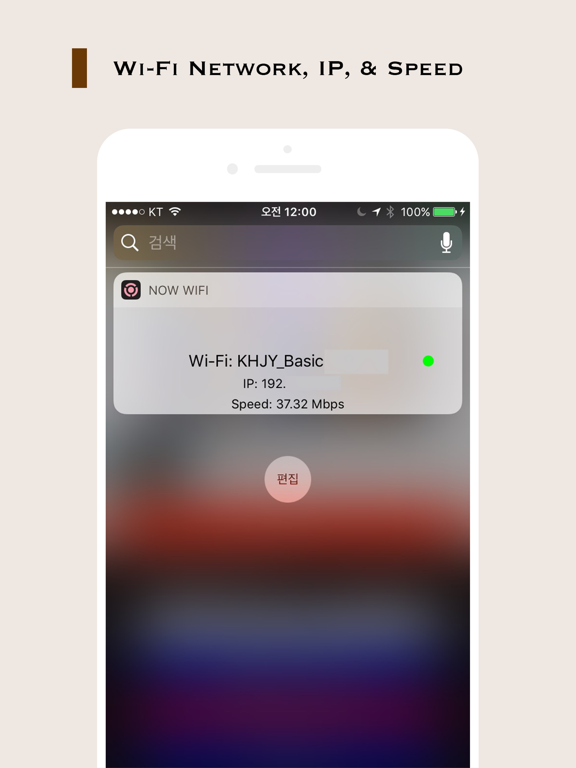
현재 외국에서 근무중인데 이곳 환경이 속도느린 오픈된 와이파이 신호가 많이 있습니다. 그래서 매번 속도 빠른 신호를 잡아주고 현재 잡힌 신호가 뭔지 확인 하는 과정이 불편했는데 위젯에서 바로 확인이 가능하니 엄청 편리하네요.
집에 듀얼밴드 와이파이를 쓰고있는데..평소엔 2g 실시간으로 드라마나 영화볼땐 5g로 이용하고있어요. now wifi는 직접 설정 와이파이화면으로 안들어가도 현재 어떤 와이파이가 연결되어있는지~ 속도가 어떤지 한눈이 보여주기때문에 굉장히 편리해요!!! to bottom에 이어서 굉장히 잘 사용하고 있습니다!!!! 만들어주셔서 감사합니다~
지금 연결된 WiFi 이름, 네트워크 속도, IP주소를 위젯을 통해서 빠르게 확인 할 수 있습니다. 자주 찾는 스타벅스에서 간혹 WiFi가 이상한 곳으로 연결되는 경우가 있더라구요. 이런 경우를 확인하려면 "설정-WiFi"로 찾아야하는데 너무 불편합니다. 이 앱을 사...