Check the acquisition promise
Read the store headline, screenshots and description. What problem is the app promising to solve?
Study the storefront ↗
Techet · iOS
Explore the ad evidence, study the storefront, and build your next acquisition hypothesis.
01 / Creative research
Read the store headline, screenshots and description. What problem is the app promising to solve?
Study the storefront ↗Explore apps with direct store-link matches. Compare their hooks and formats without assuming the same approach works here.
Browse observed advertisers ↗Store rankings and revenue estimates describe market context. They do not establish ad spend, conversions or ROAS.
Review the market context ↗02 / Storefront & product
Study the product story and store experience behind the acquisition funnel.
The store evidence
US store price
$3.99
US rating
4.8 / 5
US rating count
9,233
Current version
9.2
2026-09-13 · Developer notes
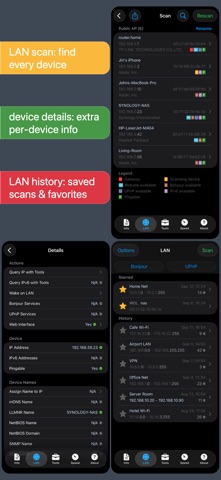
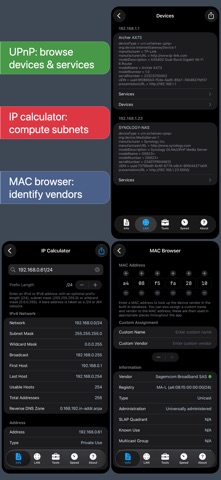
- MAC addresses and vendors are shown again on iOS 27 and newer - IPv4/IPv6 calculator with details about addresses, ranges and subnets - MAC address browser showing details about a MAC address, with custom name and vendor assignment - Speed test: server latency measurement, full results (including graphs) kept in history, and custom names and notes for history items - WS-Discovery support in the LAN scanner, improving device detection on Windows networks - Improved device name and vendor detection in the LAN scanner - Support for scanning devices connected to the personal hotspot - iOS 27 compatibility fixes - Many other bug fixes and minor …
Store metadata collected 2026-11-02 UTC · US storefront · Source record. Free may include in-app purchases. Public data does not update revenue estimates.



03 / Market context
Keep revenue, downloads and store rankings separate from advertising performance.
Hey, Apple, I’m talking to you…soooo, why not? Cuz this pairing of apps provides essential information! Why do I need to employ a third party in order to gain a little situational awareness, Apple?! Not the tactic of a copilot, let alone a combat veteran that needs the top guns! Stop tasting our sweet juicy data and memory-holing it to the priestly class of your occult dev(il)s! It’s common knowledge that knowledge is power, and for unlawful carnal knowledge, BigFruit wants us powerless, like a hellish Cupertino Air conditioner during wildfire season! Are they evil, or are they misunderstood? Are they rotten to the core, or is this simply a misunderstanding between a big worm and we birds who flock? You can and are able to prophesies that these apps are now and shall be installed on every one of my networked iFruits, whole eBooks, iPhondle slabs, and WacProse. Given the world market our dear demigod has created, having rested on the seventh day whilst ignoring the pleas of we drowning men, the App Store is now overly ripe with men playing God in attempt to right the perceived slight…and not all we cut from the same cloth. THIS APP IS THE BEST AROUND - its never gonna let ya down! Thank Heavens!
After scanning, I viewed the devices on my WIFI and moved some from 5 Mbps to 2.5 Mbps to improve streaming. I had an older iPad, iPhone, and printers using up bandwidth that I needed for my Smart TV, Apple, and Roku TV boxes. The TVs were buffering and after I made changes, the buffering stopped. Also in these recent times with Covid-19, many users are on WIFI, so I test for download and upload speeds. I can view when the speed is compromised. When it is real bad, usually on weekend mornings, I place a call the ISP and they usually restore service. I like this tool so well, I now use the premium version. I previously used other network speed testing apps until I found Net Analyzer, where you can view all your devices and what frequency they occupy. I hope in the future a spectrum analyzer is available to improve setting up a device to an unused or less used channel. I recommend this to everyone.
The nifty app has a comprehensive set of tests and tools for IT/Network guys. It allows you to view network information on your iOS device that’s not limited to just WiFi. It can read and test from Cellular and Ethernet connections as well. You have the ability to accurately traceroute, dns lookups etc, as well as the ability to ping (variable packet size and timing) and run speed tests that plots the speed fluctuations over a set period of time. The upload test portion of it isn’t as robust from my experience but their servers can definitely take upwards of 70 Mbps which is more than sufficient for most tasks in residential and commercial environments. Of all the features, I’d commend the LAN scanner the most. I use it often and I like the fact that it shows you in the GUI which devices have a web interface, are pingable, or support IPV6. You can even access the web interface by clicking the link within the app itself. TL;DR - Get the paid version for sure if you are even a novice Network Admin, you’ll like it
Network Analyzer Pro is a complete network toolkit that turns your iPhone or iPad into a powerful diagnostic instrument. Whether you are troubleshooti...