
Check the acquisition promise
Read the store headline, screenshots and description. What problem is the app promising to solve?
Study the storefront ↗
Philip Broder · iOS
Explore the ad evidence, study the storefront, and build your next acquisition hypothesis.
01 / Creative research
Read the store headline, screenshots and description. What problem is the app promising to solve?
Study the storefront ↗Explore apps with direct store-link matches. Compare their hooks and formats without assuming the same approach works here.
Browse observed advertisers ↗Store rankings and revenue estimates describe market context. They do not establish ad spend, conversions or ROAS.
Review the market context ↗02 / Storefront & product
Study the product story and store experience behind the acquisition funnel.




03 / Market context
Keep revenue, downloads and store rankings separate from advertising performance.
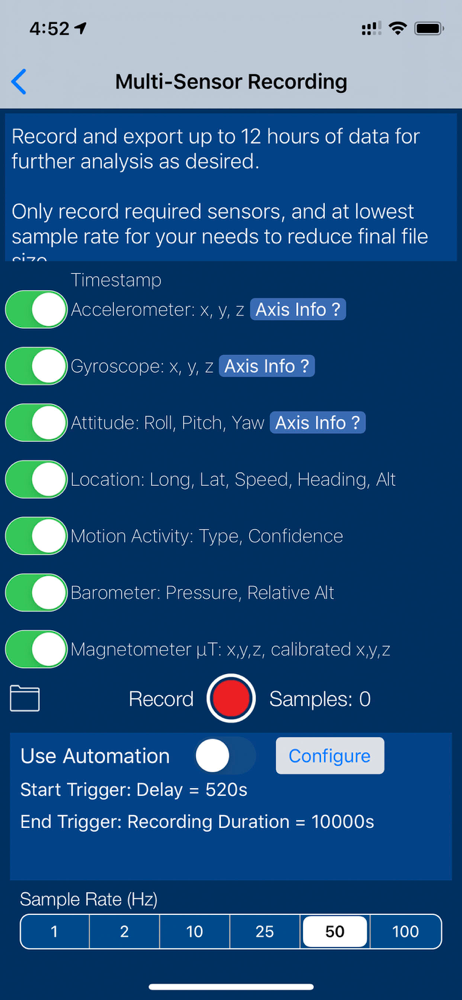
This was the only app I found to easy capture the telemetry data I was looking for. I tried several other app export data was challenging, logs were in accurate. I have two suggestion, the app needs some documentation, specifically what all the data headers are. When I airdrop the data and open I in excel and there are tons on columns some of which I don’t know what they are.
I’ve used several sensor apps on iPhone, and this is my favorite. I like the intuitive interface and the ability to record for long periods. I’ve used it in many applications, including precision analysis of aircraft motion during test flights.
Works great on my iPhone 11 except for the following that I have found so far. I set it to record for 45,000 seconds (750 minutes or 12.5 hours) and it shuts off at 6:00 hours. Also, I set the multi sensor recording to trigger on a g level and it only triggers on -g levels on the 2 g scale. I flew my iPhone 11 on a Blue Origin flight and found this out the hard way.
Sensor Play - the iPhone Sensor Playground, and the best app for serious scientific research and data recording. Used by engineers, scientists, teach...


