Check the acquisition promise
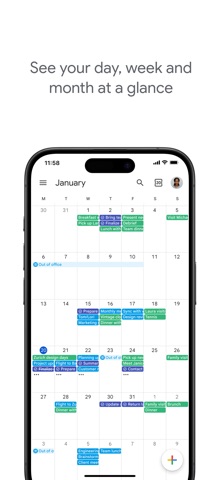
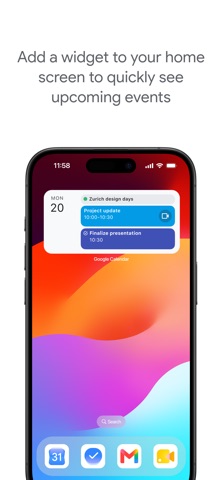
Read the store headline, screenshots and description. What problem is the app promising to solve?
Study the storefront ↗
Google LLC · iOS + Android
Explore the ad evidence, study the storefront, and build your next acquisition hypothesis.
01 / Creative research
Read the store headline, screenshots and description. What problem is the app promising to solve?
Study the storefront ↗Explore apps with direct store-link matches. Compare their hooks and formats without assuming the same approach works here.
Browse observed advertisers ↗Store rankings and revenue estimates describe market context. They do not establish ad spend, conversions or ROAS.
Review the market context ↗02 / Storefront & product
Study the product story and store experience behind the acquisition funnel.
The store evidence
US store price
Free
US rating
4.5 / 5
US rating count
132,424
Current version
26.40.0
2026-10-19 · Developer notes
• Bug fixes and performance improvements.
Store metadata collected 2026-10-22 UTC · US storefront · Source record. Free may include in-app purchases. Public data does not update revenue estimates.




03 / Market context
Keep revenue, downloads and store rankings separate from advertising performance.
Dec 23, 2025 to Jan 22, 2026 - US
Dec 23, 2025 to Jan 22, 2026 - US
| Date | Type | Rank | Category | Country |
|---|---|---|---|---|
| 1/1/2026 | TOP_FREE | #11 | 6007 | US |
| 1/1/2026 | TOP_FREE | #19 | 6007 | US |
| 1/1/2026 | TOP_FREE | #45 | productivity | US |
| 1/1/2026 | TOP_FREE | #110 | All | US |
| 1/1/2026 | TOP_FREE | #140 | All | US |
Mostly easy to use. Unfortunately, it syncs all of my events from my different accounts onto each calendar, which I do not like or need. The calendar on the web browser on my desktop is perfectly fine, each account keeps its events separate. This makes it frustrating since I rely on my phones calendar app because it's with me all the time. I hope this gets fixed soon.
It makes me INSANE when this calendar changes what I type. For example, if I type on November 1 a reminder to book a flight for December 6, Google calendar changes the date of entry to December 6 and I have to fight it to get my entry to stay on November 1. :-( It does the same thing for times of day! Also, I want to install it on my laptop, but can't seem to do that.
used this for years now. it's good. it needs more though. it needs to have moon phases, would help for those who keep track of it, be it for gardening/farming, photography, sky gazing, etc. also would be nice to have the option to add holidays from other cultures as not everyone solely celebrates only the ones shown. it would also be nice if there were more customizable color choices for the memos. no real complaints. I like that you get notifications for your memos as well.
Google, if you read this, FIX IT PLEASE!!! I’ve used Google calendar for years and loved it. However, a recent update has removed a core functionality I’ve appreciated and relied on since I started using this app as my primary calendar. You used to be able to choose which view you wanted to see when tapping on an individual day from the month overview: You could make the default either “day” (which is broken down in an hourly time-block format for only the date you select), or “schedule” (which displays a list of your overall events/tasks starting on the day you select, with the ability to scroll continuously to see events for other days). I MUCH prefer the schedule view because it’s more concise and you don’t have to scroll to see everything. You also don’t have to back out to the monthly view or use the month dropdown to see a different day’s events, as you could continuously scroll to it. Viewing the schedule is still an option on its own, however it is no longer possible to make this the default daily view when selecting a date from the monthly overview. This significantly retracts from the ease and appeal of using this app for me. I hate to say it, but I’m seriously considering switching to a different calendar application if this doesn’t get fixed, which frustrates me because I have actual YEARS of events archived in Google calendar. PLEASE FIX THIS!!!
Google Calendar is a very convenient tool to use when managing your day to day life, especially with another person. I do recommend it over the default calendar app, but the only dispute I have with it is that there’s a constant bug that sets your time zone to Greenwich Mean Time (GMT), which is located within the UK. I’ve seen that many other people online have dealt with a similar problem and have found no real solution besides changing it manually. Unless you live in this area, you run the risk of finding out last minute that you the app has switched the time of an appointment in your calendar without notifying you. As someone who has health issues and schedules doctor visits constantly, and often times in advance, it’s frustrating to catch these thing last minute and have to battle with the app for it to stay corrected. It seems this bug does not affect all users, as the other person in my calendar does not experience this and all settings within the app and my phone itself are set to the correct time zone. Unfortunately for me it simply becomes aggravating after a while. Google I pray you fix this bug for the sake of my sanity. Thank you.
After a few months of very laggy, unresponsive, disappointing app behavior, I finally have had enough to leave a review in the hopes that it will help someone on the app team realize just how bad things have gotten, at least for me (my wife has the same issues on her iOS devices as well, so it’s not something unique to my account). I was surprised to see how many other reviews I have found with almost exactly the same issues that I have. The fact that the other reviewers have been reporting consistently issues since at least the beginning of 2018 with no improvement is nearly inexcusable. My primary issues in a nutshell - 1) often app opens to random dates at initial launch; 2) after initial app load, it generally takes 60-90 seconds (sometimes much longer) before the UI is responsive; 3) once everything has finally loaded (if I have not given up and force quit it already) there is way too much UI lag and sputtering as I try to navigate through different UI views — full month, daily agenda, etc. These issues combined render the app nearly useless for me in most everyday use cases. As an app developer myself, I can appreciate the complexity of creating a performant, well-functioning app. However, given how awesome this app used to be, and the level of satisfaction I expect from an app by Google, I’m just so frustrated and disappointed. I can’t understand why these issues have not received attention yet.
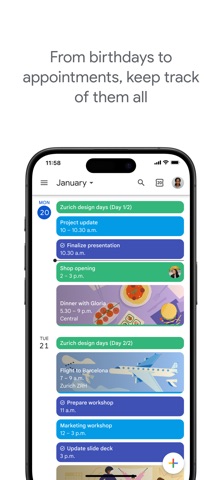
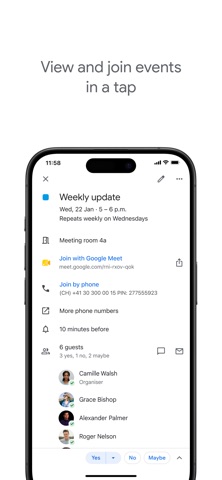
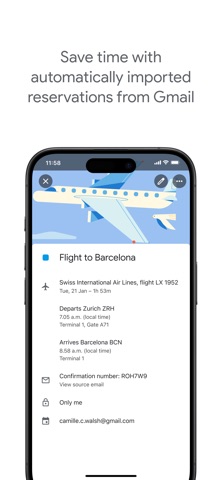
The official Google Calendar app helps you stay organized and plan your day with easy event creation, multiple calendars, customizable views, widgets,...