
Check the acquisition promise
Read the store headline, screenshots and description. What problem is the app promising to solve?
Study the storefront ↗
Neybox Digital Ltd. · iOS
Explore the ad evidence, study the storefront, and build your next acquisition hypothesis.
01 / Creative research
Read the store headline, screenshots and description. What problem is the app promising to solve?
Study the storefront ↗Explore apps with direct store-link matches. Compare their hooks and formats without assuming the same approach works here.
Browse observed advertisers ↗Store rankings and revenue estimates describe market context. They do not establish ad spend, conversions or ROAS.
Review the market context ↗02 / Storefront & product
Study the product story and store experience behind the acquisition funnel.




03 / Market context
Keep revenue, downloads and store rankings separate from advertising performance.
Not merely how well you sleep and how it can vary according to factors you can record at bedtime. Also wether you snore or talk in your sleep, and what you say. The graphs plotting "sleep quality" versus "weight" are clinically significant only if you have weight-induced sleep problems, likely if your BMI is 35 or more. For the comparison to heart rate, an iWatch is best, since it monitors your wrist pulsations continuously and allows the app to compare it to the movement and audio data it monitors while under your pillow. This will expose a side of you that you knew nothing about, fascinating in itself, and may warn you of upcoming or ongoing health problems. A truly useful app. It is one of the first things I look at EVERY morning! It also provides detailed info on how your behaved during the night, indispensable for persons with rate or thutm problems. 🤜 With the “iWatch” the amount of info generated is fascinating, but …. When you don’t wear the watch you get nothing, whereas when I did not have the iWatch the app would monitor my sleep (but not heart) with the iPhone under the pillow. The problem seems to be that when I forget to put the Watch on after charging the battery, I also forget to put the iPhone under the pillow. I’ll work on that for a future update of this review. ¡Great app! Don’t go to sleep without it😂 Problem solved: now I have two Apple watches and there is always one fully charged.
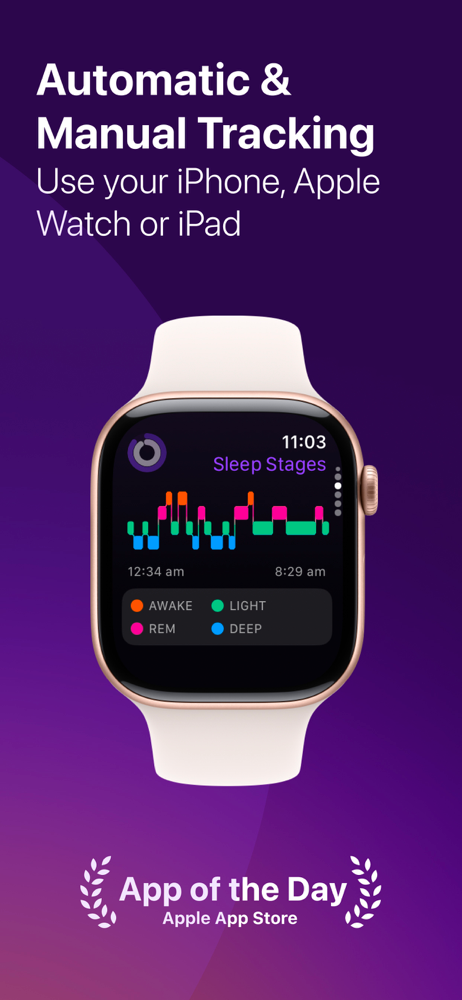
I love this APP…I now know if I “should be tired” or not Ok, I don’t like it when I charge my watch last minute and fall asleep without it because the biggest reason for me buying the watch was to know how much sleep I got, or didn’t get and need to get. So now it’s time for me to sleep but I love this app and I have said “Maybe Later” to rating it forever. But because I love you and our society, we would all do better, including me, if we got the sleep we need to power up our cellular selves and Spiritual selves (well God gives us rest…if we ask). But things Pillow Talk, LOL, so ask for it if you don’t have it. Get it? Got it? 😊 with all the “gettin “ I wrote above this followed…& that’s because I need sleep. How do I know? Because Pillow told me when I laid down and how many hours in bed and how many hours asleep and last night was only less than 5 hours. So goodnight and thank You Pillow for monitoring my sleep and making me aware of my deep sleep and REM and light sleep and whether it’s “normal” or not. This is well worth…your life and hopefully will give you even more nights sleep 🥰✌️Good Night and God Bless y’all and the Pillow pals who created this genius APP
I like the app and would rate higher but the Apple Watch issue really drives down the value for me at this point. - My suggestion is to find a way to simplify how the sleep analysis works on Apple Watch and ensure that it does so consistently. Not to mention if you need troubleshoot support that you can get it from beginning to end. It seems it worked fine when I first got the watch (3 days of painless reporting on my watch) and now it never shows my sleep analysis information on the watch. I’ve basically gotten fed up with attempting to trouble shoot - no real help from support. Now I just let it do it’s thing when I sleep (automatic tracking), and check the app on my phone now after spending almost 2 weeks trying to figure out the issue. I’ve done every possible fix available - still doesn’t update on my watch. Now I just use Apple sleep complications for my watch main screen and just check Pillow on my phone. It’s a little frustrating tho - not going to lie. I personally love the color and design of the analysis of Pillow for the main watch screen complication over the Apple sleep analysis, but I can’t get it to work and frankly I’m over trying. I pay for premium and considering that - I’d like to access all the functionality but at this point I’m tired of banging my head on the wall. Other than that (which is so so SO frustrating) it’s alright, but this pain point definitely drives my review scoring. Otherwise, I’d give the app 4-5 stars.
Sleep trouble? Sleep better with Pillow, your smart sleep tracker. Pillow can analyze your sleep cycles automatically using your Apple Watch, iPhone o...
| Name | Price | Type |
|---|---|---|
| Pillow Premium - Monthly | $9.99 | Monthly |
| Premium Sleep Tracking (Annual) | $39.99 | Yearly |
| Pillow Premium - Annual | $39.99 | Yearly |
| Pillow Premium - Annual | $39.99 | Yearly |
| Pillow Premium - Quarterly | $59.99 | Quarterly |


