App Profile: ClaroSpeak Plus
Android / Games / Puzzles
ClaroSpeak Plus
Installs:
Rating:
3.44
Total Reviews:
9
Top Countries:
AU, CH, GB
< $5k
/mo
< 5k
/mo
Reviews: What People Think About ClaroSpeak Plus
adamhenley
Rating: 4/5
This is a wonderful app. I use it more and more everyday for my college readings. I ask that the word limit (set at 20,000 words) be removed or changed to a million words. With newer and newer iPhones having more RAM and better processors, it is a unneeded limitation. I have some PDF documents that are very long that I would like to export as audio.
Also, please allow images from Dropbox to be selected. I can only access pdf and docx.
Also, please add a bookmarking ability so that I can return to a place in a file that is previously ocr'd.
**please make it so that when viewing a PDF, and you scroll through the quick view (by pressing the area on the bottom to view the real pdf view) that when you click back to the OCR'd rendering of it - that it would go to that page that corresponds to the pdf view instead of having to click through every page individually. This is annoying with PDFs of very large page size.
Thanks!
Grecofamily
Rating: 1/5
Purchased the bundle thinking it would great for my dyslexic daughter to help with the numerous worksheets she needs to read. Unfortunately it is terrible. Voices are terrible, it doesn't flow as a human voice would. Words are not spoken correct as they are typed on the page. For the cost this software/app should be accurate. Forget anything that has to do with math. I want my money back.
boiqrtsobg
Rating: 1/5
Barely functional and still has in app purchases for some functionality listed on the website (such as downloading an audio file)
About ClaroSpeak Plus
ClaroSpeak is a reading and writing app with high-quality text-to-speech, formatting controls, a wide range of fonts and styles and cloud storage integration.
ClaroSpeak Plus also includes our "Capture Text from Photo" feature with high quality Optical Character Recognition (powered by ABBYY).
ClaroSpeak provides visual highlighting in-sync with spoken words, a great range of color and font settings to allow for optimum reading, and word prediction to help with writing. ClaroSpeak is a quality app for proofreading text through listening, helping with reading and literacy development, and creating audio files from any text.
PRODUCT FEATURES
• Text-to-Speech
- Type into ClaroSpeak and have the text read back to you. You can check text and proofread it quickly and easily.
- You can import documents into ClaroSpeak from apps such as Mail, or import directly from Dropbox or Google Drive using ClaroSpeak's integration. ClaroSpeak can open a range of document formats including Word doc, PDF and epub.
- Text from any app can be copied and pasted into ClaroSpeak ready to be read back.
- Apple's speech recognition can be used to dictate text directly into ClaroSpeak, and can be listened back to ensure it is right.
- The Apple spell check works in ClaroSpeak too, further helping accuracy.
- You can save the text as an audio file using the same high-quality voice.
• High-Quality Voices
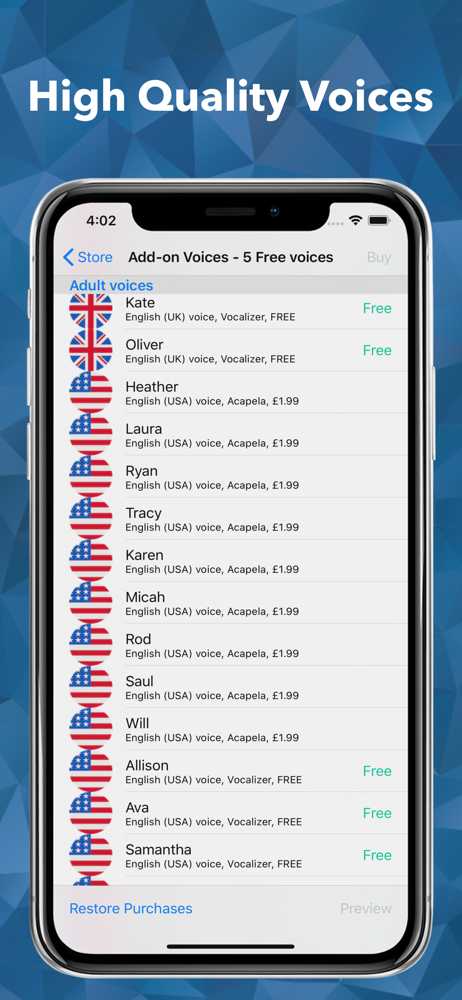
4 high-quality Nuance Vocalizer voices are available as free downloads, with the language of your choice.
The voice can be made to speak faster or slower. The voices are installed within ClaroSpeak, so they work when not online and do not use up any data allowance.
Additional Nuance & Acapela voices in 30+ languages and even more accents are available through in-app purchase in ClaroSpeak.
• Capture text from photo
This feature lets you select a photo from your library or take a new one with your camera. Your chosen image will be scanned for text, using high-quality OCR (powered by ABBYY), and the text in the image will be inserted into ClaroSpeak.
***Minimum camera spec: 2MP***
• Word Prediction & Autocorrection
Word prediction helps with writing more quickly and accurately. Train dictionaries from the current text so the best suggestions come up first. Enable Claro autocorrect and ClaroSpeak will use our specifically designed correction list to automatically correct misspelt words as they are typed.
• Visual Highlighting
Text is highlighted as the text is read back. Highlighting allows you to coordinate reading and listening. ClaroSpeak lets you pick the color and style of highlighting required.
There are four highlighting modes to choose from: none, word by word, word trail, or sentence by sentence highlighting.
• Font & Layout
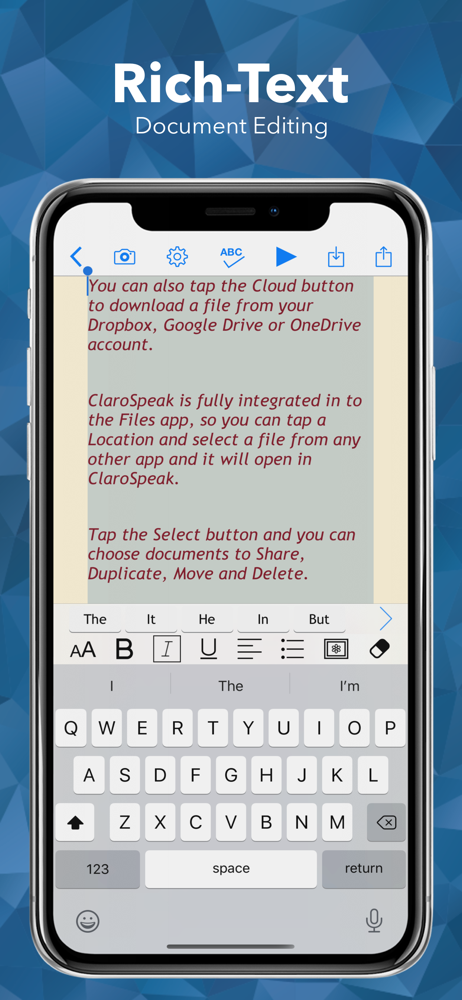
Change the font type, size or color to suit your needs. Layout the text for easier reading by adjusting the character, line and paragraph spacing and adjusting the page margins. Text can be formatted bold, italic and underlined to emphasize. Images can be inserted into the text from the camera or your library.
• Save to Audio
Convert any text into an audio file using any of the high-quality voices. This is quick and easy, allowing text to be listened to on the move. Great for proofreading on the go.
• Sharing your text
Text created within ClaroSpeak can be emailed, messaged, printed, opened in another app, or copied and pasted into another app, like Safari. Sending the text to Facebook and Twitter lets you join in with social media.
• Read webpages
You can now read webpages in Safari and other browsers, using the "Read with ClaroSpeak" extension from the share menu.
• Dropbox and Google Drive Integration
Open documents stored in Dropbox or Google Drive directly in ClaroSpeak. Save text and audio files directly back to Dropbox or Google Drive. Great for transferring files between devices and keeping files in the cloud.
For the latest news, tips and advice follow @ClaroSpeak on Twitter.
ClaroSpeak Plus also includes our "Capture Text from Photo" feature with high quality Optical Character Recognition (powered by ABBYY).
ClaroSpeak provides visual highlighting in-sync with spoken words, a great range of color and font settings to allow for optimum reading, and word prediction to help with writing. ClaroSpeak is a quality app for proofreading text through listening, helping with reading and literacy development, and creating audio files from any text.
PRODUCT FEATURES
• Text-to-Speech
- Type into ClaroSpeak and have the text read back to you. You can check text and proofread it quickly and easily.
- You can import documents into ClaroSpeak from apps such as Mail, or import directly from Dropbox or Google Drive using ClaroSpeak's integration. ClaroSpeak can open a range of document formats including Word doc, PDF and epub.
- Text from any app can be copied and pasted into ClaroSpeak ready to be read back.
- Apple's speech recognition can be used to dictate text directly into ClaroSpeak, and can be listened back to ensure it is right.
- The Apple spell check works in ClaroSpeak too, further helping accuracy.
- You can save the text as an audio file using the same high-quality voice.
• High-Quality Voices
4 high-quality Nuance Vocalizer voices are available as free downloads, with the language of your choice.
The voice can be made to speak faster or slower. The voices are installed within ClaroSpeak, so they work when not online and do not use up any data allowance.
Additional Nuance & Acapela voices in 30+ languages and even more accents are available through in-app purchase in ClaroSpeak.
• Capture text from photo
This feature lets you select a photo from your library or take a new one with your camera. Your chosen image will be scanned for text, using high-quality OCR (powered by ABBYY), and the text in the image will be inserted into ClaroSpeak.
***Minimum camera spec: 2MP***
• Word Prediction & Autocorrection
Word prediction helps with writing more quickly and accurately. Train dictionaries from the current text so the best suggestions come up first. Enable Claro autocorrect and ClaroSpeak will use our specifically designed correction list to automatically correct misspelt words as they are typed.
• Visual Highlighting
Text is highlighted as the text is read back. Highlighting allows you to coordinate reading and listening. ClaroSpeak lets you pick the color and style of highlighting required.
There are four highlighting modes to choose from: none, word by word, word trail, or sentence by sentence highlighting.
• Font & Layout
Change the font type, size or color to suit your needs. Layout the text for easier reading by adjusting the character, line and paragraph spacing and adjusting the page margins. Text can be formatted bold, italic and underlined to emphasize. Images can be inserted into the text from the camera or your library.
• Save to Audio
Convert any text into an audio file using any of the high-quality voices. This is quick and easy, allowing text to be listened to on the move. Great for proofreading on the go.
• Sharing your text
Text created within ClaroSpeak can be emailed, messaged, printed, opened in another app, or copied and pasted into another app, like Safari. Sending the text to Facebook and Twitter lets you join in with social media.
• Read webpages
You can now read webpages in Safari and other browsers, using the "Read with ClaroSpeak" extension from the share menu.
• Dropbox and Google Drive Integration
Open documents stored in Dropbox or Google Drive directly in ClaroSpeak. Save text and audio files directly back to Dropbox or Google Drive. Great for transferring files between devices and keeping files in the cloud.
For the latest news, tips and advice follow @ClaroSpeak on Twitter.
File size: 757910528
Launched countries: USAUCAGBIE
Minimum OS version: 13.0
Release Date: 1400076368000
Published by Claro Software Limited
Website url: https://www.clarosoftware.com/portfolio/clarospeak/
Publisher country: United Kingdom