Check the acquisition promise
Read the store headline, screenshots and description. What problem is the app promising to solve?
Study the storefront ↗
Nico Schroeder · iOS
Explore the ad evidence, study the storefront, and build your next acquisition hypothesis.
01 / Creative research
Read the store headline, screenshots and description. What problem is the app promising to solve?
Study the storefront ↗Explore apps with direct store-link matches. Compare their hooks and formats without assuming the same approach works here.
Browse observed advertisers ↗Store rankings and revenue estimates describe market context. They do not establish ad spend, conversions or ROAS.
Review the market context ↗02 / Storefront & product
Study the product story and store experience behind the acquisition funnel.



03 / Market context
Keep revenue, downloads and store rankings separate from advertising performance.
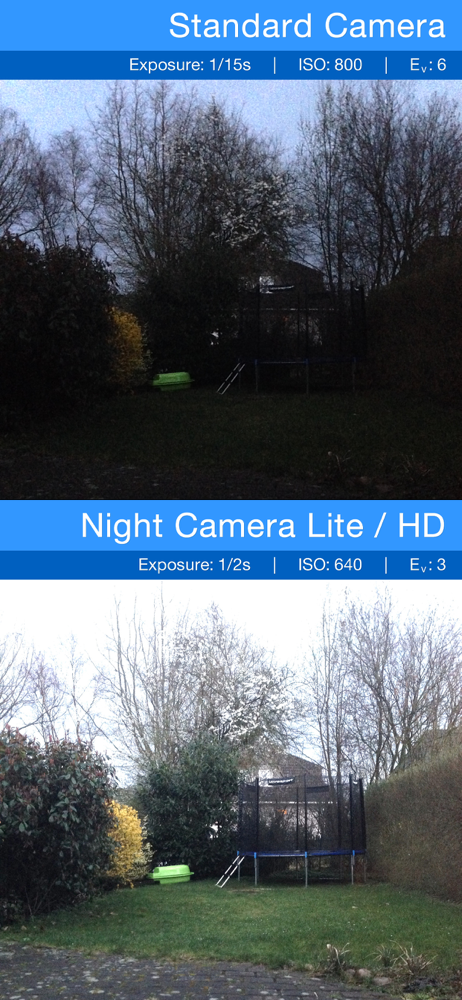
At first everything looked green (like night vision goggles) and super white/washed-out when I took pictures. There’s a button in the bottom left corner that says “exposure” when you click it, then there’s two settings you can change. There’s one on the left that’s next to a picture of a camera shutter, and then one on the right next to “shutter speed.” It took me a minute to figure out what was going wrong, but putting both on ‘auto’ did the trick. (putting shutter speed on auto might make the camera screen change slower than how fast you move your device but once I got it pointing where I needed it, it worked pretty well)
I use seven (7) camera apps. This app is my go-to camera, for evening, night or dark spaces. The intuitive user interface assists in capturing moments that can be gone, in the amount of time that it takes to capture the image. The difference is also understood, by visualizing the difference between recalling a great image from memory and being able to have an photograph of the moment. A moment that you can return and relive on-demand. That said, this camera is the complete package for taking great tableau shots or an elegant night scenes replete with the crispness of bright city lights.
I have purchased several low light and camera apps. This one is much simpler to use and enables you to take photos much quicker. Easy interface and the low light filters work quite well although with fewer features from lite version. Would be very nice if they added option to use another device to view camera view and use as a remote shutter so I can allow shutter to sit and adjust without having to screen capture button or volume button, which causes a little movement and decreases photo quality while taking by hand. But is very good app.
Thanks to the manual setting options for light exposure up to 1 second *, separate residual light- and ISO enhancement, Night Camera is perfect for ta...
| Name | Price | Type |
|---|---|---|
| Night Camera:One Month Premium | $1.99 | Monthly |
| Night Camera: One Year Premium | $5.99 | Yearly |
| Night Camera: One Week Premium | $8.99 | Weekly |
| Remove Ads | $9.99 | One-time |
| Night Camera Pro - Lifetime | $9.99 | One-time |