
Check the acquisition promise
Read the store headline, screenshots and description. What problem is the app promising to solve?
Study the storefront ↗
Chris Lawley · iOS
Explore the ad evidence, study the storefront, and build your next acquisition hypothesis.
01 / Creative research
Read the store headline, screenshots and description. What problem is the app promising to solve?
Study the storefront ↗Explore apps with direct store-link matches. Compare their hooks and formats without assuming the same approach works here.
Browse observed advertisers ↗Store rankings and revenue estimates describe market context. They do not establish ad spend, conversions or ROAS.
Review the market context ↗02 / Storefront & product
Study the product story and store experience behind the acquisition funnel.
The store evidence
US store price
$4.99
US rating
4.8 / 5
US rating count
310
Current version
1.2.1
2026-09-18 · Developer notes
Bug fixes for the sync system and start up
Store metadata collected 2026-11-02 UTC · US storefront · Source record. Free may include in-app purchases. Public data does not update revenue estimates.




03 / Market context
Keep revenue, downloads and store rankings separate from advertising performance.
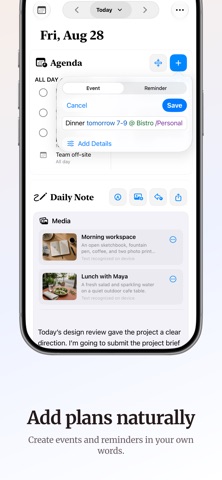
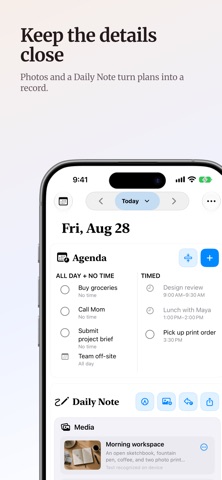
This app seemed like it was made for me. I live in Apple Calendar and Reminders and always wanted a way to have both show that wasn’t overwhelming. Showing reminders in the calendar app was nice but since it wasn’t ordered and it pushed timed and even all day events to the bottom, if I had a ton of reminders, it was too cluttered to read. The layout of All Day/no time alongside Timed is great. The widgets work nicely on phone & mac. I’m not using the Daily Note too often but it is a nice thing to have and as the developer noted in a video for the app, it’s great to update tomorrow’s Daily Note so you see it first thing the next morning. One bug I noticed was the medium widget on the iphone doesn’t say “x more” if not all the items can be displayed. It works fine on the small and large size widgets on iphone. Note, it also works on the medium sized Mac widget. So just an iphone problem. A feature I’d like would be maybe to be able to have all day Calendar events show up in the Timed section? I know it doesn’t make sense, but I have birthdays and a ton of reminders, and the birthday got buried on my phone and it wasn’t until I pulled up app on mac that I noticed it. Not a deal breaker but maybe some way to tweak that?
I’ve been waiting for an app like this for a long time. It’s simple, elegant, and incredibly powerful without feeling overwhelming. Having my daily notes, calendar events, and reminders all in one clean, distraction-free interface makes planning my day feel effortless. I also appreciate that it’s a true native Apple app with iCloud sync, widgets, and excellent privacy. There are no unnecessary features or clutter—just a beautifully designed experience that helps you stay organised and focused. Sometimes the best productivity apps are the simplest, and Parchment proves exactly that. Highly recommended.
The killer feature is that it integrates into, AND IS, your native Reminders and Calendar. Accessed from one place. It even gives a handy spot for personal notes to scribble for tracking things in your day. What it gets right: Time-sensitive reminders, daily to-do (agenda), and a place for miscellaneous mnemonic notes just for today’s scope. What it gets wrong: It’s mixing a flexible pop-up space for tracking projects or tasks that aren’t due today but have to be handled flexibly when you can get to them, some time this week or this month. It needs a digital sticky note TO-DO for all those “get to it later” items that need a reminder for the time period (upcoming week/month/quarter), but resist assignment to any particular day or time of day. And you DO NOT want to see them carried over in the same list of things that are assigned for today and today alone, if that makes sense.
Parchment is a private daily journal that brings your writing, plans, calendar, and reminders together in one quiet place. It uses Apple's Reminders a...


