App Profile: Dual Shot: Front + Back Camera
Android / Games / Puzzles
Dual Shot: Front + Back Camera
Installs:
Rating:
0.00
Total Reviews:
0
Top Countries:
SE, PT, LK
< $5k
/mo
< 5k
/mo
Reviews: What People Think About Dual Shot: Front + Back Camera
AppSuave
Rating: 1/5
Iphone 13 pro max, after download i tried it. No sound in all modes. Try to close and re-open app. Sound working, then try another without closing the app then there is no sound. also in overlay shot there is no sound even if i close the app and re open.
About Dual Shot: Front + Back Camera
Dual Shot is the ultimate dual camera app that lets you record with both the front and back cameras at the same time. Capture your reactions and your surroundings together in one smooth take. Whether you are vlogging, traveling, interviewing, or creating content, Dual Shot helps you tell your story from every perspective.
With three recording modes, you can easily switch between Split Screen, Overlay, and Dual Record to match your creative style. The app gives you full control over layout, lens, and preview, so every shot looks professional. You can preview in real time, adjust zoom, and choose your lens setup before you start recording.
Features
Dual Record - Record with both front and back cameras simultaneously and capture every moment as it happens
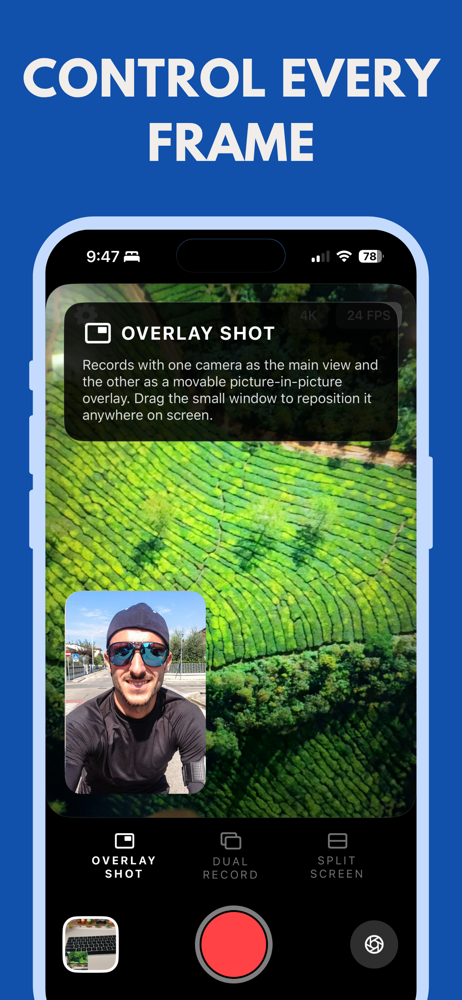
Overlay Mode - Display one camera inside another for picture in picture style videos perfect for reactions or commentary
Split Screen - Combine both camera views side by side for a clean and cinematic look
Real Time Preview - Switch layout or lens anytime before or during recording for complete creative flexibility
Adjust Zoom and Focus - Control each camera independently and fine tune your shot
Save and Share - Export in high quality ready for TikTok Reels YouTube and any social platform
Optimized for Performance - Smooth recording with minimal delay and smart lens switching
Perfect For
- Vloggers and content creators who want to record their reaction and environment at the same time
- Travel storytellers who want to capture both scenery and self in one shot
- Interviewers and journalists who need both perspectives in a single video
- Reaction creators and reviewers who want a simple overlay workflow
- Anyone who wants to make their videos more engaging and professional
Why Choose Dual Shot
Dual Shot makes dual recording simple and powerful. Unlike traditional camera apps, it allows you to film both sides of the story without editing or switching lenses manually. You can see both views live, customize layouts, and export instantly. Whether you are recording casual clips or creating cinematic videos, Dual Shot delivers the flexibility and quality you need.
With three recording modes, you can easily switch between Split Screen, Overlay, and Dual Record to match your creative style. The app gives you full control over layout, lens, and preview, so every shot looks professional. You can preview in real time, adjust zoom, and choose your lens setup before you start recording.
Features
Dual Record - Record with both front and back cameras simultaneously and capture every moment as it happens
Overlay Mode - Display one camera inside another for picture in picture style videos perfect for reactions or commentary
Split Screen - Combine both camera views side by side for a clean and cinematic look
Real Time Preview - Switch layout or lens anytime before or during recording for complete creative flexibility
Adjust Zoom and Focus - Control each camera independently and fine tune your shot
Save and Share - Export in high quality ready for TikTok Reels YouTube and any social platform
Optimized for Performance - Smooth recording with minimal delay and smart lens switching
Perfect For
- Vloggers and content creators who want to record their reaction and environment at the same time
- Travel storytellers who want to capture both scenery and self in one shot
- Interviewers and journalists who need both perspectives in a single video
- Reaction creators and reviewers who want a simple overlay workflow
- Anyone who wants to make their videos more engaging and professional
Why Choose Dual Shot
Dual Shot makes dual recording simple and powerful. Unlike traditional camera apps, it allows you to film both sides of the story without editing or switching lenses manually. You can see both views live, customize layouts, and export instantly. Whether you are recording casual clips or creating cinematic videos, Dual Shot delivers the flexibility and quality you need.
File size: 3374080
Launched countries: USAUCACNFRDEGBITJPKRRUDZAOARATAZBHBYBEBRBGCLCOCRHRCYCZDKDOECEGSVFIGHGRGTHKHUINIDIEILKZKEKWLBLTLUMOMYMTMXNLNZNGNOOMPKPAPEPHPLPTQAROSARSSGSKSIZAESLKSECHTWTHTNTRUAAEUYUZVEVNBOKHEELVNIPYGEIQLYMAMZMMYEBJBFCMCGCIJOLAMLSNTZUGZMZW
Minimum OS version: 18.6
Release Date: 1760338800000
Published by Kok Keong
Website url:
Publisher country: