
Check the acquisition promise
Read the store headline, screenshots and description. What problem is the app promising to solve?
Study the storefront ↗
AgileBits Inc. · iOS
Explore the ad evidence, study the storefront, and build your next acquisition hypothesis.
01 / Creative research
Read the store headline, screenshots and description. What problem is the app promising to solve?
Study the storefront ↗Explore apps with direct store-link matches. Compare their hooks and formats without assuming the same approach works here.
Browse observed advertisers ↗Store rankings and revenue estimates describe market context. They do not establish ad spend, conversions or ROAS.
Review the market context ↗02 / Storefront & product
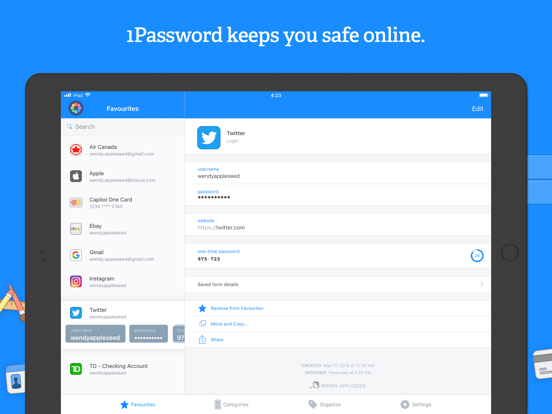
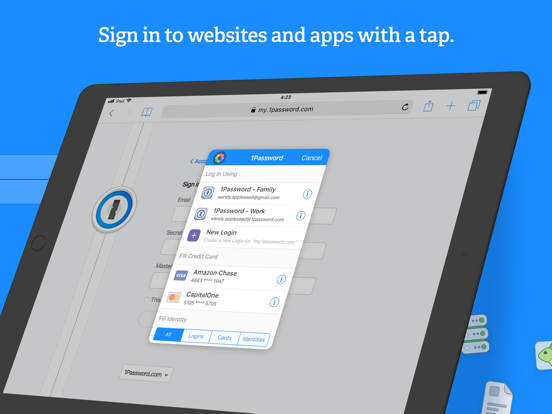
Study the product story and store experience behind the acquisition funnel.



03 / Market context
Keep revenue, downloads and store rankings separate from advertising performance.
I was completely in love with one password until I had to update my phone 2yrs ago. It duplicated everything in my account and it was not syncing consistently. It can be very confusing not knowing that you actually have to sign in even though the app is open and you have access to your data you aren’t necessarily signed in for it to sync, especially after a software update, which can really mess up a lot of things, also when you are using multiple email addresses for Work and Home and signed in under different identities on computers, it can get confusing having to load the apps under both users on computers. There’s a lot of real world issues that aren’t necessarily spelled out as to how to approach it, you kind of have to figure it out as you go. Migrating computers and using multiple drobbox accounts was a big obstacle because it doesn’t clearly say your vaults are now stored on a 1password cloud. For us that are not IT people some of that should be made more clear because going from older versions you assume you still need your own personal cloud storage. It does say you have 2gig but my thought process was you were just limiting the apps abilities— i know… stupid, but did cause a lot of brain work to think how i was going to set up identities and defaults. I can just imagine how overwhelming it is for people who struggle finding the on button…. With all that said, i still would not be without it because overall it makes life a lot easier.
Often websites don't share the password limits and requirements (e.g. 8-25 char, need 1 special character). Then, after you have the requirements, generating an adequate new password sometimes takes more than 1 attempts. Last pass understands this and is designed to help to make this process as easy as possible. 1Password does not. In the box where you need to add your new password, you can click a LastPass icon to generate a new one. Then, from that pop up, which keeps you on the original webpage, you can ADJUST what it will generate by length and features. On the other hand, 1password's link auto-generates a password, but it's always a crappy one. Short, like 8 characters, with few numbers or special characters, and always with a pronounceable segment. If you want to create a stronger password, you need to open the app, create a login for this new page, then generate a new password. Here, you can adjust the generation so it meets the needed features. However, it is difficult to copy the generated password, so you can bring it back to the website and paste it. In order to copy the generated password, you have to save it as a login. This is an extra step. Given that it often takes multiple attempts to create an adequate password, all these extra steps are a pain. I much prefer the lastpass method.
A safe haven for your passwords, account information, or just any valuable information for that matter. Accessed with one master password only YOU know and can remember easily, you’ll have an overview of ALL your inputed accounts or information with their respective passwords, PIN numbers, and security questions with answers. One of the great features of 1Password is that it can generate passwords for you if you so choose. You can set it up to where you can have 25 characters total with numbers and uppercase letters thrown into the mix (25 not being the max but you get the idea!) Absolutely a MUST have app for your phone if you have multiple online accounts. You ever sit there trying to get on an account you haven’t signed to in a while and you go through papers or whatever method you use to keep track of your passwords trying to desperately remember? Well look no further 1Password is here and all you got to do is open the app, type in the master password or use FaceID/TouchID, and boom! Tap on that password for the account you were just trying to access - COPY then bam! Paste that into the type bar and you’re good to go. No big deal, forget about it! Hope this review helps and honestly it really does give you peace of mind knowing you can create the most secure password with the most characters used, forget it, then simply access the app and there you have it just ready to be copied and pasted.
1Password remembers all your passwords for you, and keeps them safe and secure behind the one password that only you know. 1Password: the password ma...
| Name | Price | Type |
|---|---|---|
| Monthly Subscription | $3.99 | Monthly |
| Families Monthly Subscription | $6.99 | Monthly |
| Monthly | $19.99 | Monthly |
| Annual Subscription | $35.99 | Yearly |
| Families Annual Subscription | $59.99 | Yearly |


